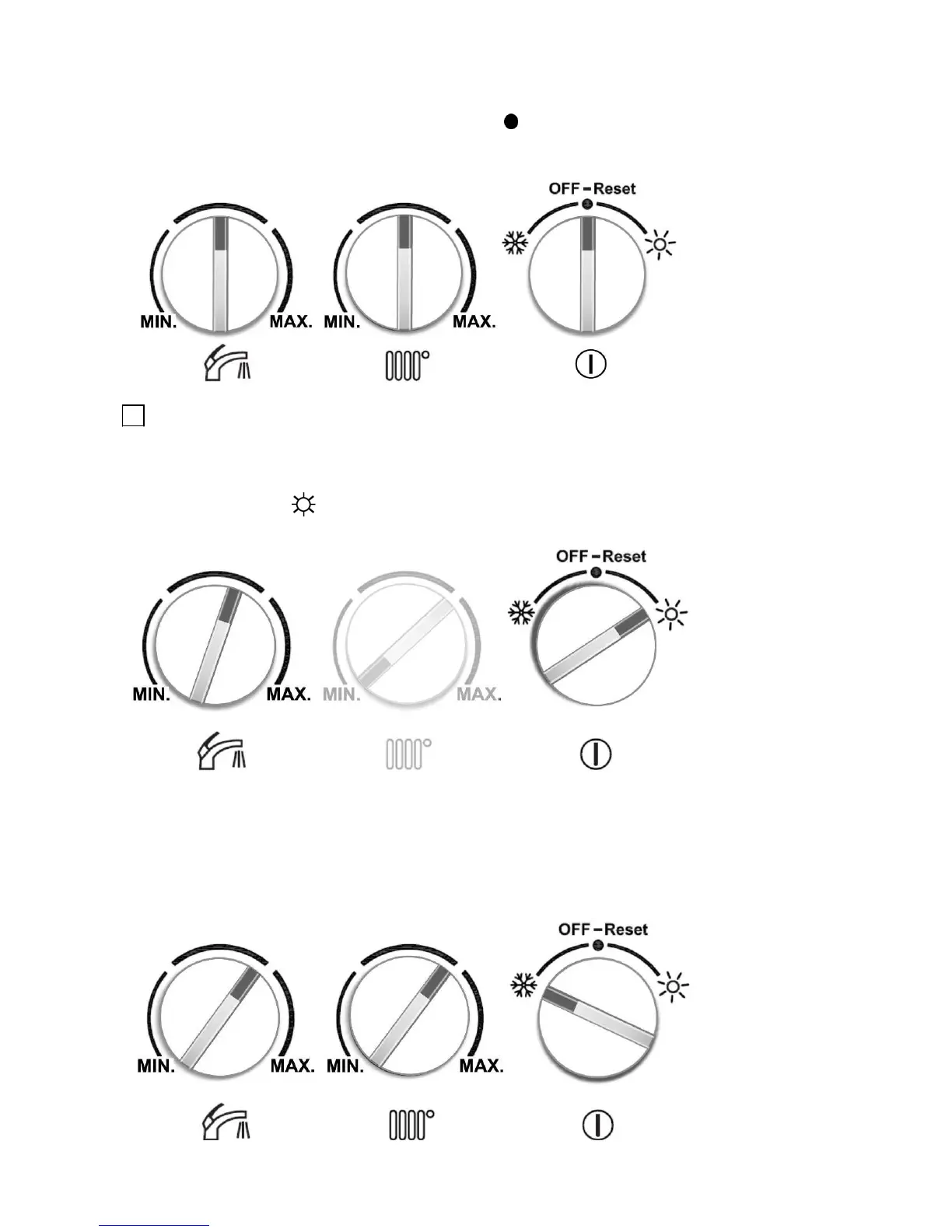
- In case of failed ignition, automatic ignition sequence is repeated 5 times. If all ignition trials are
failed, flame failure lockout happens. Error LED (red) will turn ON and blink to indicate this error
condition (fig.22). Turn Status ’s knob to the reset “
” position and hold it for 5 sec. to get to the
normal operation again If the lockout condition continues after reset read the Fault/Error finding.
- Turn the Status Pot. to ‘ OFF-Reset ’ position to shut off the boiler. LCD backlight will turn OFF.
CH (Central Heating) Mode
By adjusting the CH , summer mode or winter mode can be selected.
a) Summer mode
- Rotate the CH to the ‘
’ position. In the summer mode, any CH heat demands can not be satisfied.
The summer mode is only to satisfy domestic hot water demand.
b) Winter mode
- Rotate the CH to the ‘ ’ position. In the winter mode, your appliance satisfies central heating and
also domestic hot water.
- Adjust any CH water flow temperature between 40 and 80
o
C with the Central Heating . The boiler
will modulate to the desired temperature. CH symbol on the LCD indicates that CH is active. If there
is a DHW request, it interrupts the CH mode until DHW request is finished.



 To Next Page