E-max Gaming Corporation, Inc.
11
2.3 Basic Controls
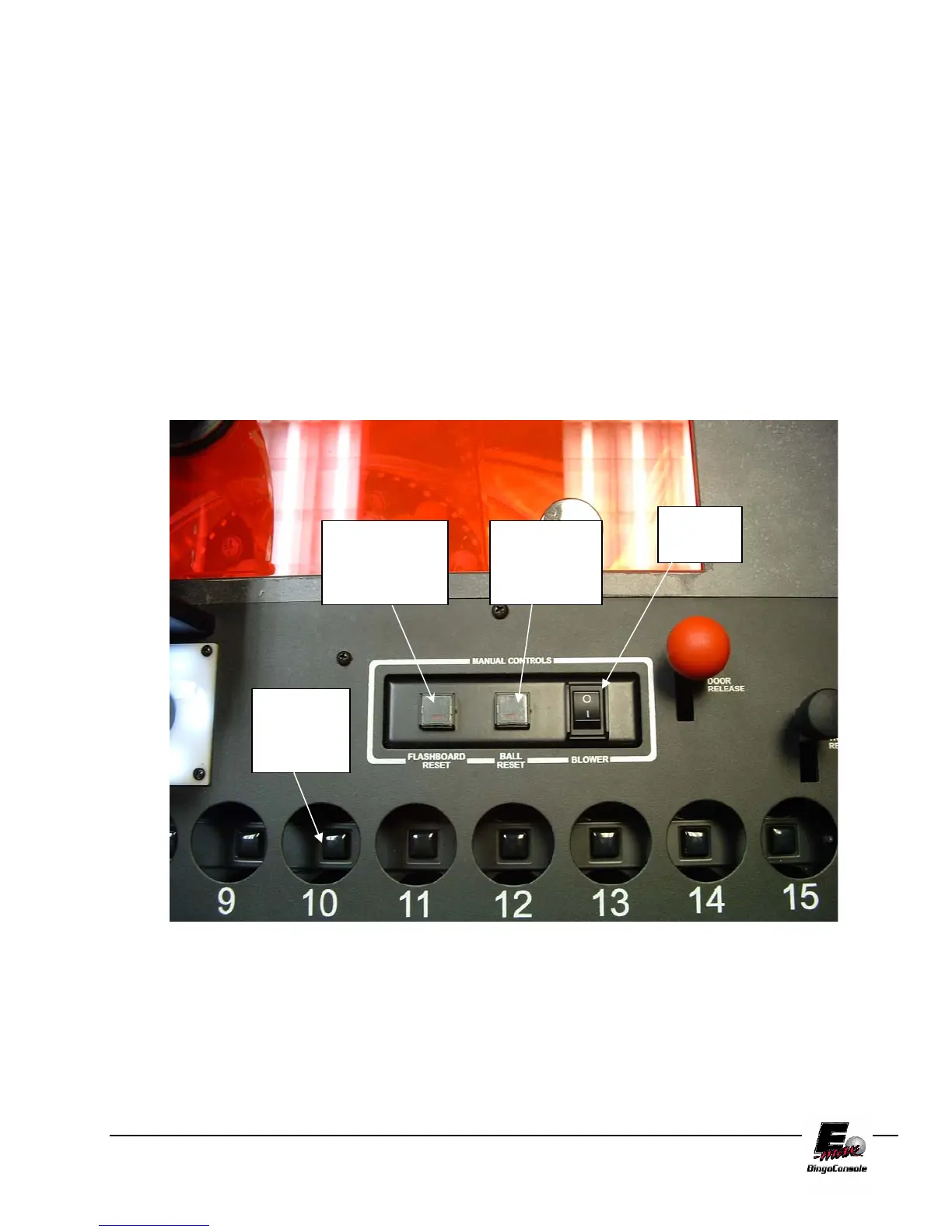
Ball Blower Cabinet Manual Controls (Figure 2.3) & (Figure 2.4)
1. Blower Switch – This is the On/Off switch for the ball blower motor
2. Ball Reset Switch and LED – This switch cancels the last ball inserted into the ball tray. (only active in
Manual Mode when LED is ON)
3. Flashboard Reset Switch and LED – This switch clears all the called balls and flashboard. (only active in
Manual Mode when LED is ON)
4. Ball Tray Switches – Insert ball and press down on the ball to activate the switch.
5. Two black ball release knobs – Releases balls into ball tray chamber.
6. Red Door Release knob - Releases balls into mixer chamber.
7. Ball Camera with light – Embedded digital camera and white light ball illumination.
8. Ball Tube – Centers balls extracted from mixing chamber over camera.
FIGURE 2.3
Blower
Switch
Ball reset
switch and
LED
Flashboard
reset switch
and LED
Ball
Tray
switches



 To Next Page