FG Series BACnet v2.3
9
Step 3
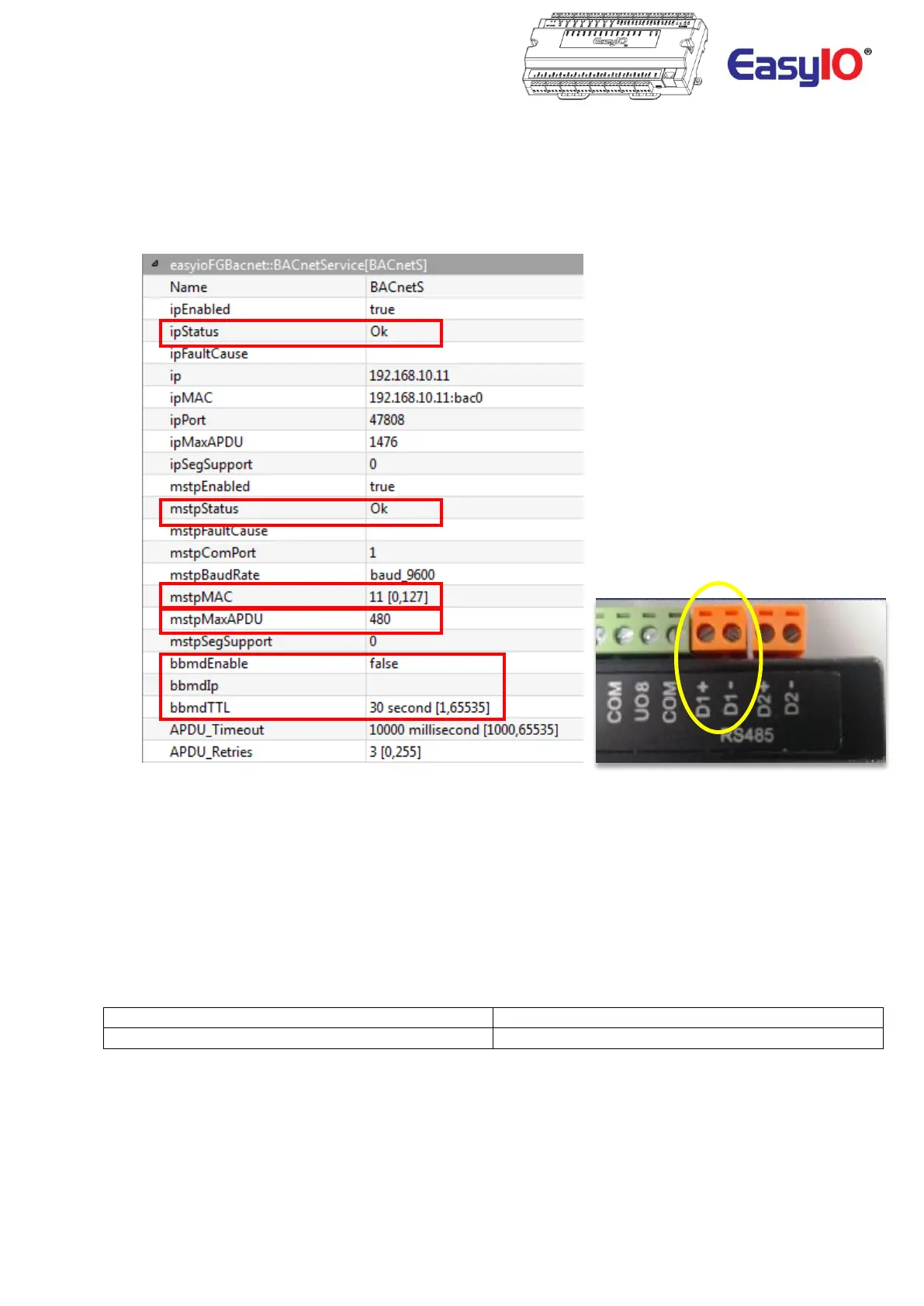
Click at the service object to access the property at the property side bar.
Configuration of the BACnet communication parameters such MSTP MAC address is carried out here.
Select BACnet communication stack to be enabled. By default both IP stack and MSTP stack is disable.
**Note**
For MS/TP connection, only Port 1 is supported.
Port 2 DO NOT support BACnet MS/TP.
The BACnet service or in other words, the FG+ or FS can registered itself to a BBMD device to able to receive
broadcast messages. These is done through the bbmdEnable, bbmdIp and bbmdTTL properties.
If BBMD is not preset or required in the network these properties can be left blank.
EasyIO FG+ and FS Series is NOT a BBMD Device nor BACnet Router.
If the communications stack if configured correctly, the status will display as OK.
FS Series Baud Rate Supported
9.6k , 19.2K, 38.4K, 76.8K, 115.2K



 To Next Page