7
3. Change to the desired value.
• Front Panel/Remote: Use and press and ↵ button to modify to desired value.
• Mouse: Click on the desired value and modify.
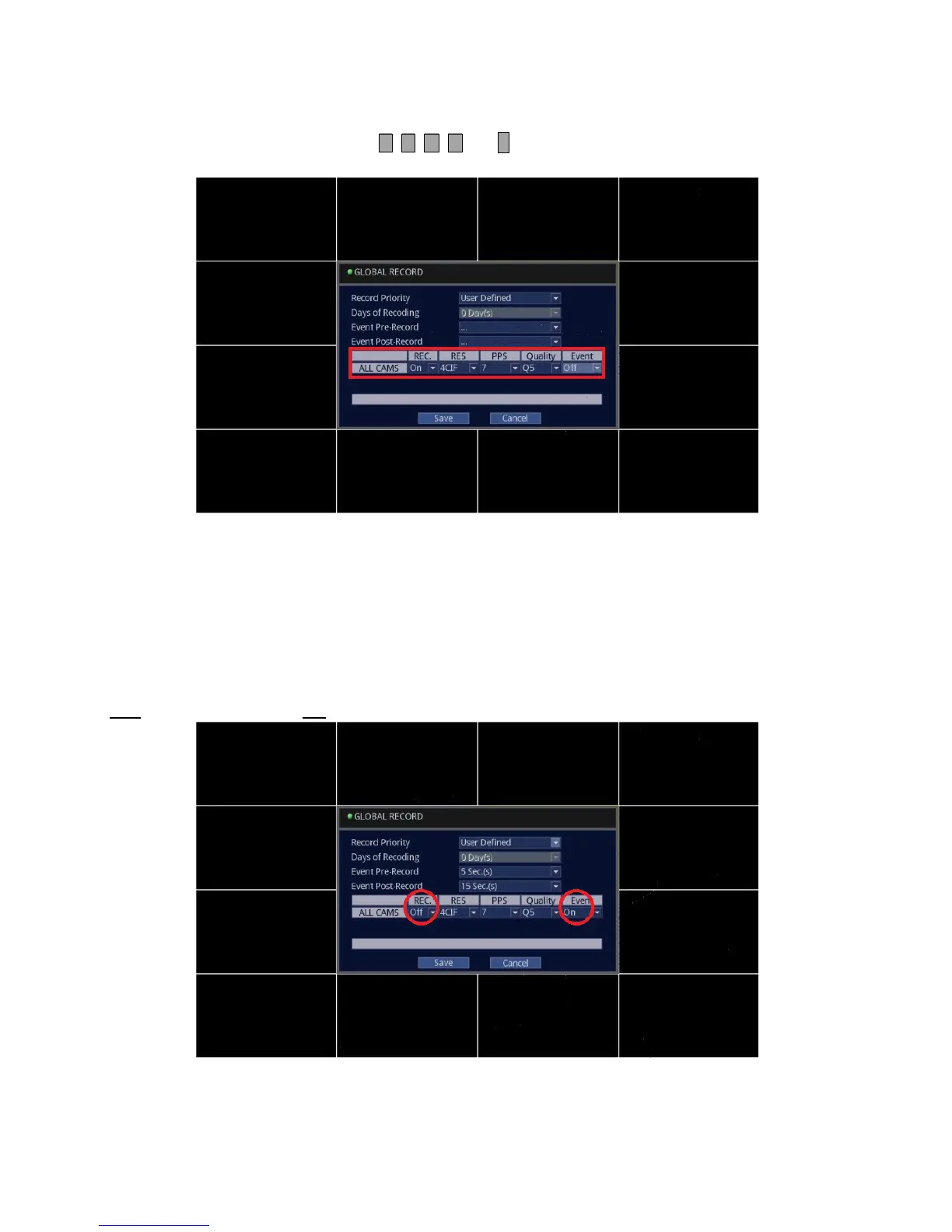
REC.: On or Off. Refers to Continuous (24/7) recording for all cameras.
RES: CIF,2CIF or 4CIF. Refers to recording resolution for all cameras. CIF being lowest, and 4CIF being the best.
PPS: 1, 2, 4, 7, 15, 30. Refers to pictures per second for all cameras. 1 being jerky, and 30 being smooth, real-time video.
Quality: Q1, Q2, Q3, Q4, Q5. Refers to detail level for all cameras. Q1 is least detailed, and Q5 is superfine, most
detailed.
Event: On or Off. Activates Motion or Alarm recording for all cameras.
IMPORTANT: Should you wish the DVR to record ONLY when the motion is detected, make sure that the [REC.] is
set to “OFF
” and Event is set to “ON”. Illustration is shown below.



 To Next Page