EasyManua.ls Logo

Eaton 3S 550 - User Manual

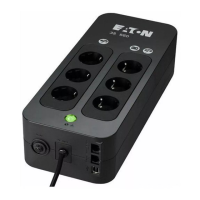
Eaton 3S 550
43 pages
Print Icon
To Next Page IconTo Next Page
Loading...
ИБП Eaton 3S 450 DIN (3S450D) - Руководство пользователя по Eaton 3s
Постоянная ссылка на страницу: https://eaton-power.ru/catalog/eaton-3s/eaton-3s-450-din/

Questions and Answers

  • A
    allenkevinAug 20, 2025
    Why is my Eaton 3S 550 operating on battery when AC power is available?
    • M
      Michael HarmonAug 20, 2025
      Your Eaton UPS might be operating on battery power because the circuit breaker located under the UPS has been tripped due to an overload. To resolve this, disconnect some equipment to reduce the load and then reset the circuit breaker by pressing the button.
  • A
    Amy WhiteAug 22, 2025
    Why is the red LED flashing on my Eaton 3S 550?
    • P
      Patrick RoweAug 22, 2025
      If the red LED is flashing on your Eaton UPS, it indicates that the battery has reached the end of its service life. You will need to have the battery replaced.
  • D
    David WallerAug 25, 2025
    What to do if green button 8 flashes frequently and audio alarm continuous on Eaton 3S 550?
    • D
      David WillisAug 25, 2025
      If the green button 8 on your Eaton UPS flashes frequently and the audio alarm is continuous, it means the battery backup outlets are overloaded. Disconnect excess equipment connected to the battery backup outlets.
  • D
    David CarrAug 26, 2025
    What does it mean when green button 8 flashes frequently and audio alarm beeps on Eaton UPS?
    • J
      Justin LewisAug 26, 2025
      If the green button 8 on your Eaton UPS flashes frequently and the audio alarm beeps, it indicates that the UPS is frequently operating on battery power due to a poor AC power source. Consider having the electrical installation checked by a professional or try using another wall outlet.
  • D
    Donald MckeeAug 28, 2025
    Why red LED 7 flashes on Eaton 3S 550?
    • J
      Jane AguilarAug 28, 2025
      If the red LED 7 is flashing on your Eaton UPS, it means the battery has reached the end of its service life. You should have the battery replaced.
  • S
    ssimsAug 30, 2025
    How to fix Eaton 3S 550 filtered outlets not working?
    • M
      Matthew CarrAug 30, 2025
      If the filtered outlets on your Eaton UPS are not working, it could be due to two reasons: either the wall outlet isn't supplying power, or the circuit breaker located under the UPS has been tripped by an overload. First, ensure the wall outlet has power. If it does, disconnect some equipment to reduce the load, and then reset the circuit breaker by pressing the button.
  • H
    harrissamanthaAug 31, 2025
    What to do if filtered outlets 5 are not supplied on Eaton UPS?
    • N
      Nicholas BaileySep 1, 2025
      If the filtered outlets on your Eaton UPS are not supplied, there could be two reasons. Either the wall outlet isn't supplied, in which case you should ensure the wall outlet has power. Alternatively, the circuit breaker located under the UPS might have tripped due to an overload; in that case, disconnect excess equipment and reset the circuit breaker by pressing the corresponding button.
  • M
    Michele McdanielSep 3, 2025
    What to do if connected devices are not supplied when AC power fails on Eaton UPS?
    • R
      rkleinSep 3, 2025
      If your devices aren't getting power from the Eaton UPS during an AC power failure, make sure they are connected to the battery backup outlets.
  • L
    Lisa BatesSep 4, 2025
    How to fix disturbed telephone line or modem access not possible with Eaton UPS?
    • B
      Bryan NealSep 5, 2025
      If you are experiencing a disturbed telephone line or cannot access the modem when using your Eaton UPS, it may be because surge protection on the telephone line is no longer provided. Try disconnecting the telephone line from the wall outlet.
  • R
    Robert ChapmanSep 6, 2025
    What to do if the battery backup outlets 6 are not supplied with power on Eaton UPS?
    • N
      nicholas33Sep 6, 2025
      If the battery backup outlets on your Eaton UPS aren't providing power, press button 8 and check that it turns green.

Summary

Operating Conditions

UPS Connections

Connect the UPS to the AC-power system via a wall outlet with an earth connector, using the attached cord.

Operation

The UPS charges the battery as soon as it is connected to the AC outlet, whether button 8 is pressed or not.

Battery Disposal and Safety

Caution. Battery service life is reduced by 50% for every ten degrees above 25 °C.

Eaton 3S 550 Specifications

General IconGeneral
Power Rating550VA/330W
Input Frequency50/60 Hz
Typical Recharge Time8 hours
Surge ProtectionYes
Operating Temperature32°F to 104°F (0°C to 40°C)
TopologyStandby
Battery TypeSealed Lead Acid
USB PortYes
Output Frequency50/60 Hz
Typical Backup Time (Full Load)5 minutes
Communication InterfaceUSB
Storage Temperature-15°C to 45°C
Relative Humidity0-95% non-condensing
Transfer Time6 ms typical
Data Line ProtectionYes (RJ11/RJ45 ports)

Related product manuals