SAVE THESE INSTRUCTIONS FOR FUTURE REFERENCE
IF 1848
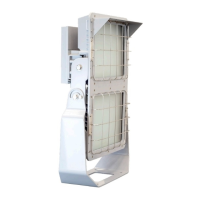
Champ LED Floodlight
NFMVA20L/25L LED Fixtures
Installation & Maintenance Information
IF 1848 • 03/19 Copyright
®
2019, Eaton’s Crouse-Hinds Division Page 1
WARNING
To avoid the risk of fire, explosion or electric shock, this product should be
installed, inspected and maintained by a qualified electrician only, in accordance
with all applicable electrical codes.
WARNING
To avoid electric shock:
• Be certain electrical power is OFF before and during installation and
maintenance.
• Floodlight must be supplied by a wiring system suitable per local code with
an equipment grounding conductor.
To avoid burning hands:
• Make sure LEDs and drivers are cool to touch when performing
maintenance.
WARNING
To avoid explosion:
• Make sure the supply voltage is the same as the rated floodlight voltage.
• Do not install where the marked operating temperatures exceed the
ignition temperature of the hazardous atmosphere.
• Do not operate in ambient temperatures above those indicated on the
floodlight nameplate.
• Use only replacement parts from Eaton’s Crouse-Hinds Division.
• Use proper supply wiring as specified on the floodlight nameplate.
• All surfaces must be clean.
• LED compartment non-serviceable. Do not open.
• Before opening wiring compartment, electrical power to the floodlight
must be turned off and area must be free from hazardous atmosphere.
Keep tightly closed when in operation.
• To minimize the risk from electrostatic discharge, when cleaning, wipe the
lens with a clean, damp cloth.
INSTALLATION
Mounting
Yoke Mount - Wall Mount Using Floodlight Yoke Only
1. Using floodlight yoke as a template, mark and drill desired location on mounting
surface.
2. Secure floodlight yoke to surface using ½” bolts or lag screws (not provided).
WIRING
Wiring the Floodlight
1. Open back cover/heat sink by loosening nine (9) #10-24 x 0.75” stainless steel
cover screws using a 5/16” nut socket or flat head screwdriver
(see Figure 1).
The heat sink cover should be removed by pulling back on one corner of the top
most edge to prevent damage to gasket.
NOTE: To avoid pinching hazard between heat sink cover and driver housing, ensure
that floodlight is oriented in vertical position before, and during, wiring procedure.
2. All components in the fixture are pre-wired so only line in, neutral and ground
need to be connected in the fixture using the supplied Wago connectors, using
methods that comply with all applicable codes. See Figure 2 for wiring diagram.
• Wire range from AWG 18-14 (0.75 - 2.5mm²) for neutral, and line (strip
length 0.43” [10.9mm]), and AWG 16-14 (1.5 - 2.5mm²) for ground
connections (strip length 0.43” [10.9mm]).
• Entries to driver housing shall be sealed, using HTL or STL, with
devices rated a minimum of IP66.
• Standard openings are M20, M25 or 3/4” NPT.
• Optional openings are M20 (20mm) and/or M25 (25mm).
• Secure all electrical connections and wiring entry glands.
• Ensure that the following lengths for field wiring, internal to the driver
housing compartment, are followed:
– 4.5” ± 0.25” (114 ± 6mm) for ground wire
– 2.5” ± 0.25” (64 ± 6mm) for neutral wire
– 2” ± 0.25” (51 ± 6mm) for line in wire
APPLICATION
LED floodlight construction is designed for use indoors and outdoors in marine and wet
locations, where moisture, dirt, corrosion, vibration and rough usage may be present.
NFMV:
IECEx:
• IEC, ATEX:
• IECEx UL 15.0029X
• DEMKO 15 ATEX 1377X
• DEMKO 15 ATEX 1383
• Ex ec IIC T4 Gc Tamb -40°C to +55°C
• Ex tb IIIC T81C Db Tamb -40°C to +40°C
• II 3 G Ex ec IIC T4 Gc Tamb -40°C to +55°C
• II 2 D Ex tb IIIC T81C Db IP66 Tamb -40°C to +40°C
Refer to the floodlight nameplate for specific classification information, maximum
ambient temperature suitability and corresponding operating temperature (T-number).
IEC STANDARDS:
• IEC 60079-0:2011+ Corr.1(2012-01) + Corr. 2 (2013-12) + I-SH 01 (2013-11) + I-SH
02 (2014-10) / EN 60079-0:2012 + A11:2013
• IEC 60079-7:2017/ EN 60079-7:2015
• IEC 60079-31:2013/ EN 60079-31:2014
• IEC 60598-1:2008/EN60598-1:2008
• IEC 60598-2:2008/EN60598-2:2008
• IP66
LED floodlights are supplied for use with a choice of voltages:
• 100-277 VAC, 50/60 Hz and 127-300 VDC
• 347-440 VAC, 50/60 Hz
LINE TERMINAL
NEUTRAL TERMINAL GROUND TERMINAL
Figure 1
Cover/heat sink
DO NOT PLACE
ADDITIONAL WEIGHT
ON THE BACK COVER/
HEAT SINK



 To Next Page
 General