- 18 -
EBA 550 • EBA 550 LT
Start machine
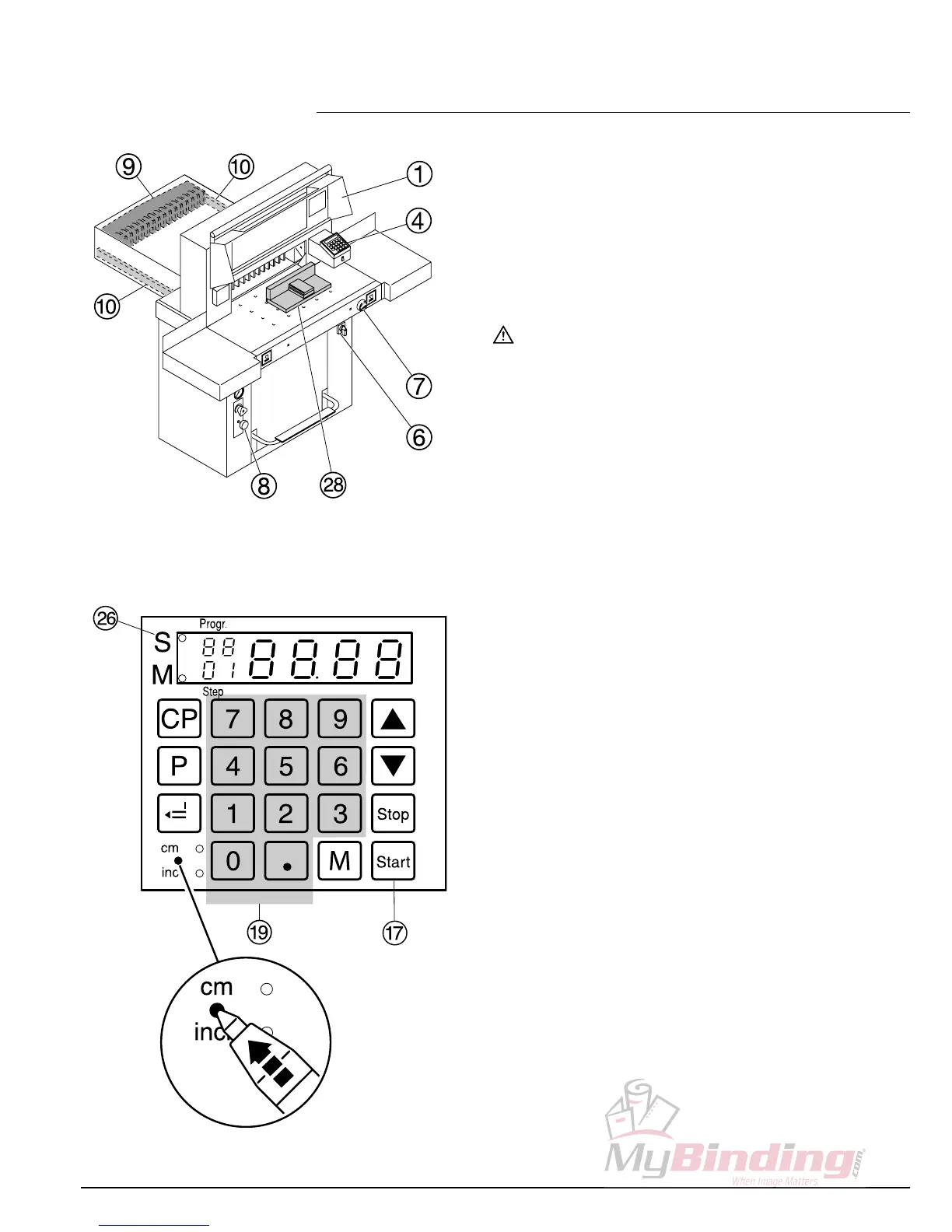
• Main switch
F
to position "I", Pull out blade
locking key
H
.
Open the front safety guard
A.
• Press
S
button
Q
backgauge I moves to
the rear and searches for the reference
position, wait until a measurement is shown
in the display
D
(57 cm or 22,44 inches).
Warning!
Before storing or cutting a measurement
please check if the correct measurement
scale (cm or inch) is stored (LED lights). For
information on how to store see picture below left.
Cutting to specified dimensions
• Enter dimension on the numerical key pad
S
LED "S"
Z
lights.
(If a wrong dimension is entered this can be
corrected by pressing the
s
button).
• Press
S
button dimension is
approached, LED "S" disappears.
With the false clamp measurements
between 6 cm and 8 cm can only be
approached with the hand-wheel
G
.
Dimensions between 8 cm and 9 cm can
only be approached with the
S
button
pressed and held.
(When the
S
button is
released, the backgauge
I
oves to a
measurement of 9 cm measurement
9 cm blinks, keep the
S
button pressed,
backgauge moves to e.g. 8,5cm.
See page 14.
• Insert paper and move by means of the
stacking angle to the backgauge
I
and side
lay on the left
J
.
• Close the front safety guard
A
.
• Release the cut.
• Operation •


 To Next Page