- 19 -
Cut according to markings
• Adjust the backgauge with the hand-wheel
or crank handle
G
to the back.
• Insert paper and move by means of the
stacking angle
b
to the backgauge I and
side lay on the left
J
.
• Turn the hand-wheel
G
to the right until the
marking on the paper to be cut is below the
cutting line indicator.
• The further the hand-wheel
G
is turned to
the right, the quicker the backgauge moves.
If the hand-wheel is turned to the left the
backgauge will return quicker.
• Close the front safety guard
A
.
• Release the cut.
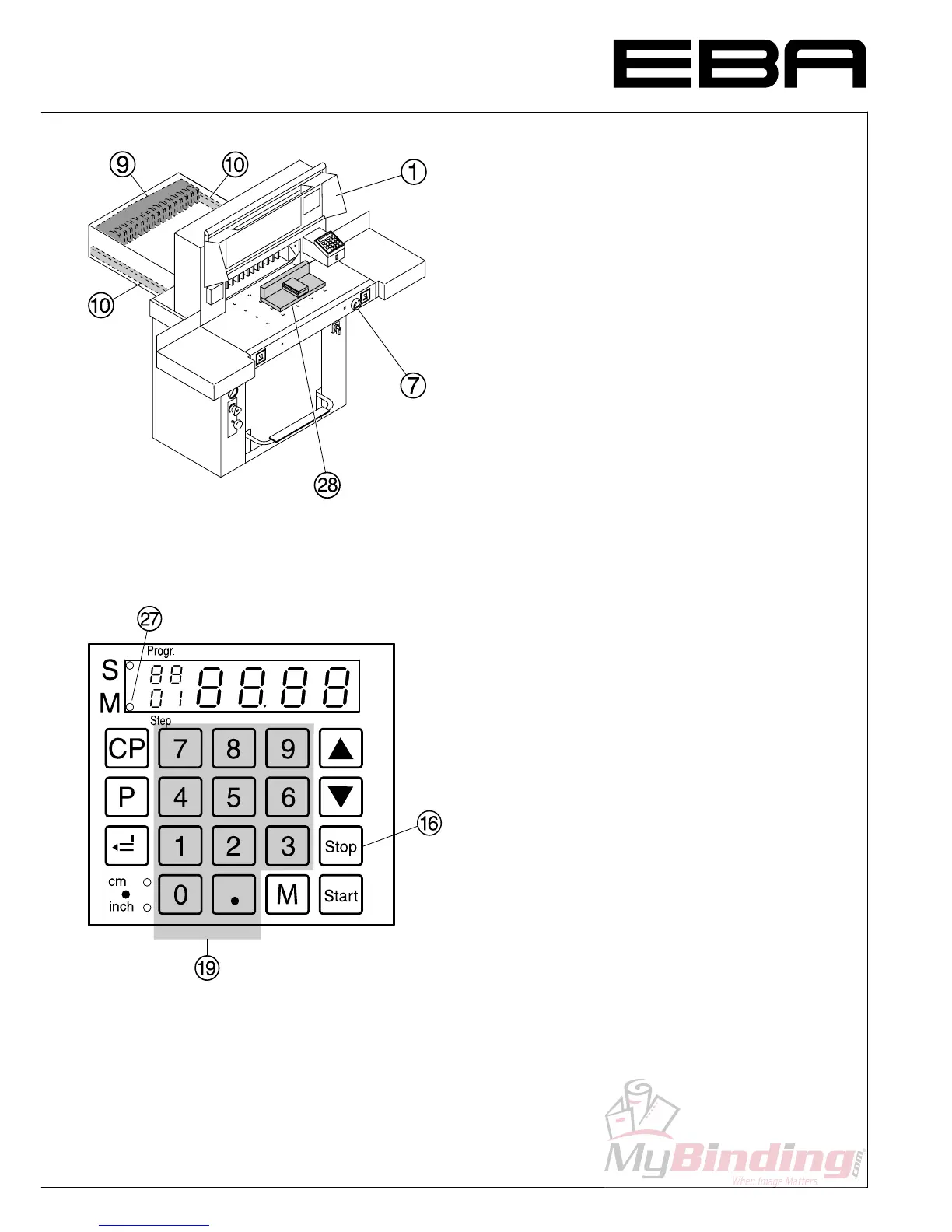
Multiple cut
•
Enter the multiple cut size on the display
S.
•
Advance to the measurement with the
S
button.
•
Push the paper to the backgauge
I.
•
Press
T
button the red LED "M"
a
light
will be on.
•
Enter the multiple cut size.
•
After cutting has been activated press
S
button.
Every time the
S
button is pressed, the
backgauge will advance by the multiple cut size.
•
Pressing the
s
button
P
shows the actual size.
Exiting program-mode
•
Press
T
button LED "M"
a
is cleared on
the display.
• Operation •


 To Next Page