28
7.2.3.3. Device parameters
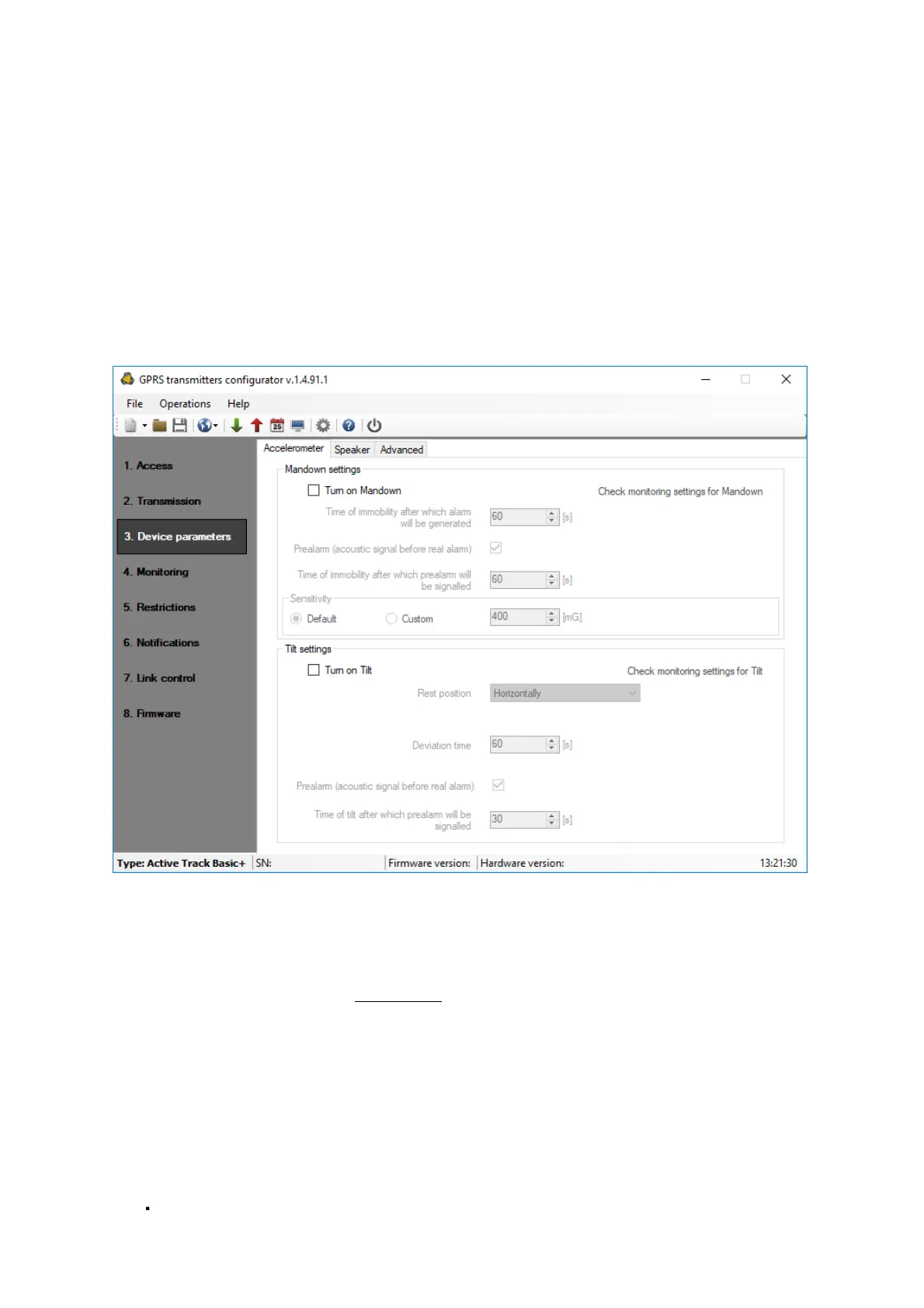
In the Active Track Basic+ device, you can configure the accelerometer's settings (if
the SMS command support option is enabled) and the speaker's parameters. You can
also enter the permission to manually reset and switch off the device using the
appropriate combination of buttons.
7.2.3.3.1. Accelerometer
Note:
This tab is available only when the "SMS command support" option is enabled - the
battery working time is shorter (see chapter 7.2.3.1.2.1).
Thanks to the built-in motion sensor, the device can detect threats such as immobility
of the guard holding the device caused by an assault or incorrect position of the
device in relation to the Earth's gravitational field. The method of sending events
generated by the accelerometer function to the server is subject to the standard
procedure configured in the Monitoring tab. The current settings of this procedure can
be quickly verified using the "Check monitoring settings for Mandown" function.
7.2.3.3.1.1. ManDown
The ManDown functionality allows for monitoring and signalling motion of the guard
holding the device. The lack of motion may result from an assault, but also from
neglecting duties.
The adjustable parameters are:
Sensitivity - specifying vibration threshold below which the device determines
its state as lack of motion(default 400mG)


 To Next Page