W h e n n o t c o n n ec t e d t o E c h e l o n A P P s , t h e L E D t r e a d m i l l c a n b e o p e r a t e d b y i t s e l f
w i t h b u i lt - in p r o g r a m a n d m o d e :
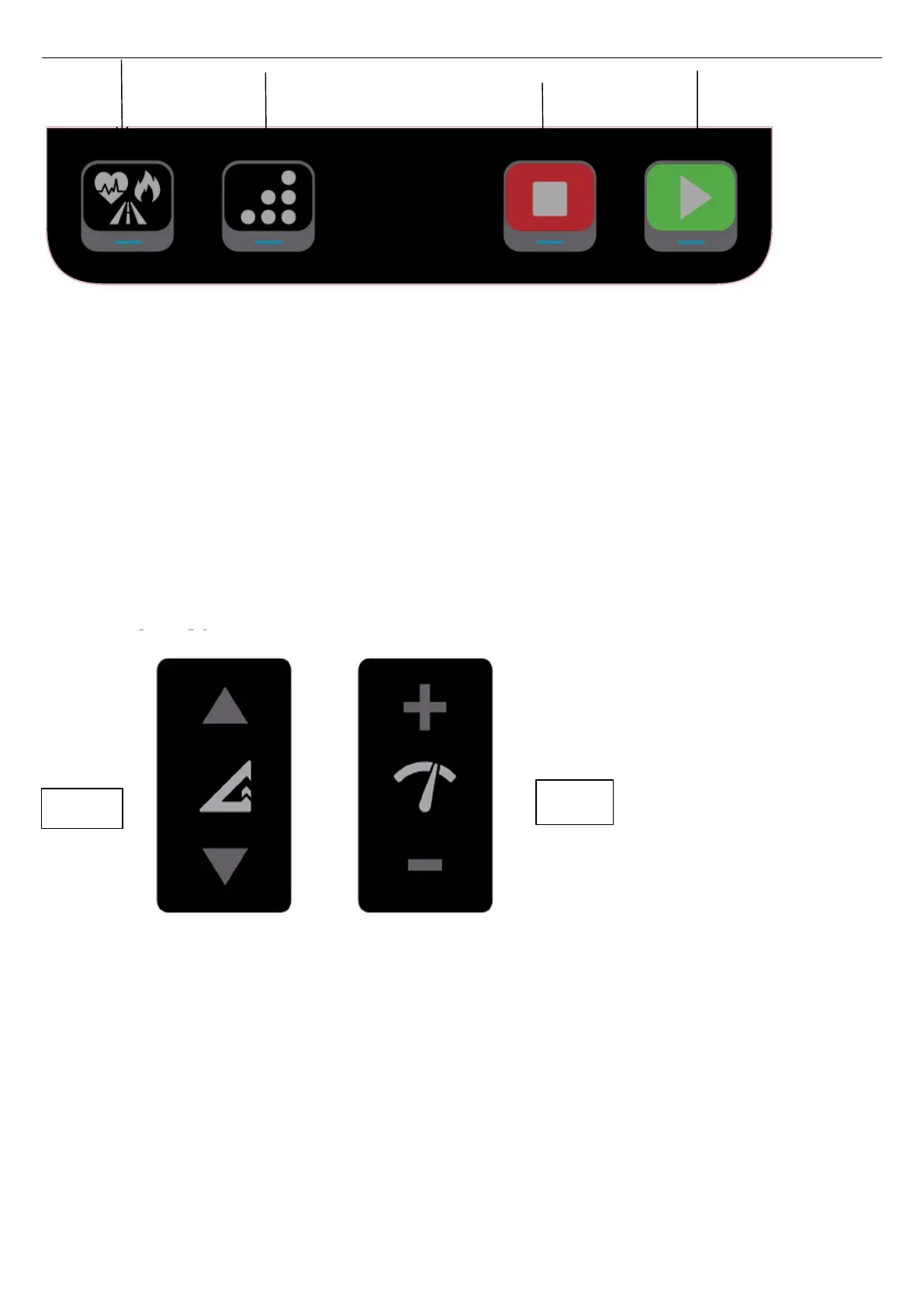
P r o g r a m : P 1 - P 1 0 b u i l t - i n p r o g r a m s f o r s e l e c t i o n b y p re s s t h i s b u t t o n ;
M o d e : P r e s s m o d e k e y t o s w i t c h a m o n g t i m e , d i s t a n c e a n d c a lo r i e s t o i n p u t t h e
t a r g e t .
S t a r t k e y : A t s t an d b y m o d e w it h o u t p r e s s i n g P r o g r a m o r M o d e k e y, P r e s s s t a r t k e y
t o s t a r t t o r u n;
S t o p k e y : w h e n t h e t r e a d m i l l r u n s , p r e s s t h is k ey t o p a u se t h e t r e a d m i l l; p r e s s a n d
h o l d t h i s k e y t o s t o p t h e t r e a d m i l l ; a t s t a n d b y, p r es s t h i s k e y t o r e s e t .
C h a n ge m p h a n d k m h : u n p l u g t h e s a f e t y k e y, p r e s s a n d h o l d pr o g r a m a nd m o de
k e y a t t h e s a m e t i m e f o r 3 s e c on d s , t h e p r og r am s w i t c h e s i t s u n i t a n d t he n r e b o o t ,
t h e s p e e d w i n d o w w i l l s h o w i t s c u rr e nt u n i t f o r 1 s e c o n d s . E = m e t r i c ( k m h ) , I =
i m p e r i a l ( mp h )
N o t e : w h e n c o n n e c t e d t o E c h e l o n A P P s b y i P a d / m o b i l e b y B l u e t o o t h , i t c a n s e l e c t
t h e E c h e l o n r u n c l a s s t o o p e r a t e t h e t r e ad m i l l , i n s t e a d o f u s in g t h e b u i l t - i n pr o gr a m
a n d m o d e o n t r e a d m i ll .
Handgrip keypress
Keypress Button instruction with either LED panel, or connected Echelon APPs
by Bluetooth:
Power on treadmill, the LED panel light up, you can either workout under LED panel
alone, or log-in Echelon APPs, select your desired classes, click Play, the treadmill will
start automatically, enjoy the running joy; when the class end, the treadmill will stop
automatically. If you wanna start/pause/stop the treadmill, below manual setting will
help:
1. Start key: Press start key, there is 3 beeping for countdown, the treadmill starts
with the running belt and Red LED on side rail;
2. Stop key: Press Stop key, the treadmill pauses, the belt does not run with flash red



 To Next Page