4
Installation Guide
4
tel - 1-800-477-2267
email - support@aampglobal.com
Illustrations are typical and may not match exact vehicle detail
FCTP-MB1903
Sprinter Tow Package
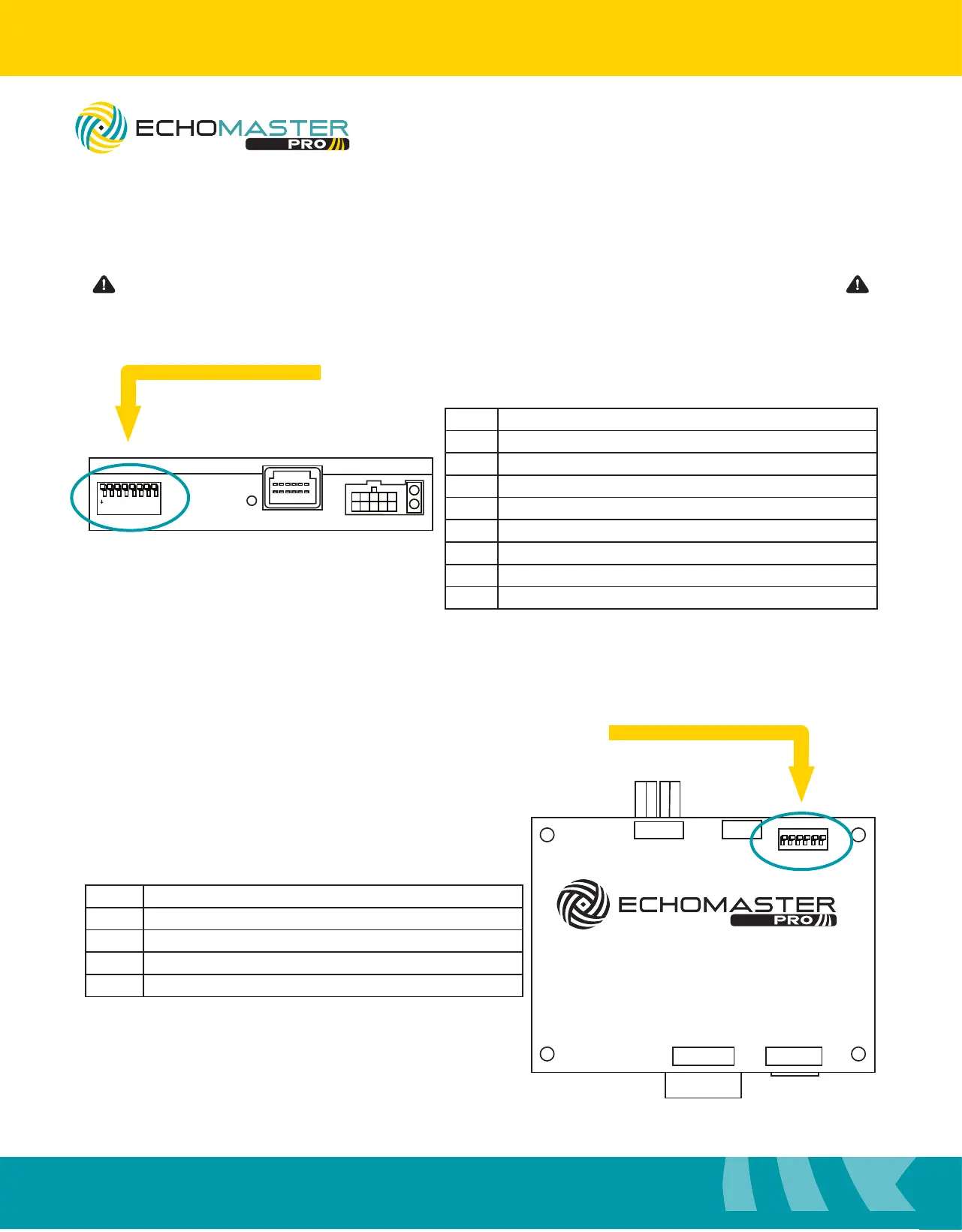
Setting the DipSwitches
1
ON
2 3 4 5 6 7 8
FC-MBS
BLINDSPOT CAMERA INTERFACE
LVDS
CAMERA POWER
USB
1
ON
2 3 4 5 6
1
ON
2 3 4
FC-MBS
BLINDSPOT CAMERA INTERFACE
LVDS
CAMERA POWER
USB
1
ON
2 3 4 5 6
No. Function
1 Left Camera On / Off
2 Right Camera On / Off
3 Front Camera On / Off
4 No Function
5 Rear Camera - Aftermarket (on) / OEM (off) Camera
6 No Function
7 No Function
8 With Black Edges on Screen (on) / Full Screen (off)*
* 10 inch Screens only
Side DipSwitch Settings
Top DipSwitch Settings
No. Function
1 MUST BE OFF
2 OEM Touch On / Off
3, 4, 5 Screen Size - 7” Screen (on) / 10” Screen (off)
6 No Function
Please be sure to set all DipSwitches before plugging the interface module into the vehicle.



 To Next Page