14
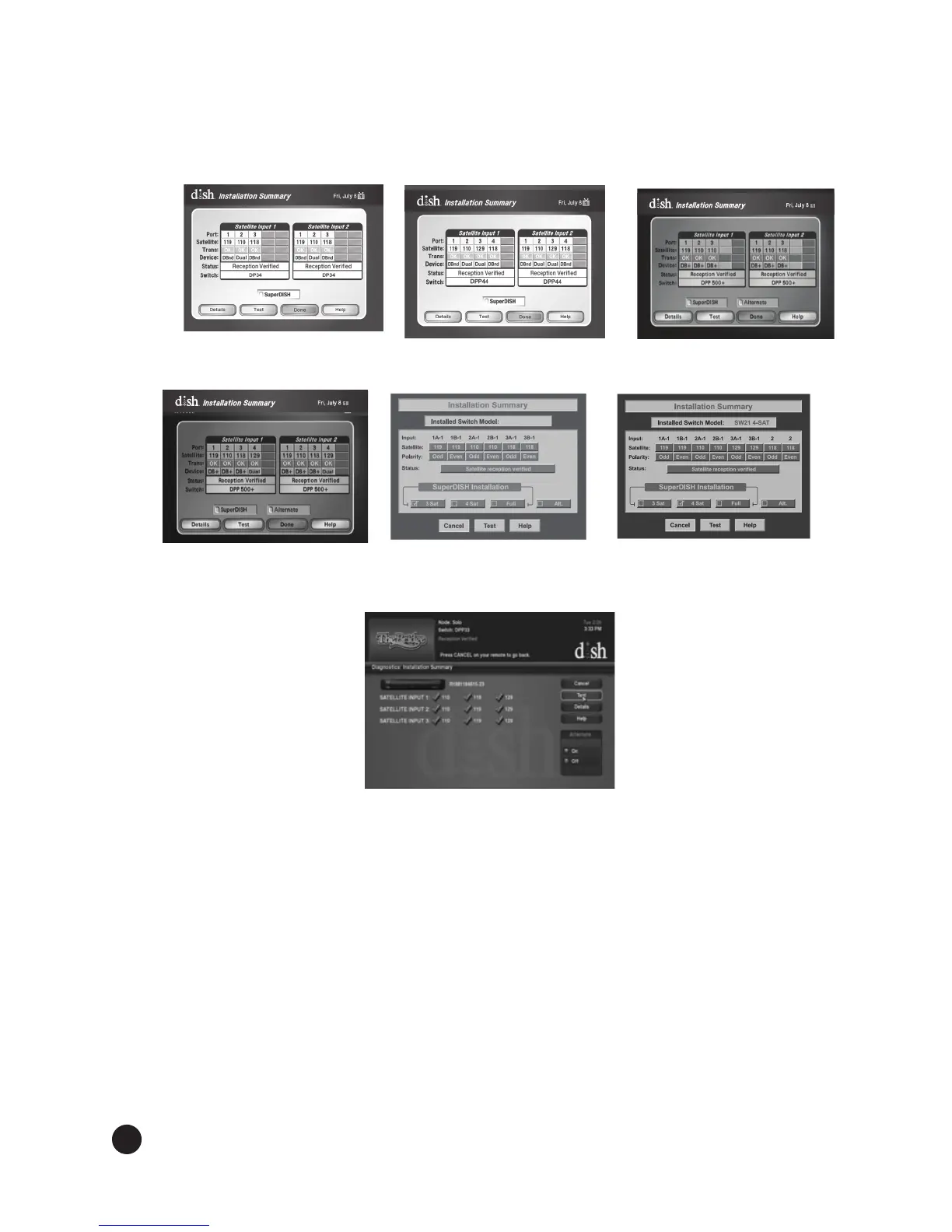
Run Check Switch. Run Check Switchagainandconrmreceptionfor110°W,119°W,and
118.7°W satellites if using DISH 500+ and for 110°W, 119°W, 129°W, and 118.7°W satellites if
usingDISH1000+(seeFigures17,18,19,20,21,22,and23dependingonyourconguration).
Install additional receivers. If installing an additional receiver, follow steps 7 through 13,
pages 10-12. Make sure the Installation Summary screen shows reception from the 110ºW,
119ºW, and 118.7°W satellites for DISH 500+ and from the 110ºW, 119ºW, 129ºW, and 118.7°W
satellites for DISH 1000+. If using a legacy receiver, keep a DISH Pro, DISH Pro Plus, or a DISH
Pro X receiver connected and powered at all times to power the LNBF.
13.
14.
Figure 17. DISH 500+
Installation Summary
Figure 18. DISH 1000+
Installation Summary
Figure 19. DISH 500+
Installation Summary
Figure 20. DISH 1000+
Installation Summary
Figure 21. DISH 500+
Installation Summary
Figure 22. DISH 1000+
Installation Summary
Figure 23. XiP
Installation Summary


 To Next Page