EN 6
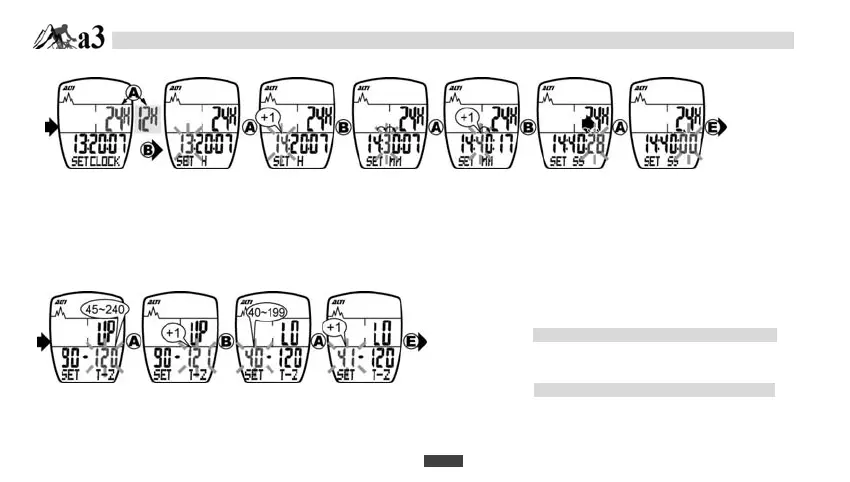
A-3. CLOCK SETTING
A-4. TARGET ZONE SETTING
1. Press E button to begin CLOCK SETTING.
2. Press A button to select 12H or 24H.
3. Press B button to set HOUR.
4. Press A button to increase the HOUR b
1.
5. Press B button to set MINUTE.
6. Press A button to increase the MINUTE by 1.
7. Press B button to set SECOND.
8. Press A button to reset the SECOND to 00.
-4.
TARGET ZONE
SETTING
1. Press E button to begin TARGET ZONE
SETTING.
2. Press A button to set UP target zone by
increasing 1 for pressing each time.
Target zone UP (upper limit) is within 45~240.
3. Press B button to set LO Target zone.
4. Press A button to set LO Target zone by
increasing 1 for pressing each time.
Target zone LO (lower limit) is within 40~199.
-5.
EL ON/OFF
SETTING
DATA SETTING MODE


 To Next Page