13
8. QUICK START
Install and connect the WARM2 mixer as described
in the previous chapter.
This “ Quick Start” guide explains a simple
procedure to route and headphone monitoring a
turntable.
1. Set the controllers to their initial position
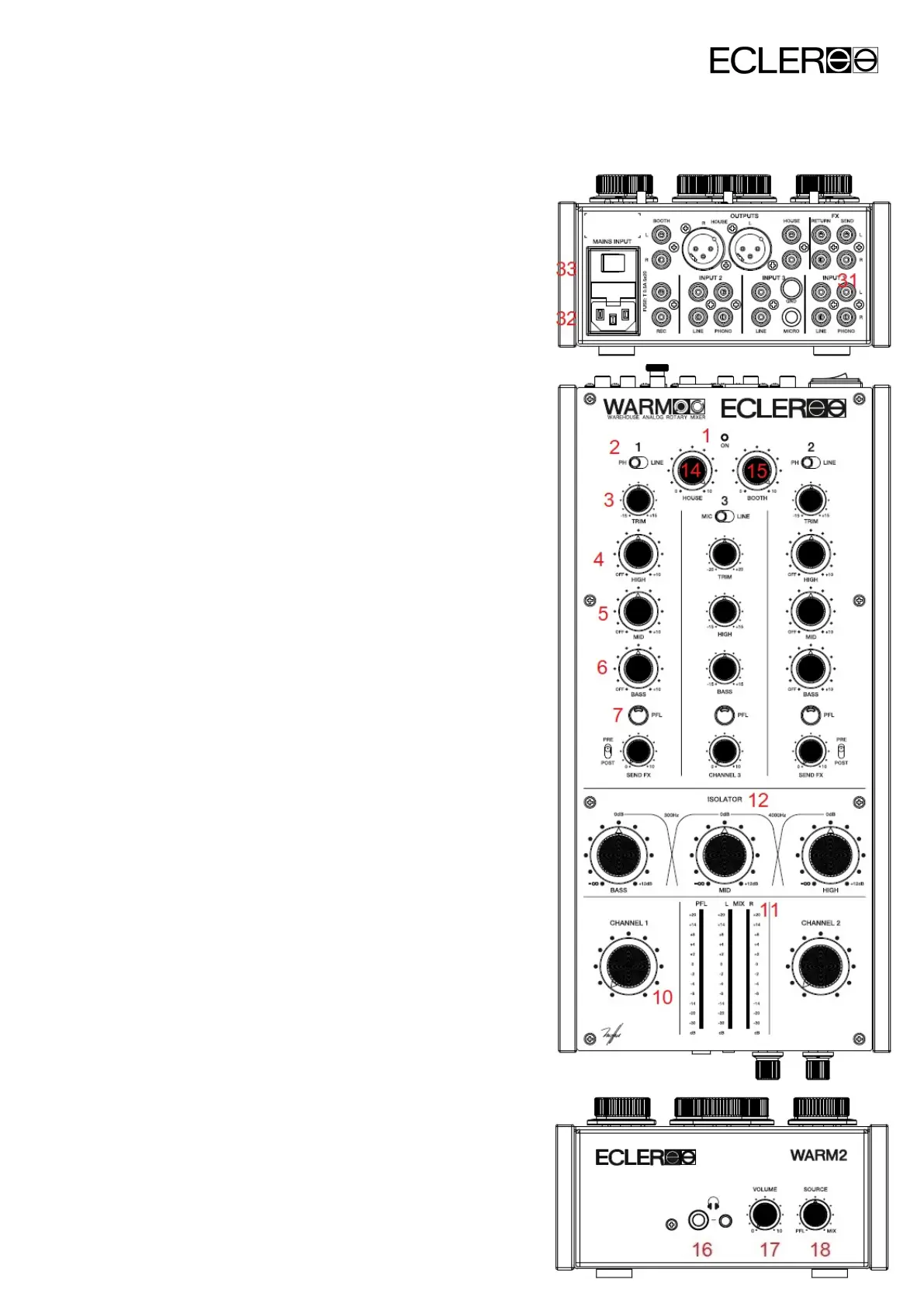
Set Channel 1 TRIM, HIGH, MID and BASS
(3, 4, 5 and 6) rotary controls to their central
position. Set the channel potentiometer (10)
to zero rotating it counter clockwise.
2. Connect your turntable
Connect your turntable to the PHONO input
on channel 1 (31), choose your favourite
record and start to play it.
3. Connect the headphones
Connect your headphones to the related
output (16). Set the headphones VOLUME
controller (17) to minimum level and move
the SOURCE selector (18) to PFL position.
4. Connect the main power cable
Connect the power cable to the power
supply input (32) and turn it on using the
MAINS INPUT switch (33). Both elements
are located on the mixer backside.
5. Select the input source
Make sure that the channel 1 input switch
(2) is placed in PHONO position and press
the PFL button (7). The PFL VU-meter (11)
should start to work. If this doesn’t happen,
verify that the turntable is correctly
connected and that the record is playing.
6. Adjust the input level



 To Next Page