49
English
a
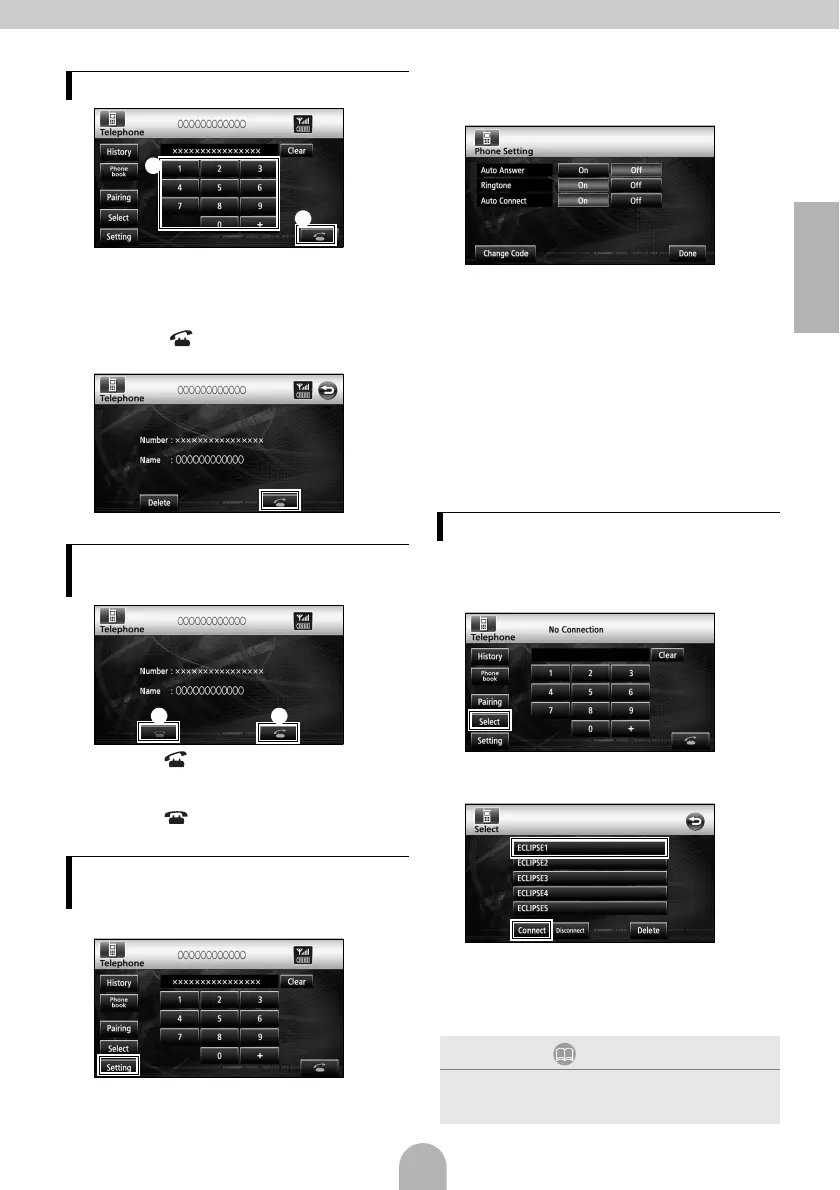
a On the hands-free screen, touch numbers
between [0] and [9] to input the phone
number.
• Touch [Clear] to delete digits one at a time.
b Touch [ ] when you have input the
phone number.
b
● The input phone number is dialed.
a
a Touch [ ] while the phone is ringing.
• A phone connection is made, and you can start
talking.
b Touch [ ] on the dialing screen.
• The call will be disconnected.
aTouch [Setting].
bOn the Phone Setting screen, touch the
setting switch for each item to perform the
following settings.
Auto Answer :
Automatic call answering can be set.
Ringtone :
The ring tone can be set.
Auto Connect :
Registered cell phones can be connected to
the main unit automatically.
Change Code :
The PIN CODE can be changed by touching
[Change Code].
Done:
To exit menu.
Cell phones registered in the main unit can be
connected.
aTouch [Select].
bSelect the cell phone to be connected and
then touch [Connect].
cWhen the registration has been completed,
a message will appear on the display.
● The cell phone is now connected to the main
unit.
Making a call
Answering a phone call / Hanging
up (Refusing a call)
Various settings of the hands-free
function
a
b
b a
Connecting a cell phone
ATTENTION
If the registration is not successful, a message will
appear on the display. When this happens, perform
the connection procedure again.



 To Next Page