45
English
10. USB mode operations
This receiver can play a music file stored in a
USB memory.
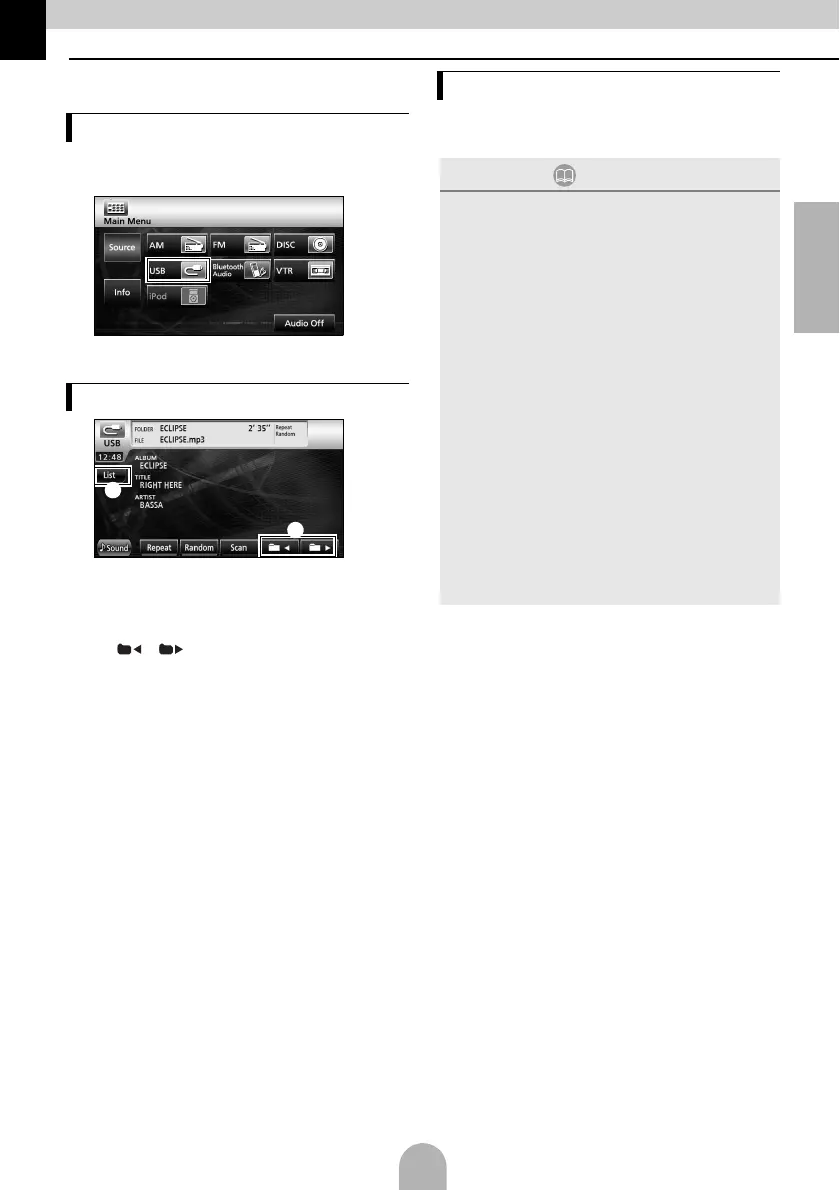
aConnect the USB memory to the USB
connector.
b
● The mode switches to the USB mode and
playback starts.
a [List]:
Select the desired folder from the folder
list screen, and select the music file you
want to listen to.
b [ ]/[ ]:
The folder can be switched. Music files in
the selected folder will be played.
aDisconnect the USB memory parallel to the
USB connector.
Listening to music
Operations using the screen
a
b
Disconnecting the USB memory
ATTENTION
● Do not disconnect the USB memory during
playback.
● Playable MP3/WMA File Standards
•MP3
Supported standards:
MPEG-1, MPEG-2, and MPEG-2.5
Supported sampling frequencies:
MPEG-1: 32, 44.1
MPEG-2: 16, 22.05, 24
MPEG-2.5: 8, 11.025, 12
Supported bit rates:
MPEG-1:32 to 320 K bps
MPEG-2: 8 to 160 K bps
MPEG-2.5: 8 to 160 K bps
* Supported VBR (8 to 320K bps)
* Does not support free format.
Supported channel modes:
Monaural, Stereo, Joint Stereo, Dual-Channel
•WMA
Supported standards:
WMA Ver. 7,8,9
Supported sampling frequencies:
8, 11.025, 12, 22.05, 32, 44.1, 48 (kHz)
Supported bit rates:
8 to 320K bps
* Supported VBR (64 to 320K bps)
* Does not support free format.
Supported channel modes:
Monaural, Stereo



 To Next Page