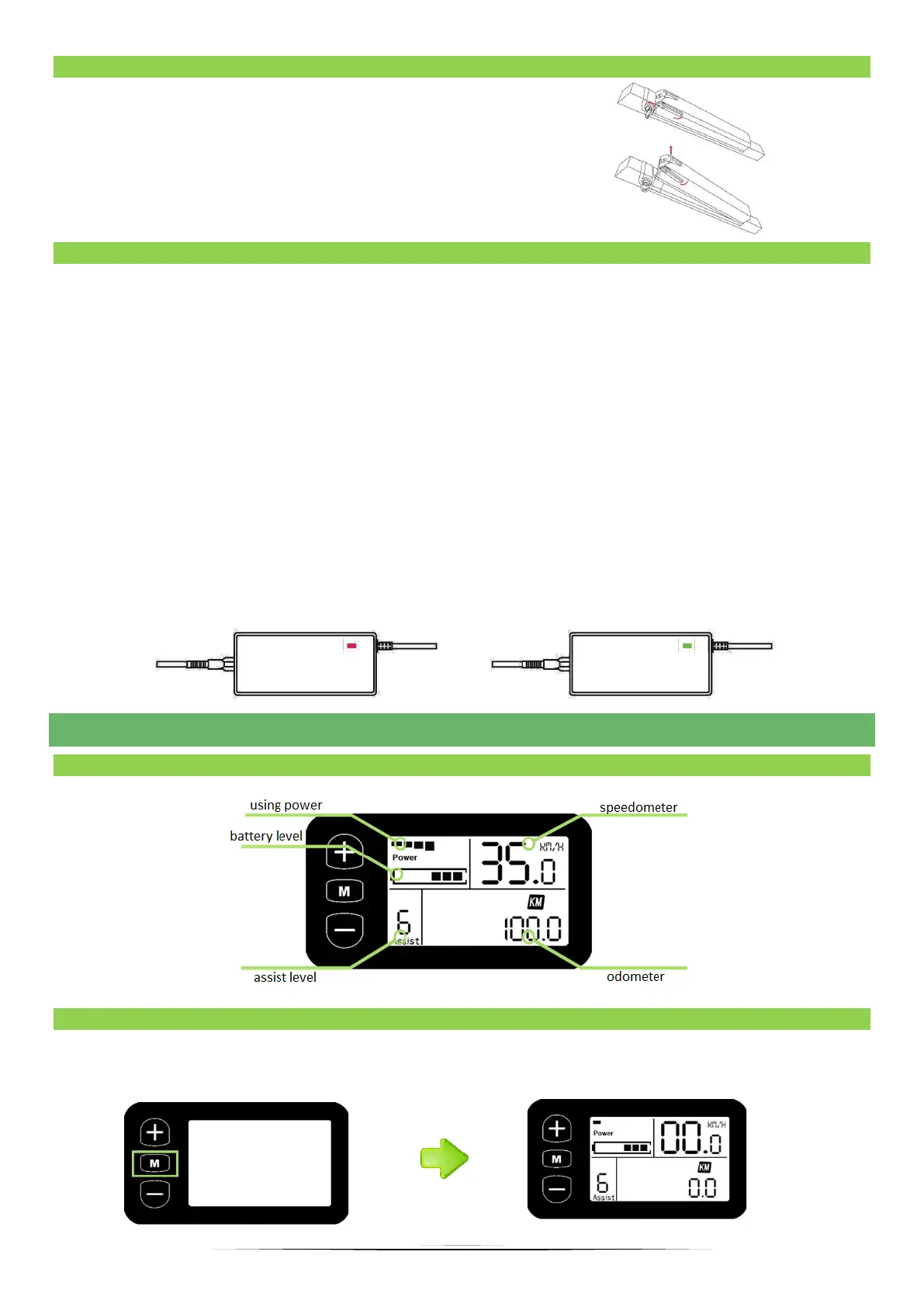
To remove the battery, turn and hold the key,
then pull the lever on the side of the battery
towards you. To insert the battery, turn the key
and hold it in, then insert it from the bottom,
finally release the turned key.
9.4 CHARGING THE BATTERY
The battery charge level indicates segments on the display located on the handlebar.
Charge the battery at ambient temperature, on a non-flammable and dry surface, away
from heat, moisture or flammable materials. In addition, it cannot be covered. When
charging the battery, please observe the following steps:
A. Insert the charger plug into the socket in the battery, and then connect the charger
cable to the power socket.
B. When the charger light is red, the battery is charging. When the red light turns green it
means that the battery is fully charged (Fig.1).
C. After charging is complete, disconnect the cable from the wall outlet first and then from
the battery.
D. Never leave the rechargeable battery unattended.
10. FUNCTION DISPLAY
10.1 FULL VIEW AREA
10.2 ON/OFF DISPLAY
To turn on the display press and hold “M” for 3 seconds. To turn off the display press and
hold “M” for 3 seconds.


 To Next Page