3.8. Parameter adjustment
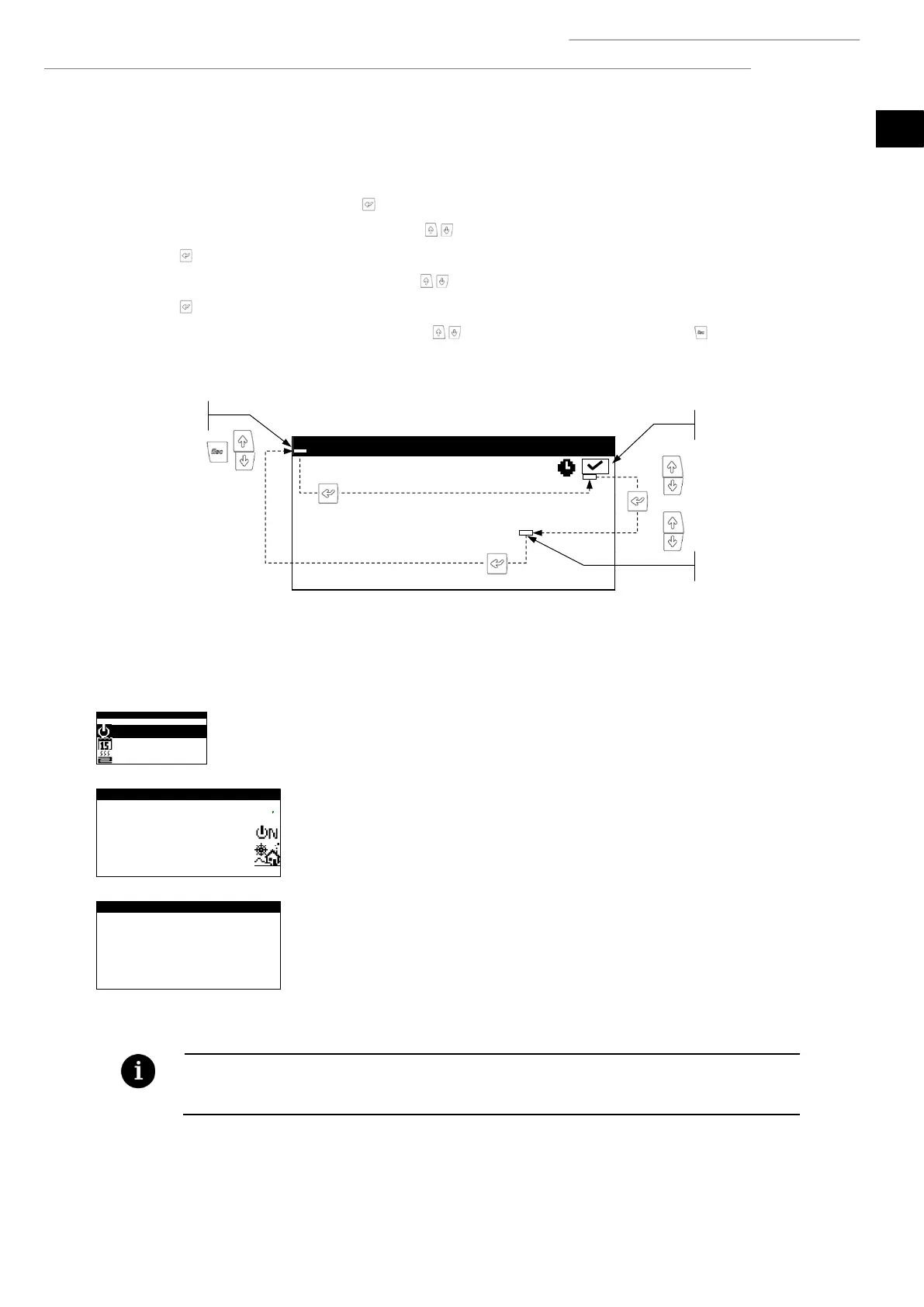
Take the following steps to change a parameter:
1. Search for the screen containing the parameter that needs adjusting (see Section 3.7).
2. With the cursor in position 1 press on to enter the screen and move the cursor to the parameter in position 2.
3. Adjust the parameter in position 2 using buttons .
4. Press to accept and move the cursor to position 3.
5. Adjust the parameter in position 3 with buttons .
6. Press to accept and return to position 1.
7. With the cursor in position 1 again, press buttons to go to the previous or next screen, or to return to the list of
user menus.
Figure 3.4. Adjusting comfort parameters.
3.9. ON/OFF Menu
On/Off
Shows the direction of the unit.
Used to switch the heat pump on / off or to activate the EMERGENCY status.
Also used to choose the operation program.
Setting up the AUTO program
The AUTO program can be used to adjust the outdoor temperatures and the time needed
to switch between the WINTER and SUMMER programs.
▪ The selected status of the heat pump can be changed automatically using the time schedule functions,
calendar or using active alarms.



 To Next Page