EasyManua.ls Logo

ECOFOREST ecogeo basic - 3.2. Main Screen; 3.3. Active Components

ECOFOREST ecogeo basic
31 pages
Print Icon
To Next Page IconTo Next Page
To Previous Page IconTo Previous Page
Loading...
User manual ecoGEO
38
EN
3.2. Main screen
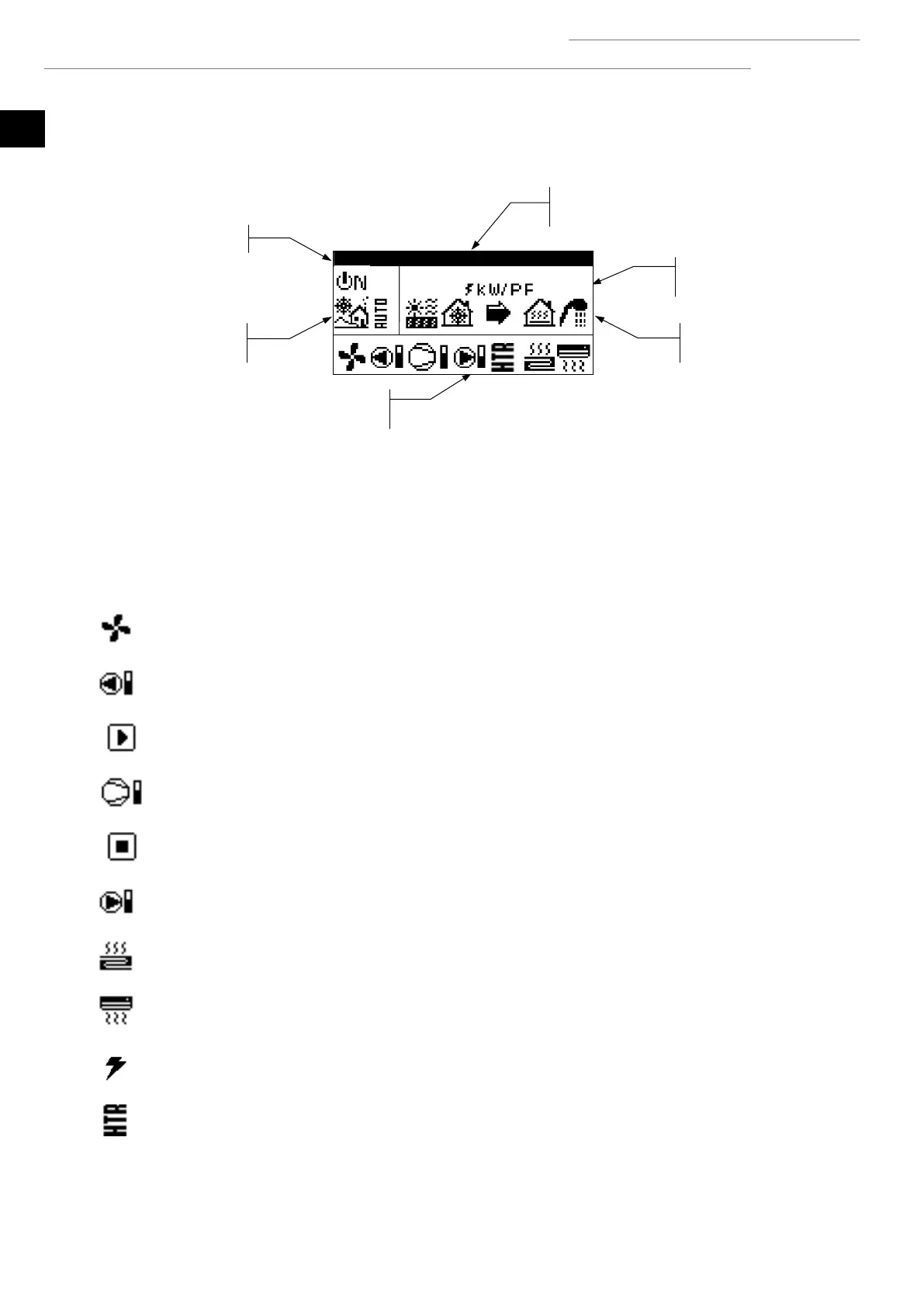
The main screen of the application contains a series of fields with information about heat pump operation.
Figure 3.2. Description of the main screen.
3.3. Active components
This field shows the main components of the heat pump that are activated. A consumption bar is also shown for the compressor and
modulating circulator pumps.
Aerothermal fan activated (only for ecoGEO B/C versions)
Brine pump activated
Compressor in start-up phase
Compressor activated
Compressor in shut-down phase
Production pump activated
Heating units activated
Cooling units activated
Auxiliary heating unit activated
HTR system activated (only for ecoGEO B/C versions)
Energy meter
Operation mode
Status
Active components
Operation program
Date and time
// Mon
4:5
7 5

Other manuals for ECOFOREST ecogeo basic

Related product manuals