EcoNet
®
Smart Thermostat User Guide 7> Return to Table of Contents
System Modes
The EcoNet Smart Thermostat will call for heat or cool based on the current settings and temperature. Cooling
and heating equipment may have a delay period before operation is enabled. The delay can be up to 5 minutes
(if the mode was changed right after equipment turns off). Status screen will show a “Hold-Off Timer” for
Equipment State.
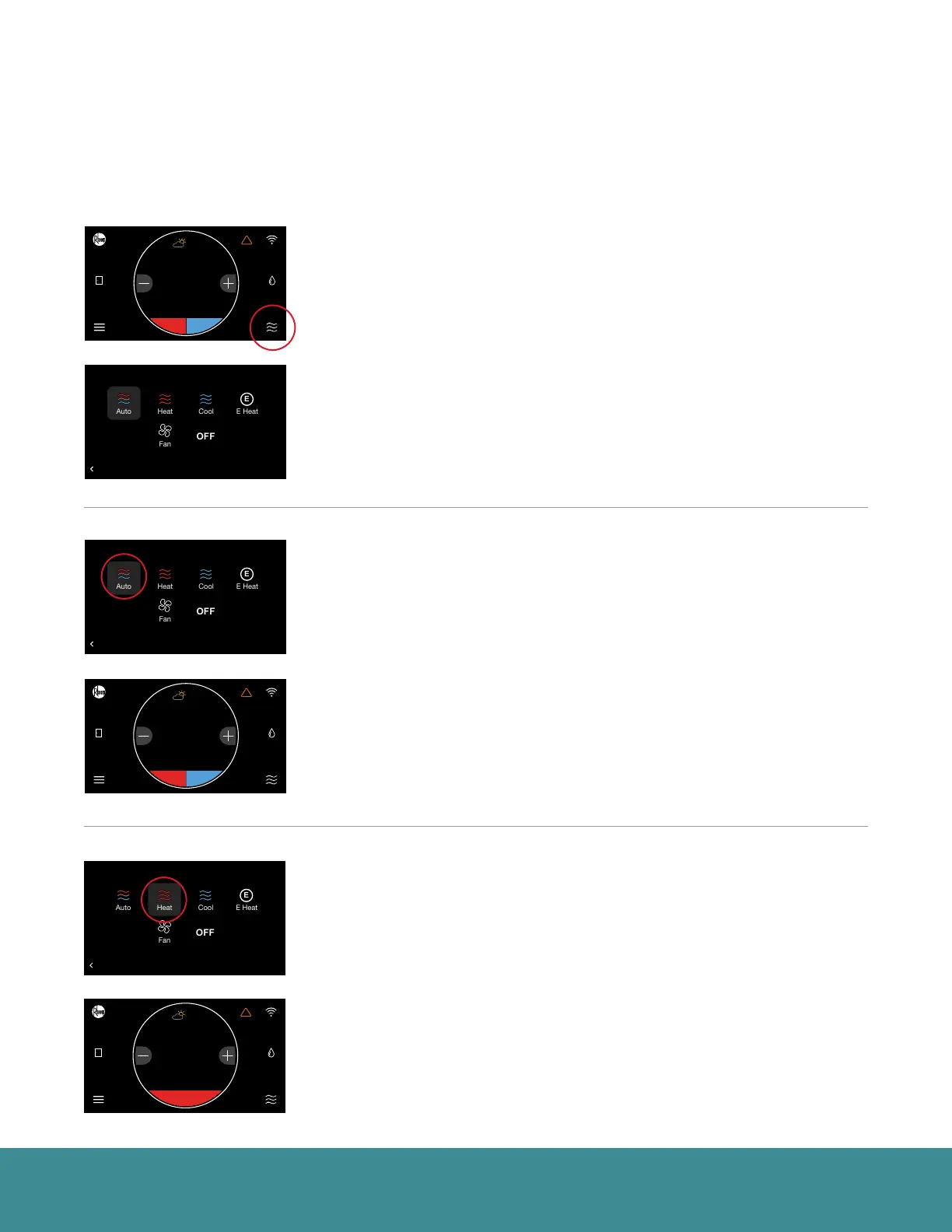
Select the mode icon in the bottom right corner of the home screen to quickly
change the operating mode.
Select from Auto, Heat, Cool, E-Heat, Fan and Off
Auto – Activates the heating or cooling system as required to keep your home
within the configured range of set point temperatures. Select the desired
set point, and then use the large adjustment buttons to set the desired
temperature. To adjust your cooling set point, tap the set point on the right -
it will turn blue, then adjust using the plus and minus buttons. The current
temperature in the center of the screen will temporarily be replaced by the
set point in large font during temperature adjustments.
Note: The default deadband or separation between the heating and cooling set points is 2 degrees.
Heat – Turns on heating when the current temperature drops below your set
point temperature. When there is an active call for heating, the words ‘Heating
To’ will appear above the heating set point.
(Heating set point screen)
71
47%
68
OFF
Dining Room
Zone 3
Away
Backlight Enabled?
Outside Temp Selection?
BACK
Basic Settings
Internet
Yes
36
UNITS
34
Group 1
Refrigeration
!
61%
72
Basement
Zone 4
85
80
T957_O Low Refrigerant Pressure
BACK
Installer Checkout
Linearize Dampers
75
44%
80
65
Away
Resume Schedule
71
Home 44%
70
80
Cooling to
BACK
Select a Mode
71
47%
68
OFF
Dining Room
Zone 3
Away
Backlight Enabled?
Outside Temp Selection?
BACK
Basic Settings
Internet
Yes
36
UNITS
34
Group 1
Refrigeration
!
61%
72
Basement
Zone 4
85
80
T957_O Low Refrigerant Pressure
BACK
Installer Checkout
Linearize Dampers
75
44%
80
65
Away
Resume Schedule
71
Home 44%
70
80
Cooling to
BACK
Select a Mode
71
47%
68
OFF
Dining Room
Zone 3
Away
Backlight Enabled?
Outside Temp Selection?
BACK
Basic Settings
Internet
Yes
36
UNITS
34
Group 1
Refrigeration
!
61%
72
Basement
Zone 4
85
80
T957_O Low Refrigerant Pressure
BACK
Installer Checkout
Linearize Dampers
75
44%
80
65
Away
Resume Schedule
71
Home 44%
70
80
Cooling to
BACK
Select a Mode
71
47%
68
OFF
Dining Room
Zone 3
Away
Backlight Enabled?
Outside Temp Selection?
BACK
Basic Settings
Internet
Yes
75
Home
62 85
!
44%
80
71
47%
68
OFF
Dining Room
Zone 3
Away
Backlight Enabled?
Outside Temp Selection?
BACK
Basic Settings
Internet
Yes
75
Home
62 85
!
44%
80
71
47%
68
OFF
Dining Room
Zone 3
Away
Backlight Enabled?
Outside Temp Selection?
BACK
Basic Settings
Internet
Yes
36
UNITS
34
Group 1
Refrigeration
!
61%
72
Basement
Zone 4
85
80
T957_O Low Refrigerant Pressure
BACK
Installer Checkout
Linearize Dampers
75
44%
80
65
Away
Resume Schedule
71
Home 44%
70
80
Cooling to
75
Home
!
44%
62
80



 To Next Page