17
EN
4. Maintenance
Before performing cleaning and maintenance on DEEBOT 7, move the Bottom Power Switch
to the OFF position and unplug the Charging Dock.
4.1 Dust Bin and Filters
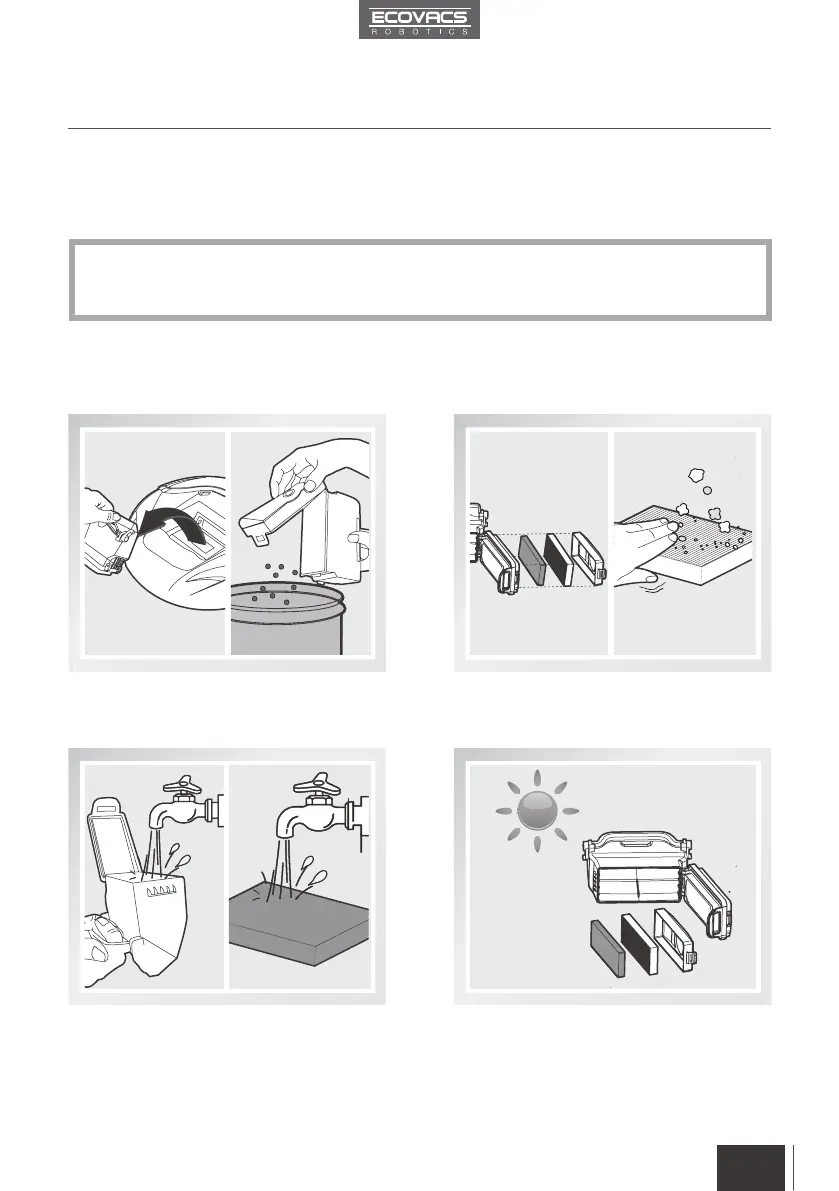
Open DEEBOT 7’s Top Cover and remove the
Dust Bin. Open the Dust Bin Cover and empty
the Dust Bin.
Rinse the Dust Bin, Anti-Bacterial Sponge
Filter and Filter Net under running water.
Dry the Dust Bin and filter components
completely before reinstalling.
Remove the filters. Pat the High Efficiency
Filter clean. Do not rinse the High Efciency
Filter under water.
DEEBOT 7’s Automatic Emptying process automatically removes the majority of dust and
debris from the robot’s Dust Bin. However moist contents or heavy particles may stay in the
Dust Bin and it may need to be cleaned periodically.
*



 To Next Page