9
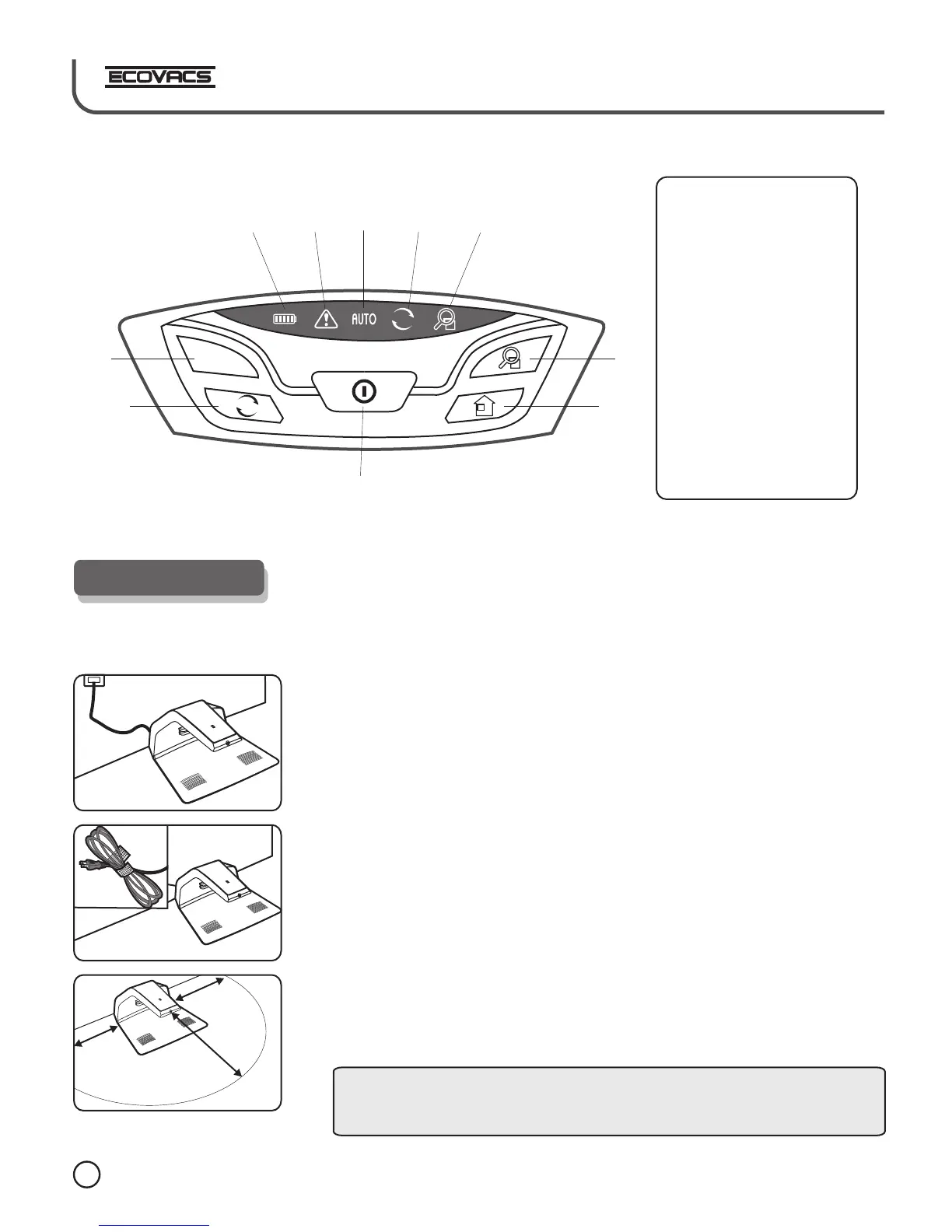
1.5m
0. 5m
0.
5m
1
2
3
4
5
6
7
8
9
10
Control Panel
AUTO
Put the block at an even place and make the base perpendicular to the ground.
Meanwhile, take a look at the marked electricity voltage to make sure the
product is used under instruction.
Placement of charging block
4.Robot Charging
Tangle the power cord and do not scatter it besides the block in case that
robot would get impeded when it turns back.
There should not be any object at least 1.5 meter in front of the charging
block. Besides, anything with strong reflector is not supposed to stay ahead of
the infrared receiver. For example, ground glass, smooth ceramic vase and
so on. Otherwise, the machine shall not detect the charging block.
1. Power
2. AUTO mode button
3. intensive mode buttom
4. Cycle mode button
5. Back charging button
6. Battery level
7. Alarming indicator
8. Auto mode indicator
9. Cycle mode indicator
10. Intensive mode indicator
Please do not put the charging block to the staircase to avoid accidental
cases.
Tips:













 To Next Page