12
3. Operating and Programming
■
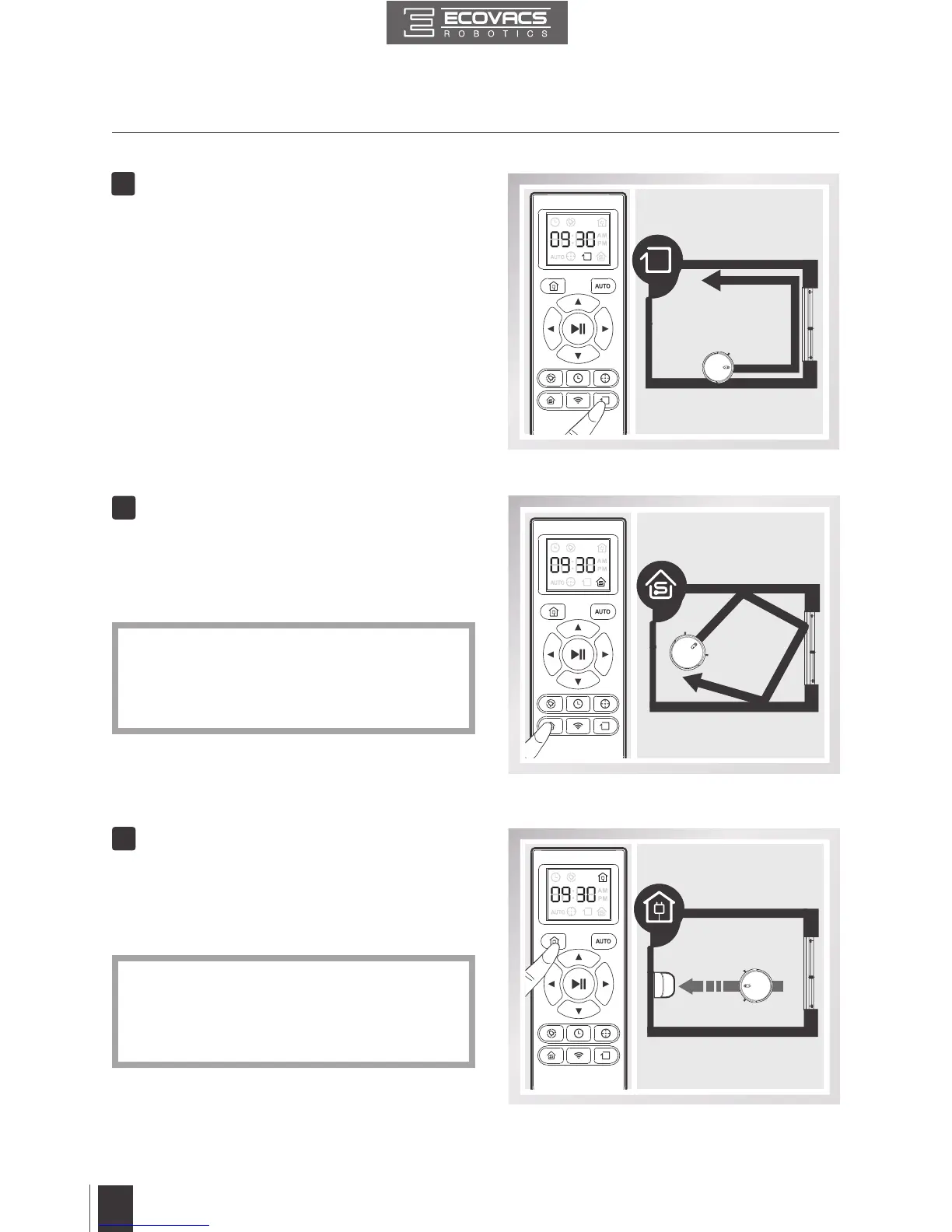
This mode is used when DEEBOT only
needs to clean a single room� To start Single
Room Cleaning Mode, press the Single
Room Mode Button on the Remote Control�
■
When battery power gets low, DEEBOT
automatically switches to Return to Charger
Mode and returns to the Charging Dock to
recharge itself�
4
5
Single Room Mode
Return to Charger Mode
* The room must be contained for Single
Room Mode to function properly� Close
doors to the room entrance and exit to
contain the room�
* DEEBOT can also be sent back to the
Charging Dock at any time by pressing the
Return to Charger Button on the Remote
Control�
■
This mode is good for cleaning the edges
and corners of a room� In Edge Cleaning
Mode, DEEBOT cleans along a border (e�g�
wall).
■
To start Edge Cleaning Mode, press the
Edge Cleaning Mode Button on the Remote
Control�
3
Edge Cleaning Mode







 To Next Page