13
DEEBOT has a Time Scheduling function� DEEBOT can be programmed to automatically clean at a
specic time using the Remote Control, even if nobody is at home. The current time of day and the
cleaning times are scheduled using the Remote Control�
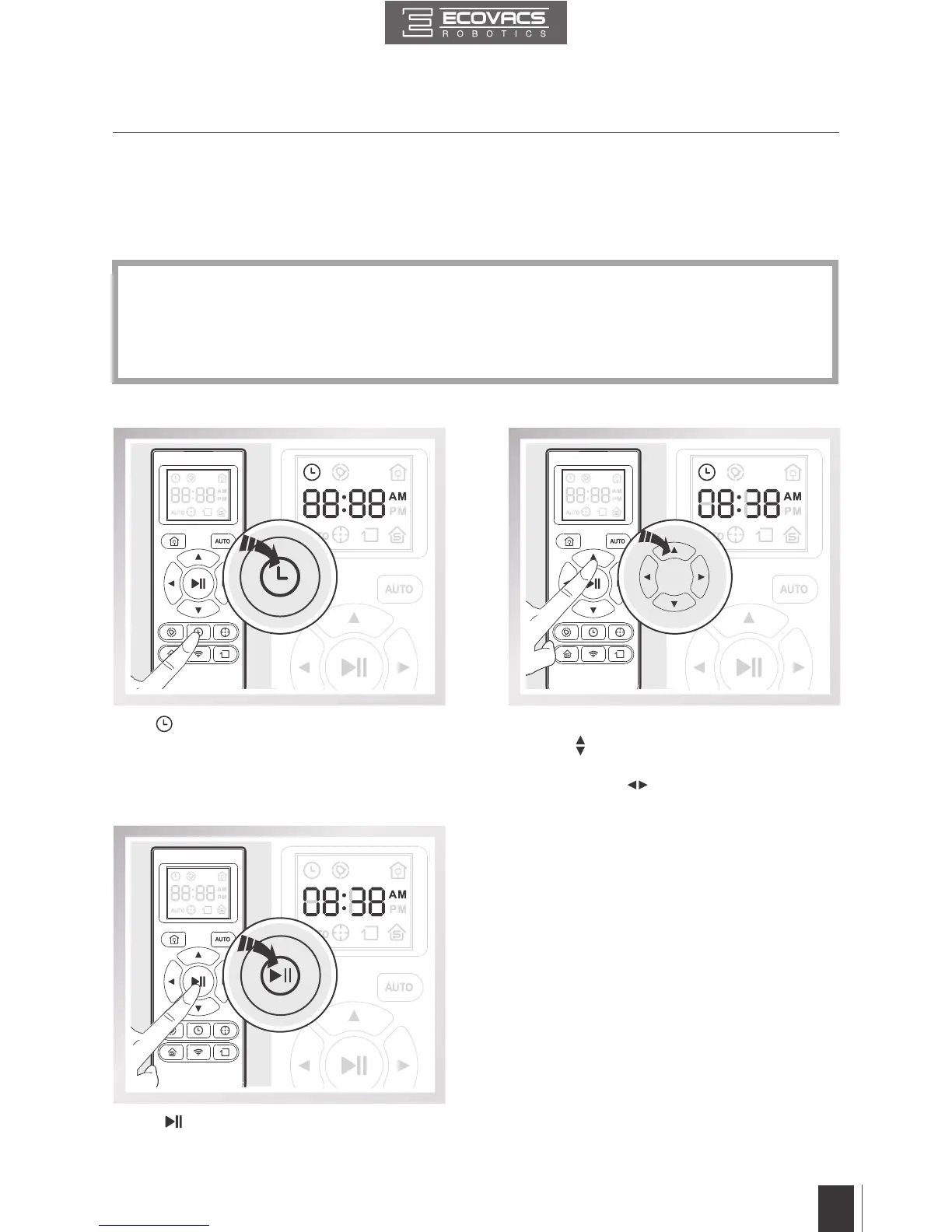
Press button on the Remote Control and the
“hour" (rst two digits) ashes on the Remote
Control LCD Screen�
Press
button on the Remote Control to
conrm and save the current time of day.
Press the up and down Direction Control
Buttons
to adjust “hour” and “minute”
number� Press the left and right Direction
Control Buttons
to switch between “hour”
and “minute�”
3.4 Programming the Robot
Set the Current Time of Day
3. Operating and Programming
* All scheduled cleanings are performed in AUTO Cleaning Mode�
* The Remote Control uses a 12-hour clock with “AM” and “PM” indicators�
* DEEBOT loses the schedule once it is powered OFF� It is suggested to keep it powered ON
and charging instead of powered OFF�







 To Next Page