9
EN
ECOVACS HOME
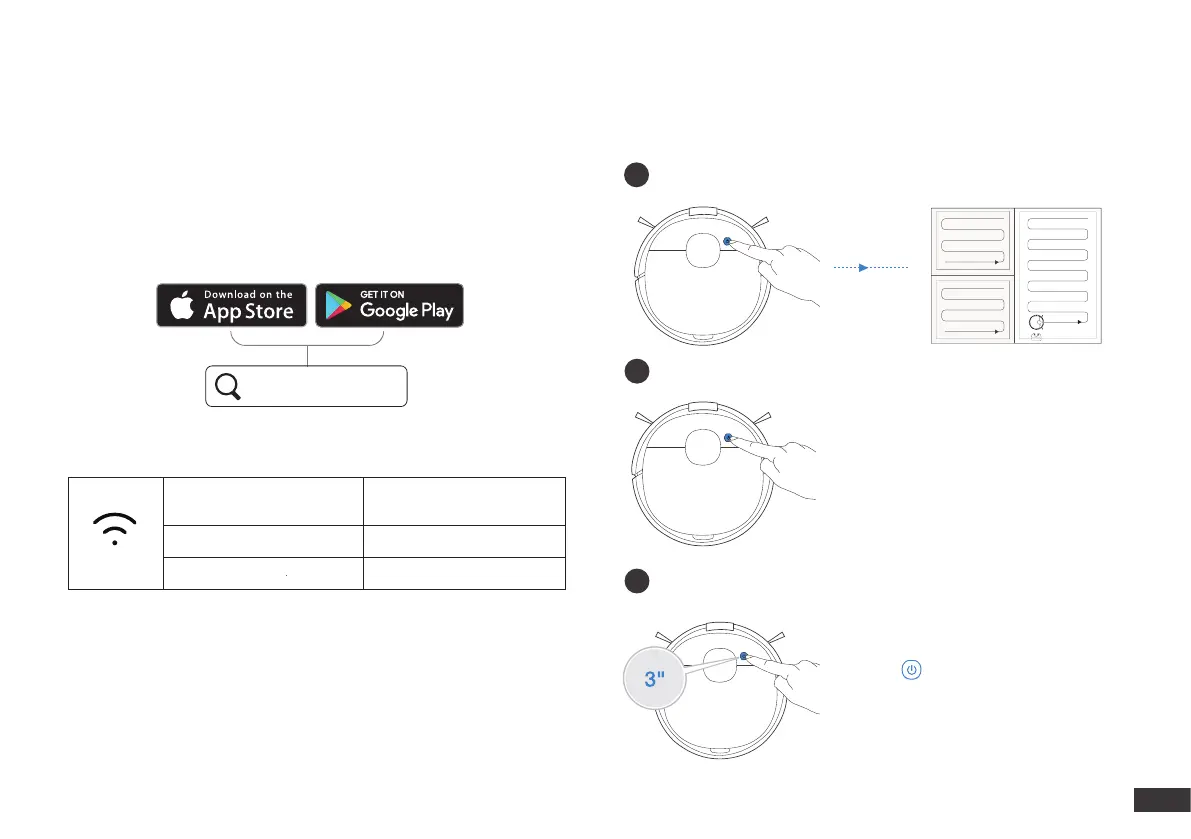
ECOVACS HOME App
To enjoy all available features, it is recommended to control your
DEEBOT via the ECOVACS HOME app.
Wi-Fi Indicator Light
Before you start, make sure that:
Tips: If you have any problems during the Wi-Fi setup process, refer
to the Troubleshooting > Wi-Fi Connection section in this manual.
• Your mobile phone is connected to a Wi-Fi network.
• The 2.4GHz band wireless signal is enabled on your router.
• The Wi-Fi indicator light on DEEBOT is slowly ashing.
Slowly ashing
Disconnected to Wi-Fi or
waiting for Wi-Fi connection
Rapidly ashing Connecting to Wi-Fi
Solid Connected to Wi-Fi
1
3
Operating DEEBOT
During the rst cleaning, please supervise DEEBOT and assist it should
there be a problem.
Pressing for 3 seconds to send
DEEBOT back to the Docking Station.
Start
2
Pause
Return to Charge
Note: The robot’s Control Panel stops
glowing after the robot is paused for
a few minutes. Press the AUTO Mode
Button on DEEBOT to wake up the
robot.







 To Next Page