8
EN
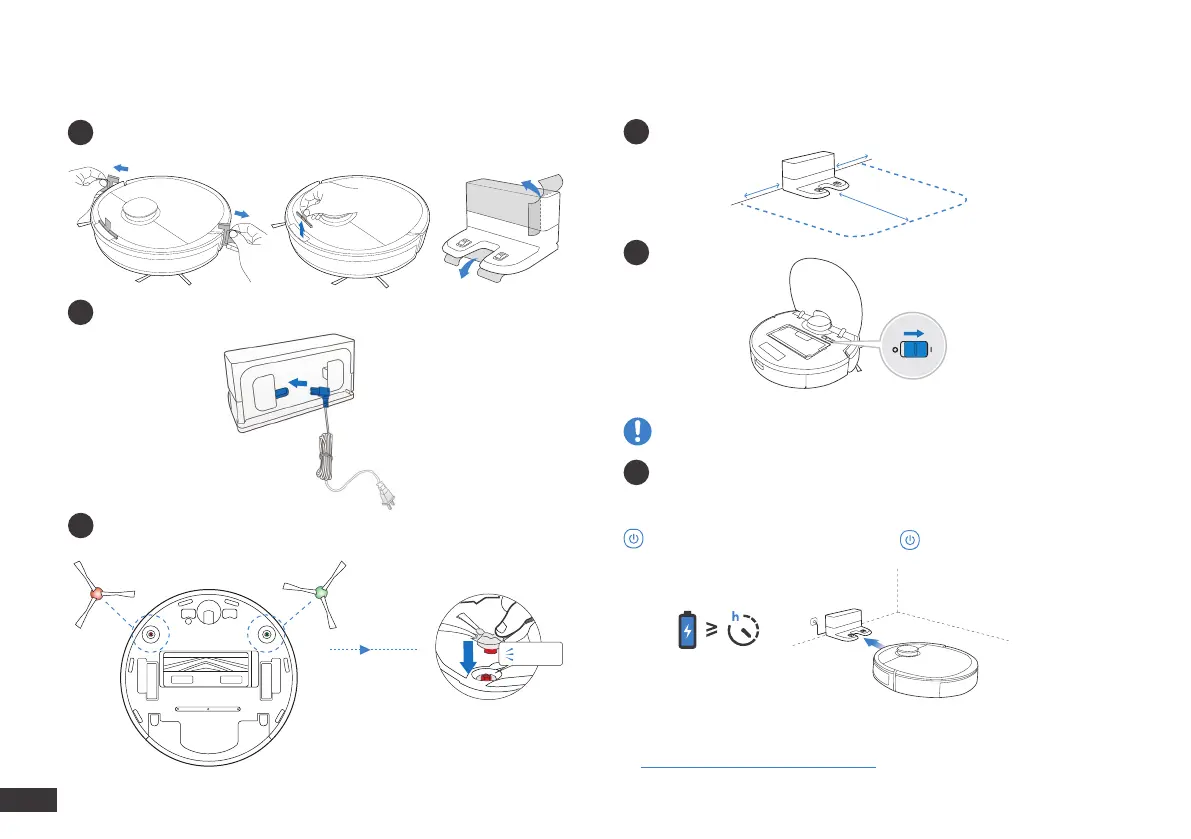
Quick Start
1
Remove Protective Strips and Films
2
Assemble Docking Station
3
Install Side Brushes
Click
Charging DEEBOT
>0.5m (1.64')
>1.5m (4.92')
>0.5m (1.64')
1
Docking Station Placement
3
Charge DEEBOT
2
Power ON
Note: I = ON, O = OFF.
DEEBOT cannot be charged when being powered OFF.
Empty remaining water from the Reservoir and remove the Reservoir
and the mopping pad plate before charging DEEBOT.
ashes when DEEBOT is charging. goes out when DEEBOT is
fully charged.
*
You can also purchase an Auto-Empty Station that automatically
empties your DEEBOT's dustbin. Explore more accessories at
https://www.ecovacs.com/global.
4








 To Next Page