30
EN
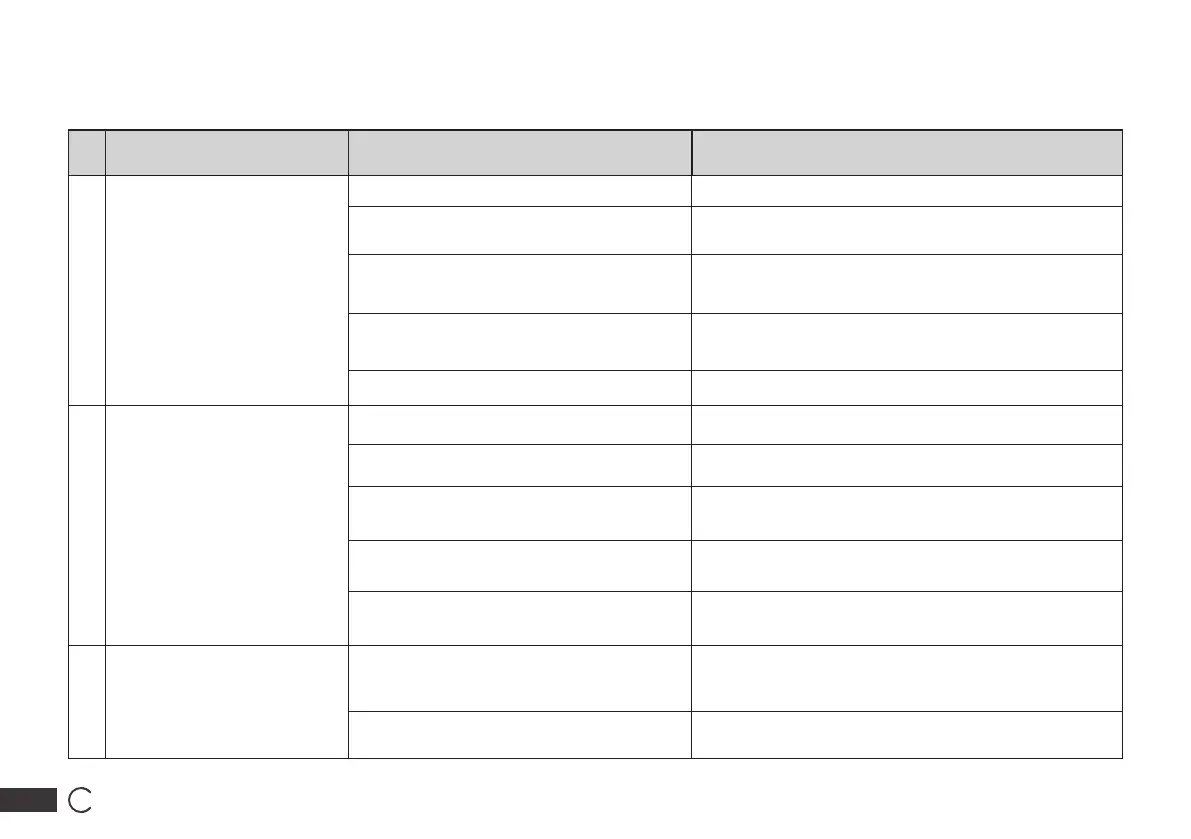
No. Problem Possible Causes Solutions
1 DEEBOT is not charging.
DEEBOT is not switched ON. Switch ON DEEBOT.
DEEBOT has not connected to the Auto-Empty
Station.
Be sure that the robot’s Charging Contacts have connected
to the Auto-Empty Station Pins.
The Power Cord is not connected to the Auto-
Empty Station.
Make sure the Power Cord is rmly connected to the Auto-
Empty Station.
The Auto-Empty Station is not connected to
the power supply.
Make sure the Auto-Empty Station is connected to the
power supply.
The battery is completely discharged. Please contact Customer Care for help.
2
DEEBOT cannot return to the
Auto-Empty Station.
The Auto-Empty Station is not correctly
placed.
Refer to section 3.2 to correctly place the Auto-Empty
Station.
The Auto-Empty Station is not correctly
connected.
Make sure the Auto-Empty Station is correctly connected.
The Auto-Empty Station is manually moved
during the cleaning.
It is suggested not to move the Auto-Empty Station during
the cleaning.
DEEBOT is paused for more than 90 minutes.
It is suggested not to pause DEEBOT for more than 90
minutes.
DEEBOT did not start cleaning from the Auto-
Empty Station.
Make sure DEEBOT starts cleaning from the Auto-Empty
Station.
3
DEEBOT gets stuck while
working and stops.
DEEBOT is tangled with something on the
oor (electrical wires, curtains, carpet fringing,
etc.).
DEEBOT will try various ways to free itself. If it is
unsuccessful, manually remove the obstacles and restart.
DEEBOT might be stuck under furniture with
an entrance of similar height.
Please set a physical barrier, or set a Virtual Boundary in
the ECOVACS HOME App.
6. Troubleshooting/6.1Troubleshooting




 To Next Page