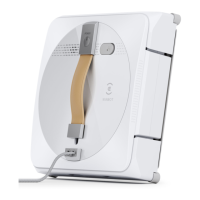
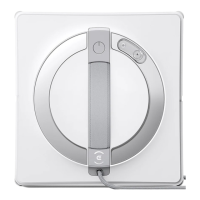
The ECOVACS WINBOT 920 is a robotic window cleaner designed for household use, offering automated cleaning of glass surfaces. It is equipped with a range of features for efficient and safe operation, including a safety tether, multiple cleaning modes, and an accompanying mobile application for enhanced control.
Function Description:
The WINBOT 920 is primarily used for cleaning windows, both interior and exterior, provided they meet specific environmental and structural criteria. It adheres to the glass surface using suction and navigates to clean the entire area. The device is designed for maintenance cleaning on common windows and is not intended for heavy-duty or first-time cleaning of heavily soiled surfaces. It operates while plugged into a power source, with a built-in back-up battery that charges during use and powers the appliance if it becomes unplugged or in case of power failure.
Important Safety Instructions:
Before using the WINBOT 920, it is crucial to follow several safety precautions. The appliance should not be used in extreme temperatures (below 0°C/32°F or above 40°C/104°F, or above 65% humidity). For outdoor use, winds must be calm, and it should not be raining or snowing. It is not suitable for use in whole gale storms, force-10 winds, or at altitudes exceeding 2000 meters (6162 feet). The WINBOT 920 should not be used on cracked, wet, or greasy windows, or on framed windows with a frame smaller than 5mm (0.2 inches). The safety tether and carabiner must always be properly connected to a safe position before operation. The power adapter and plug are for indoor use only. The appliance should not be left unattended while plugged in. Only accessories and the power adapter supplied by the manufacturer should be used. The power supply voltage must match the voltage marked on the power adapter. Care must be taken not to damage the power cord, and the appliance should not be used with a damaged cord or receptacle. The back-up battery is replaceable only by skilled persons or the manufacturer's service agent and must be disposed of according to local laws and regulations. The appliance should not be incinerated as the battery can explode in fire. For recharging the battery, only the detachable supply unit EA10952/GM95-240375-D provided with the appliance should be used.
Technical Specifications:
- Model: WINBOT WG811
- Rated Input: 24V ⎓ 3.75A
- Rated Power: 75W
- Power Adapter (EA10952):
- Input: 100-240V ~ 50-60Hz 1.5A
- Output: 24V ⎓ 3.75A 90W
- Power Adapter (GM95-240375-D):
- Input: 100-240V ~ 50-60Hz 2.5A
- Output: 24V ⎓ 3.75A 90W
- Off/Standby Mode Power: Less than 0.50W
- Frequency: 2400-2483.5MHz
- Output power of the wireless module: Less than 100mW
- RF exposure requirements: A separation distance of 20 cm or more should be maintained between the device and persons during operation.
Usage Features:
- Quick Start: The WINBOT 920 is connected to power via its power cord, power adapter, and plug.
- ECOVACS HOME App: The appliance can be controlled via the ECOVACS HOME App, which offers features such as Deep Cleaning Mode, Spot Cleaning Mode, and switching between interior/exterior window cleaning. The app also provides direction buttons for manual control.
- Preparation: Before use, the WINBOT must be properly tethered to a safe place using the carabiner, preferably on a firm and safe metal railing.
- Cleaning Solution Application: It is recommended to spray WINBOT Cleaning Solution from ECOVACS onto the cleaning pad. Over-spraying should be avoided as it may cause the driving treads to slip. Tap water or other cleaners may adversely affect cleaning performance and potentially void the warranty.
- Placement: The area where the WINBOT will attach should be wiped clean. The WINBOT should be placed on the window at least 10cm (4 inches) from corners or other obstacles. Objects should be kept away from the WINBOT's fan to prevent blockage.
- Operation: To start, turn the power switch to "I". The WINBOT will begin cleaning after successfully attaching to the window.
- Pause/Finish: The cleaning process can be paused. To finish, the WINBOT is removed from the window, the safety tether is unfastened, and the device is unplugged.
Maintenance Features:
- Cleaning Pad Replacement: The dirty cleaning pad should be removed and replaced with a clean one, ensuring it is correctly attached and does not cover the Edge Detection Sensors. The gray microfiber side of the pad faces out.
- Cleaning Pad Washing: Cleaning pads can be washed with mild detergent. Wet cleaning pads should not be used on the WINBOT as it may slip on the window. Regular washing extends the pad's service life. Worn pads or those that no longer fit within the fastener area should be replaced to maintain optimal cleaning performance.
- Driving Treads Maintenance: The driving treads should be inspected, especially via the ECOVACS HOME App, and cleaned if dirt is visible.
- Fan Cleaning: The fan should be cleaned as described in the manual to prevent malfunctions.
- Edge Detection Sensors Cleaning: The Edge Detection Sensors should be cleaned to ensure proper function.
- Battery Care: After a low battery alarm, the WINBOT should be fully charged to prevent reducing battery life. For long-term storage, the WINBOT should be fully charged, turned off, and recharged every six months to prevent over-discharge.
Troubleshooting:
The manual provides a troubleshooting guide for common issues such as irregular movement, the WINBOT not moving, or getting stuck. Solutions include cleaning various components, replacing the cleaning pad, using the app's direction buttons, and contacting customer service if problems persist. For instance, if the WINBOT moves irregularly, solutions include spraying more cleaning solution, cleaning driving treads, replacing the cleaning pad, or using the app for control. If the WINBOT stops moving after adhering, it might be too close to an edge or obstacle, requiring repositioning or app control to move it. If the bumper rail is stuck or damaged, or if the Edge Detection Sensors or fan malfunction, cleaning or contacting customer service is recommended.


 To Next Page
 General