Quick Start
Open Cap on the back of your Sol Jam
Turn on the Main Power Switch
On the Top Panel, press the Standby Power
Button to power on your Sol Jam
Search your Bluetooth Connection on your
Smart Device
Pair & Play
1
2
3
4
5
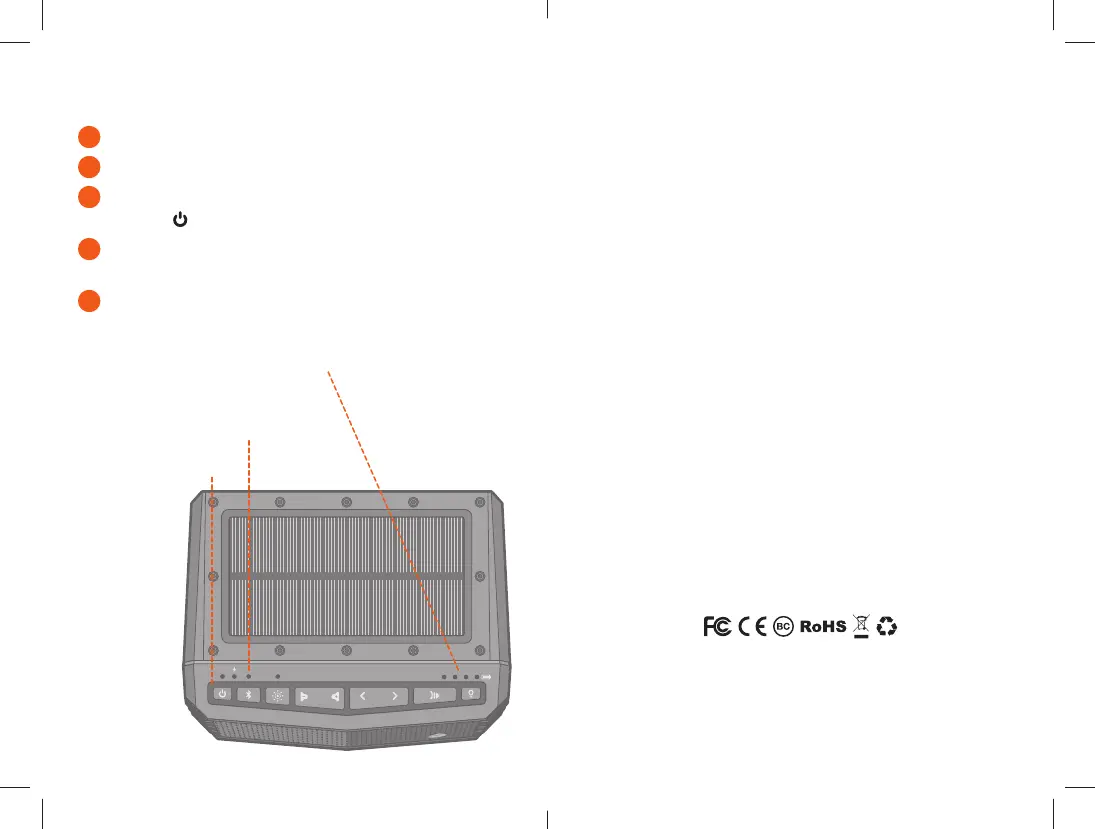
Control Buttons
LED Status Indicators
Power, Charge, Bluetooth, EcoCast
LED Battery Level Indicators
3) NEVER open the auxiliary door in a water environment. This could cause water to ingress into
the unit which could potentially be hazardous and cause a fire or a spark.
4) NEVER connect a device to the auxiliary input jack when in a water environment. The auxiliary
jack should only be used in a dry environment.
5) NEVER attempt to fix, repair your ECOXGEAR unit. Please send it back to Grace Digital for
any assessments and repairs.
CARE, MAINTENANCE, & PRECAUTIONS:
1) The unit is waterproof only when the cap is properly closed.
2) Close the cap properly before use. If the unit is placed in water without the cap properly
closed, water may enter into the unit and void your warranty.
3) Dry unit completely before opening the cap. Do NOT open the cap if wet or in a
wet environment.
4) Do NOT apply excessive force to any surfaces of the unit when wet or in a wet environment.
5) Do NOT use or store the unit in places with high temperature.
6) AVOID prolonged exposure to strong magnetic fields.
7) Periodically check the rubber seal for premature wear.
8) Periodically clean the rubber with a soft moist cloth and ensure no objects such as dirt, hair, or
sand are on the rubber seal ring. Do NOT use any oily solvent or chemicals for cleaning.
9) Rinse off the unit with tap water after use in salt water or swimming pool.
10) Power and / or charge the built-in rechargeable battery for portable use by connecting the
USB cord to a computer USB connection or to an AC outlet using the AC-to-USB cord 5V, 2A
power adapter intended for use with the unit.
11) Noise and audio distortion may occur when the batteries are nearing end of charge.
12) Do NOT remove the built-in battery. Do NOT remove the grill covers.
13) Contact our Customer Support at support@gracedigital.com or call us at 800.903.9524.
LIMITED MANUFACTURER’S WARRANTY:
The Sol Jam is covered by a 1-year limited warranty that covers defects in workmanship
and / or materials for a period of 1 year from original purchase date. This warranty does not apply
to any products which have been abused, neglected, modified, or used for a purpose other than
the one for which they were manufactured. Please refer to the above care and maintenance
instructions for suggested care details. The warranty is valid only for the original owner who
purchases the unit from an authorized dealer. Transfers do not qualify for warranty protection.
Grace Digital reserves the right to replace any out-of-stock or discontinued product with a
comparable product. Discontinued products may not be available for warranty replacement.
Any contents are NOT covered by the limited manufacturer’s warranty. Warranty terms may be
revised without notification at the discretion of the manufacturer. Please visit www.ecoxgear.com
for additional product & warranty information.
Sol Jam by ECOXGEAR, a division of Grace Digital Inc., San Diego, California.
Designed and Engineered in the USA. Made in China.
Patent Pending.



 To Next Page