
 Need help?
Do you have a question about the EcoxGear SolJam and is the answer not in the manual?
Open the back cap of the Sol Jam unit to begin.
Turn on the main power switch located on the unit.
Press the standby power button on the top panel to turn the unit on.
Locate the Sol Jam via Bluetooth on your smart device.
Connect your device and start playing music.
Understand the visual indicators for the unit's battery charge.
Interpret indicators for Power, Charge, Bluetooth, and EcoCast status.
Use the standby button to turn the unit on or off.
Connect the Sol Jam to your Bluetooth device for audio.
Switch between Speaker, Transmitting, and Receiving modes.
Control the speaker's audio output volume level.
Select previous or next audio tracks.
Control audio playback and answer/reject phone calls.
Cycle through various LED light modes for ambiance.
Understand the Bluetooth LED states for pairing and connection.
Interpret EcoCast LED colors for different modes.
Each LED represents 25% of a charge; four full LEDs indicate a full charge.
Device adheres to FCC rules regarding interference and operation.
Device meets general RF exposure requirements.
Device complies with Industry Canada licence-exempt RSS standards.
Device is IP67 rated, suitable for submersion up to 3 feet for 30 minutes.
Do not charge the unit if wet or suspecting water ingress.
Lists the Sol Jam unit, carabiner, and USB cable included in the package.
Details available accessories for charging and mounting.
Optimize solar charging by positioning the panel directly towards the sun.
Charging efficiency depends on sun angle, location, time, and cloud cover.
Circuitry turns off when the battery is full until it drains.
Fully charge the unit using USB-C and a 5V power source.
Press standby button after charging; check LED indicators.
Estimated 12 hours of playback at 75% volume.
Details physical size and weight of the Sol Jam unit.
Specifications for output power, S/N ratio, and battery capacity.
USB-C input, USB output, and charging time details.
Details on EcoCast technology, range, and Bluetooth version/range.
Information on the solar panel and IP67 waterproof/dustproof rating.
Guide to pairing the Sol Jam with your Bluetooth device.
LED indicator behavior during pairing and connection.
How to manually enter pairing mode if needed.
The unit remembers the last paired device for auto-reconnection.
Instructions to set up additional speakers in Receiving Mode.
Confirmation message and audio playback after successful connection.
Initiate Transmitting Mode on one Sol Jam speaker.
Broadcast music to one or more Sol Jam speakers in Receiving Mode.
How to turn the cap to access the unit's connection ports.
Ensure the cap is properly closed to maintain watertight integrity.
Details on the Master Power Switch and its relation to the Standby Button.
Connect USB-C to charge the Sol Jam; notes on charge time.
Use the USB Output to charge personal devices; notes on charge rates.
Connect audio devices via 3.5mm cable as an alternative to Bluetooth.
The ECOXGEAR Sol Jam (Models: GDI-EXSJ401) is a portable, waterproof Bluetooth speaker designed for both indoor and outdoor use, including land and water environments. It features solar charging capabilities, multiple connectivity options, and an EcoCast system for broadcasting music to multiple speakers.
The Sol Jam serves as a versatile audio device, primarily functioning as a Bluetooth speaker that can connect wirelessly to smart devices to play music. Its built-in rechargeable lithium battery provides portable power, and it can also charge external devices via its USB output. A key feature is its solar panel, which allows for charging using direct sunlight, making it ideal for outdoor adventures where power outlets may not be available. The EcoCast system enables users to link multiple Sol Jam speakers (or other EcoCast-compatible ECOXGEAR speakers) to create a synchronized audio experience, broadcasting music across a wider area. Additionally, it includes a 3.5mm AUX-IN port for wired audio connections and a built-in microphone for answering phone calls when paired with a Bluetooth device. Party lights offer various modes to enhance the listening experience.
To begin using the Sol Jam, users should first open the cap on the back, turn on the main power switch, and then press the standby power button on the top panel. The device will then be ready for Bluetooth pairing. Users can search for "ECOXGEAR" on their smart device's Bluetooth settings and select it to pair. Once paired, music can be played, and phone calls can be answered directly through the speaker.
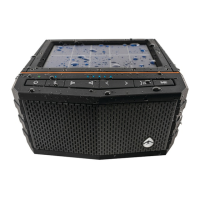
The Sol Jam features several control buttons on its top panel for easy operation. The standby power button (ن) turns the unit on or off. The Bluetooth button (*) initiates pairing mode. The EcoCast button (Ω) cycles through three modes: Speaker Mode (for individual use), EcoCast Transmitting Mode (to broadcast music), and EcoCast Receiving Mode (to receive music from another EcoCast speaker). Volume can be adjusted using the decrease (<) and increase (>) buttons. Track selection is managed with the previous (◄) and next (►) buttons. The play/pause/answer button (►) controls music playback and manages incoming phone calls. A dedicated party lights button (☀) cycles through eight different light modes, including white, green, red, blue, music sync, color fade, and off.
LED indicators on the top panel provide status updates:
For optimal performance, it is recommended to fully charge the Sol Jam prior to its first use, which typically takes about 4 hours via USB-C. The solar panel provides an alternative charging method, with efficiency depending on direct sunlight exposure and angle. When using the solar panel, ensure it is directly facing the sun without obstructions.
The EcoCast feature allows for an expanded audio system. To set up EcoCast, first pair one Sol Jam (Speaker A) to your Bluetooth device and start playing music. Then, press the EcoCast button on Speaker A to initiate EcoCast Transmitting Mode (the LED will flash red). For additional speakers (B, C, D, etc.), power them on and press their EcoCast buttons to cycle into EcoCast Receiving Mode (the LED will flash green). Once connected, Speaker A will broadcast music to all receiving speakers. The EcoCast range is approximately 30 feet between casting and receiving speakers.
Maintaining the Sol Jam's waterproof integrity is crucial. The unit is waterproof only when the cap on the back panel is properly closed. Users must ensure the cap is completely dry and securely sealed before placing the unit in water or in a wet environment. Opening the cap when wet or in a wet environment can lead to water ingress and void the warranty.
After use in salt water or a swimming pool, the unit should be rinsed off with tap water. Periodically, the rubber seal should be checked for wear and cleaned with a soft, moist cloth, ensuring no dirt, hair, or sand is present on the seal ring. Oily solvents or chemicals should not be used for cleaning.
The Sol Jam should not be used or stored in places with high temperatures or exposed to strong magnetic fields. Users should avoid applying excessive force to any surfaces, especially when wet. The built-in battery should not be removed, nor should the grill covers.
If the unit has been dropped or subjected to a severe impact, it should be returned to Grace Digital for assessment to ensure its integrity has not been compromised. Charging a wet unit or one suspected of having water ingress is hazardous and should never be attempted. The USB cables, power adapters, and the unit with an improperly fitted cap are not waterproof.
For long-term storage, all caps should be properly sealed to prevent internal moisture damage. The unit should be completely dry and clean before attempting to charge.
Customer support is available via email at support@gracedigital.com or by phone at 800.903.9524 for any assessments or repairs, as users should not attempt to fix or repair the unit themselves. Warranty information and additional product details can be found at www.ecoxgear.com.
 General
| Brand | ECOXGEAR |
|---|---|
| Model | SolJam |
| Category | Speakers |
| Type | Portable Bluetooth Speaker |
| Waterproof | Yes |
| Waterproof Rating | IP67 |
| Dustproof | Yes |
| Bluetooth Range | 100 feet |
| Power Source | Battery |


 To Next Page