49
A68M-C4DL USER MANUAL
Chapter 4
Chapter 4
Using the Motherboard Software
The auto-install DVD-ROM makes it easy for you to install the drivers and software.
The support software DVD-ROM disc loads automatically under Windows 7/8/8.1.
When you insert the DVD-ROM disc in the DVD-ROM drive, the auto-run feature will
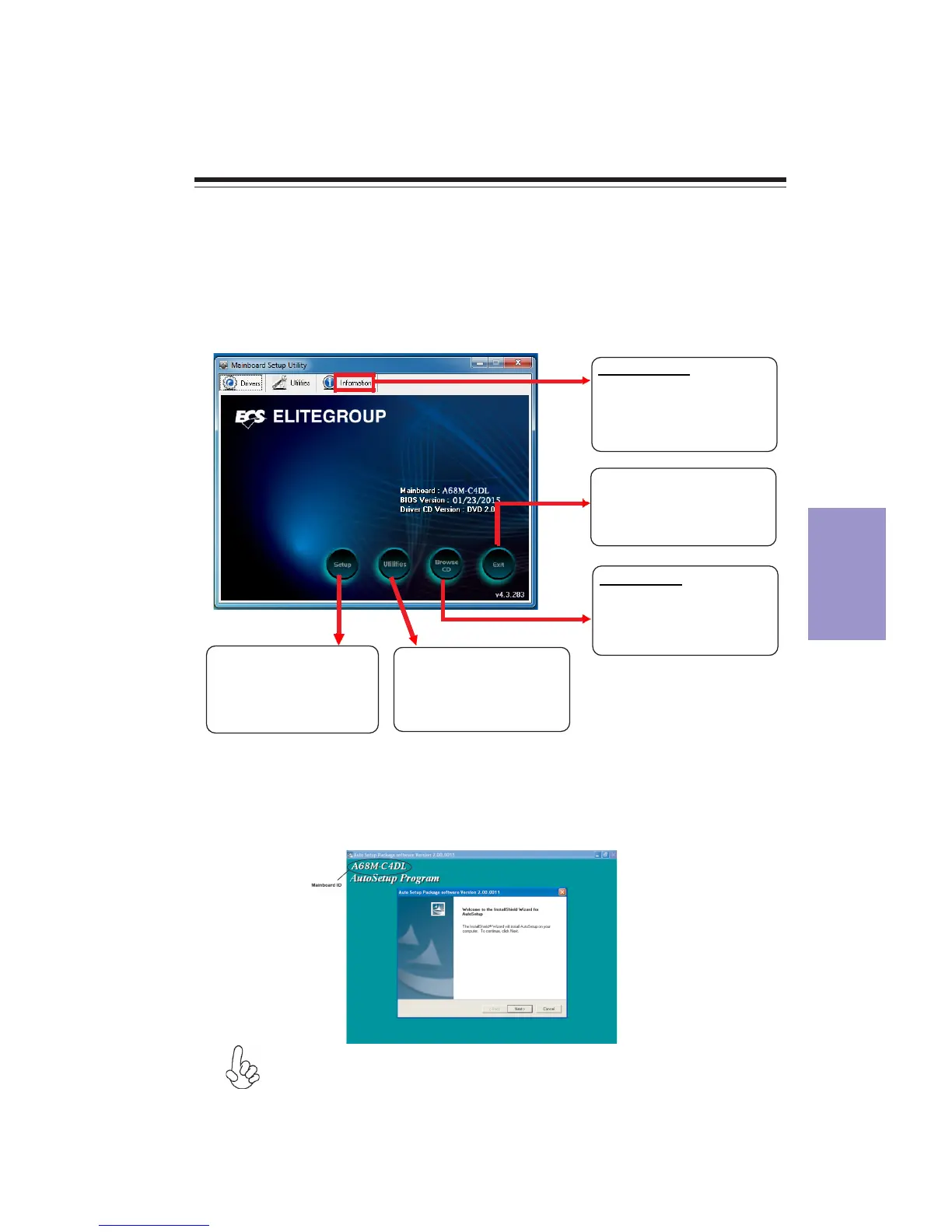
automatically bring up the installation screen. The screen has four buttons on it:
Setup, Utilities, Browse CD and Exit.
Auto-installing under Windows 7/8/8.1
Displays the path for all
software and drivers
available on the disk.
Open Windows Explorer
and show the contents
of the support disk.
Click “Exit” button to
close the Auto-Setup
window.
Browse CD:
Click the “Setup”
button to select and
run the software
installation program.
Click the “ Utilities”
button to select and
install ECS Intelligent
Utility.
Information:
Follow these instructions to install device drivers and software for the
motherboard:
The following screens are examples only. The screens and driver lists will be
different according to the motherboard you are installing.
1. Click Setup. The installation program begins:
Running Setup
The motherboard identification is located in the upper left-hand corner.


 To Next Page