- 7 -
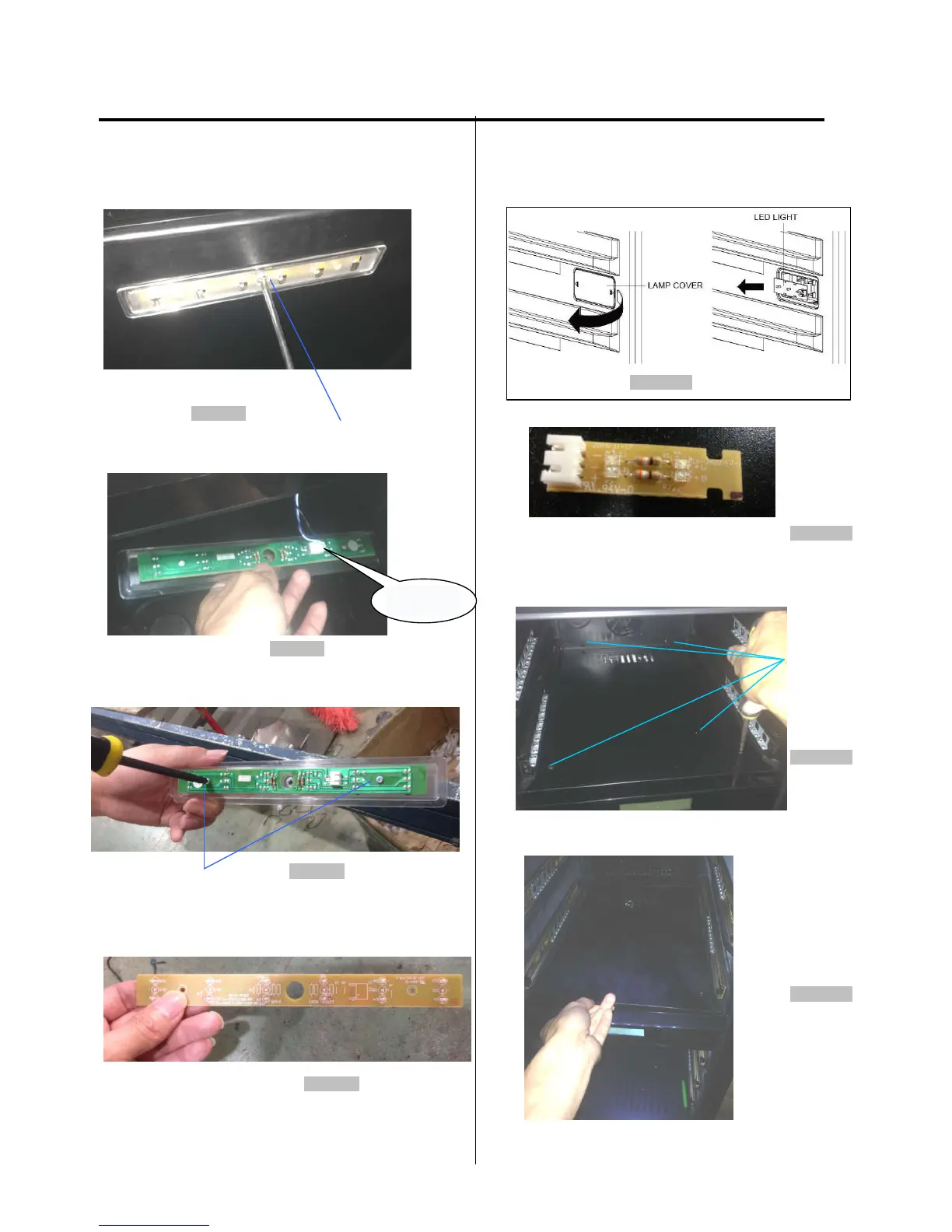
3. DISASSEMBLY
3-4 TOP LAMP
(Models:AWC151DZ, AWC241DZ,AWC241TDZ)
1.
1 Loosen four screws. (figure 6)
Figure 6
screw
2. Unplug the led light connector. (figure 7)
Figure 7
3. Loosen four screws. (figure 8)
Figure 8
screw
4.
Pull out the LED light. The LED is pictured below. (figure 9)
Figure 9
3-5 BROADSIDE LAMP
(Models:AWC151DZ, AWC241DZ,AWC241TDZ.)
1.
Pull the lamp cover.
2. Separate the claw fixed to the LED light. Separate the
lead
wire housing. (figure 10)
Figure 10
3. The LED light is pictured below.
(figure 11)
Figure 11
3-6 DISPLAY BOARD &
(Models:AWC151DZ)
1. Loosen four screws. (figure 12)
screw
Figure 12
2. Lift up the cover and pull it out.. (figure 13)
Figure 13
conn
ector



 To Next Page