Version of November 22th, 2021 13
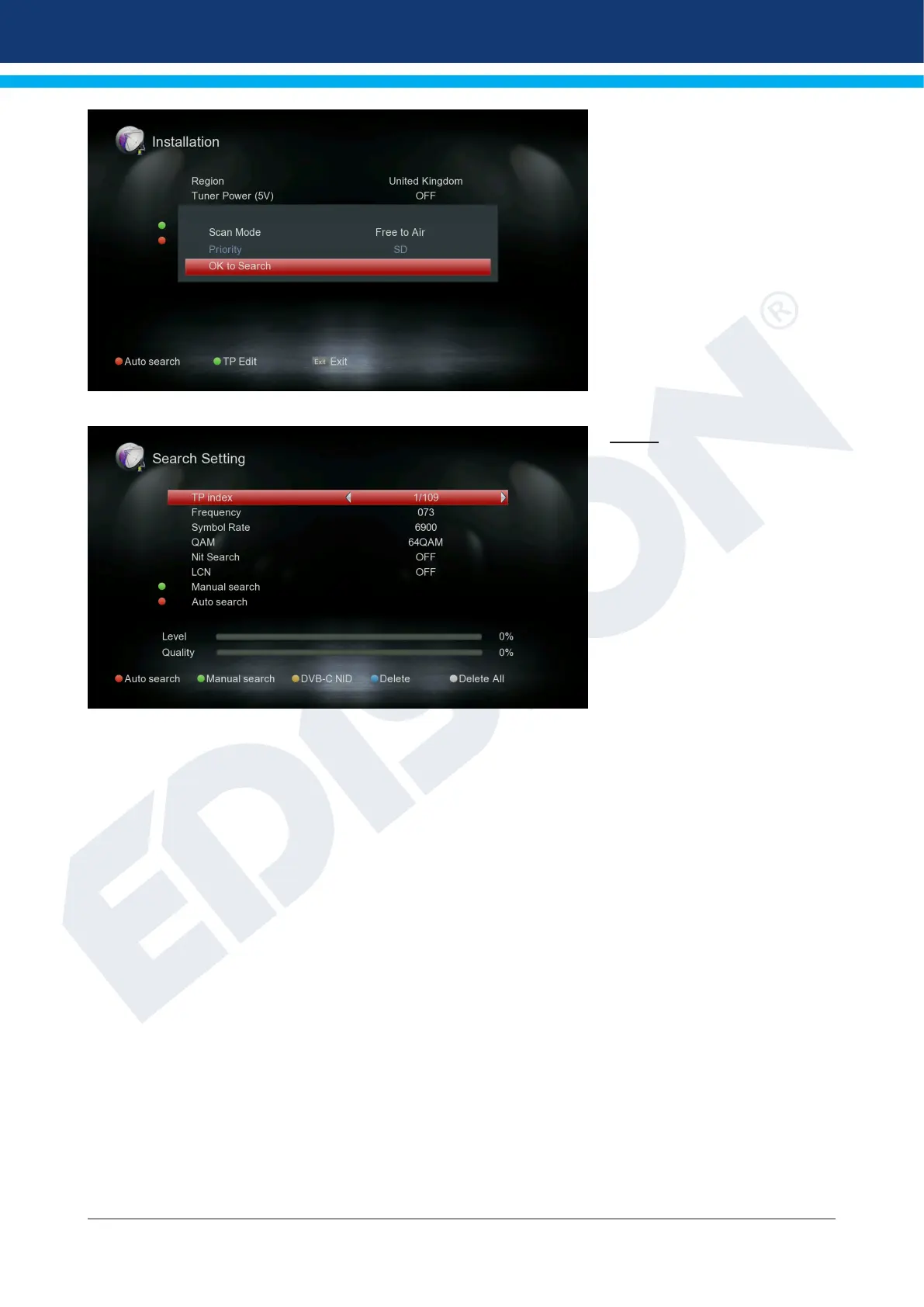
Green key (TP Edit):
If you select “TP Edit” (Manual
Search) in the next item and
press the OK button, the search
process starts according to the
settings you made.
Exit the “DVB-T2” menu by
pressing the EXIT key.
DVB-C
TP index:
Set the transmitter here. If you
change a value here, other set-
tings (frequency, configuration)
are affected under certain con-
ditions.
Frequency:
Here you can enter the frequen-
cy with the number buttons.
Symbol Rate:
Here you can enter the Symbol
Rate.
NIT Search: Marking of
the network of stations transmitted in the corresponding
transmission ow.
Here the search is the option to nd an exact station.
QAM: Here you can choose between QAM16, QAM32, QAM64, QAM128
or QAM256 values.
Green key:
Manual search If you select “Manual search” in the next item and press the OK button,
the search process starts according to the settings you made.
Red key:
Auto search In the “Auto search” section you can choose between “All” and “Free to Air”.
With OK, the automatic channel search starts.
Yellow key:
DVB-C NID With “DVB-C NID” you can specify the channel search by entering
a specic cable TV provider frequency.















 To Next Page