Version of November 22th, 2021 7
►Description
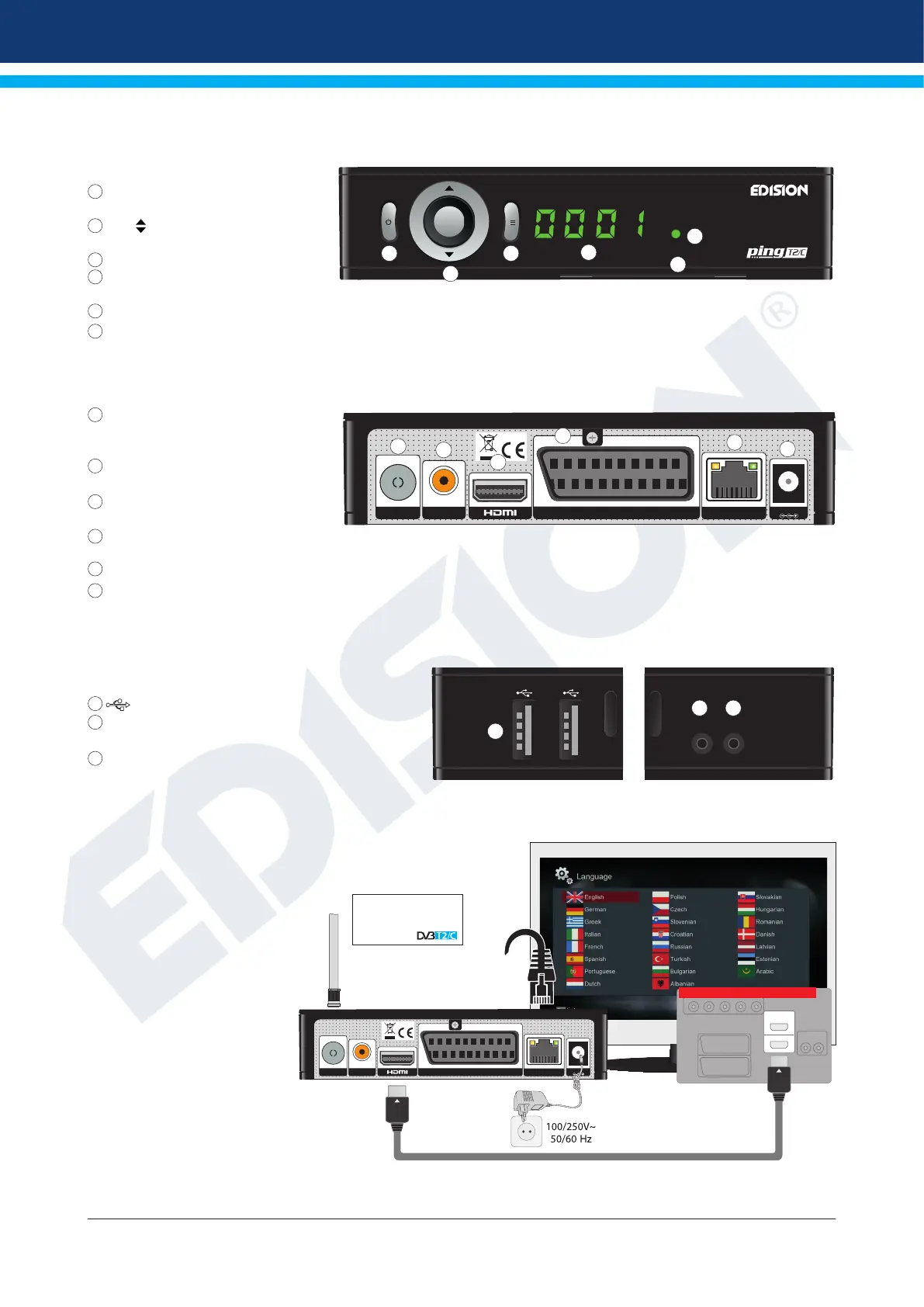
Front Panel
1
POWER button: Activates/Deactivates
the device
2
(
-/+
,
, OK
)
buttons: for moving in the
program lists
3
MENU / EXIT button
4
Display LED, displays current informa-
tion
5
Infrared sensor for the reception of remote control commands
6
Card reader
Back Panel
7
ANT IN: Input for connecting to terres-
trial or cable signal
from the antenn
8
S/PDIF: Audio interface for amplier/
audio console
9
HDMI: Connection to an HDTV quality
TV
10
SCART: For connecting to a TV set,
using SCART cable [not for HD TV]
11
ETHERNET: Ethernet port RJ45 10/100 Mbps
12
Connection for an adapter (DC 5V/2,0A)
Subpages
13
/ 2 x USB: Connection for USB storage devices
14
RS 232: For connecting to a PC, for receiver software
update.
15
IR IN: Infrared connection port
Connecting and switching on
Note: For trouble-free signal recep-
tion your antenna and cable instal-
lation should be calibrated and in-
spected by a qualied professional
with a digital
TV-level-measuring instrument.
•
Connect the receiver using HDMI
cable via the HDMI output port to
your TV’s HDMI input port.
•
Then connect the coaxial cable
from the terrestrial antenna to the
ANT IN input of the receiver.
•
Insert the batteries into the
remote control. Notes on the
remote control can be found on
the back of these instructions.
•
Connect the receiver to the
power supply.
•
The receiver starts with the BOOT process and is operational within a short time.
OK
+
-
OK
1
2
3
4
6
5
DC 5V/2.0 A
S/PDIF
ETHERNET
SCART
ANT IN
7
8
9
10
11
12
RS 232 IR IN
13
14 15
RIGHT LEFT
1
HDMI in
2
HD m i
kabel
HDMI
kabel
DC 5V/2.0 A
S/PDIF
ETHERNET
SCART
ANT IN
Power socket
HDMI:
Output receiver
HDMI cable
TV set connection panel
Use an HDMI input!
ANT IN:
coaxial-wire
input from terrestrial /
cable signal
coaxial-wire Antenna
After the rst start,
choose your language
ETHERNET:
Cable connection
with INTERNET















 To Next Page