92
MV-2556-2557-08-2022 eeese-aircare.com © All rights eeese air care aps
UK
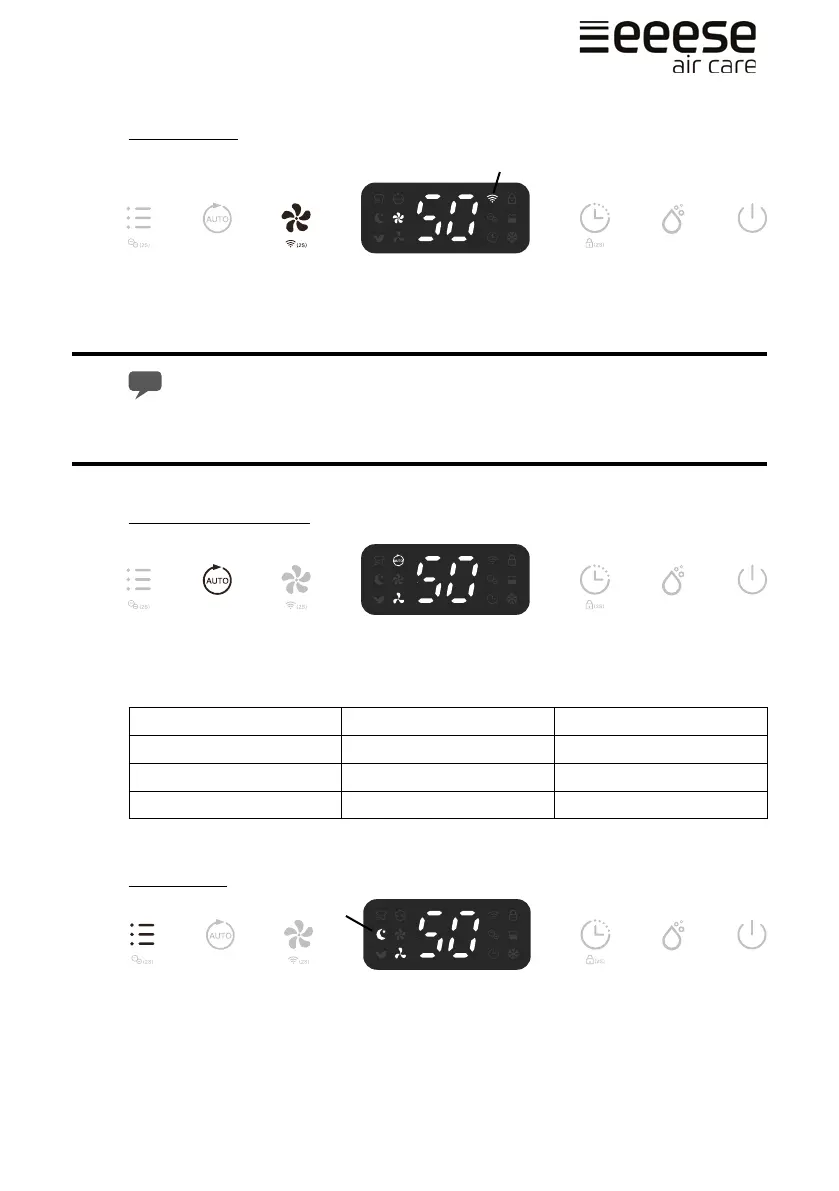
WIFI Function
Press the Fan Speed button (A) for 2 seconds to activate the WIFI function and enter into
the distribution network mode. During the network conguration, the WIFI indicator (B)
ashes and after the WIFI is connected, the icon is on.
See below section Connection to WIFI for detalied settings.
Press the Fan Speed button for 2 seconds and you can disconnect to the WIFI.
Auto Dehumidication
Press the Auto button (A) to enter into the Auto Dehumidifying Mode, the unit runs auto-
matically accordance to the ambient humidity detected below.
Ambient RH% detected Compressor Fan Speed Level
RH%>65% Working High
55%≤RH%≤65% Working Low
RH%<55% Stops Working Low
RH = Relative humidity
Sleep Mode
Press the Mode button (A) until the Sleep mode indicator (B) shows on the display. 10
seconds later, all indicators will be o. At Sleep mode, it operates on low fan speed.
A
B
A
A
B


 To Next Page