Getting
Started
7
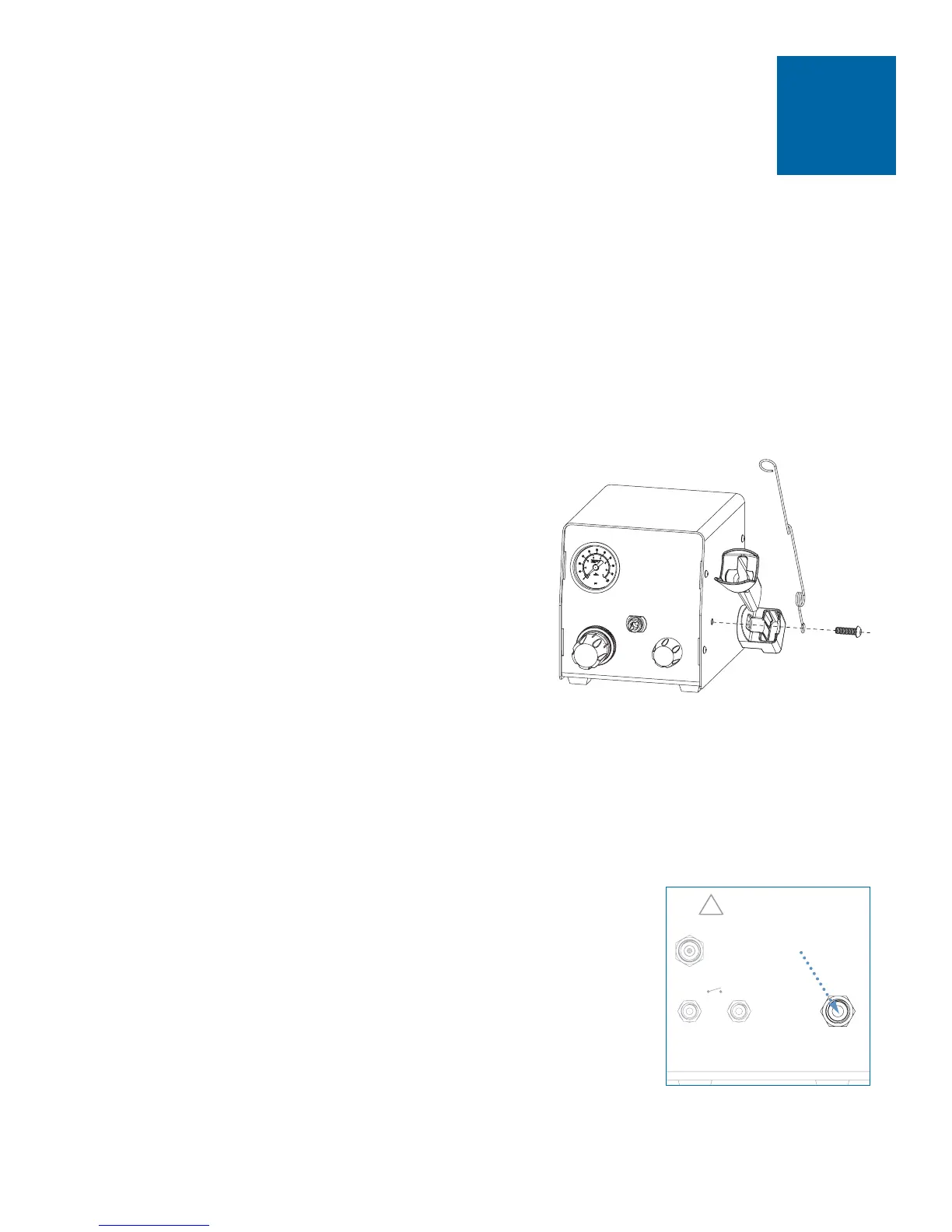
• Remove sleeve from barrel holder.
• Insert 6 mm screw through wire adapter
hose holder, then through barrel holder
❶
.
• Tighten screw to secure holder to
dispenser cover. Holder can be mounted
left or right.
• Insert barrel holder sleeve.
Note: If you prefer, the wire adapter hose
holder can be mounted on the opposite side of
the cabinet, separately from the barrel holder.
1
• Unpack the unit.
• Now is a good time to activate your Two Year Warranty. Register the
warranty online at www.efd-inc.com/warranty/two. Or if you prefer,
follow the instructions in the enclosed “Welcome” letter to contact your
EFD representative.
Unpack the Unit / Warranty
2
Install Barrel Holder
3
Note: Clean, dry filtered factory air is required to meet
warranty. If your air supply is not filtered, order the EFD
five-micron filter regulator (EFD part #2000F755).
• Push one end of the 6 mm air input hose into the input
fitting on the back of the Ultra 870.
• Connect the other end of the hose to your plant air supply.
A standard 1/4-inch NPT fitting is included with your
dispenser.
• Set plant air supply within 80 to 100 psi (5.5 to 6.9 bar).
Connect Air Input



 To Next Page