Efento SP. J.
Ul.Krupnicza 14/5
31-123 Kraków
● Differential threshold - if the absolute value of the difference between the current measurement
and the last measurement sent to the server, the transmission to the server will be triggered
Users can also set the logger to calculate the average value out
of a few measurements and compare this value to the
differential threshold value. This feature is used to reduce the
effect of measurement fluctuation. For example, a user can set
the logger to compute the average value of five temperature
measurements, and check if the difference between the last
sent measurement and the average value is larger than 0,5 C.
There are two modes for the average value calculation:
● Moving average mode - device calculates the average
value out of the last N samples. If there is a new measurement,
it is taken to the average value calculation instead of the oldest
one. Users can define how many measurements should be
taken into the account when calculating the average value. For
instance, if the user set the device to calculate the average
value from the last three samples, the device will calculate the
average value from samples N-2, N-1 and N. Once a new
measurement is taken, the average value will be calculated
from samples N-1, N, N+1.
● Window mode - device calculates the average value
out of the all samples in the window size. The window ‘moves’
once the device has taken a number of measurements equal to
the window size. Users can define how many measurements
should be taken into the account when calculating the average
value. For instance, if the user set the device to calculate the
average value from the last three samples, the device will
calculate the average value from samples N-2, N-1 and N. The
new average value will be calculated as soon as the device has
taken three new measurements (N+1, N+2, N+3).
In order to set the values:
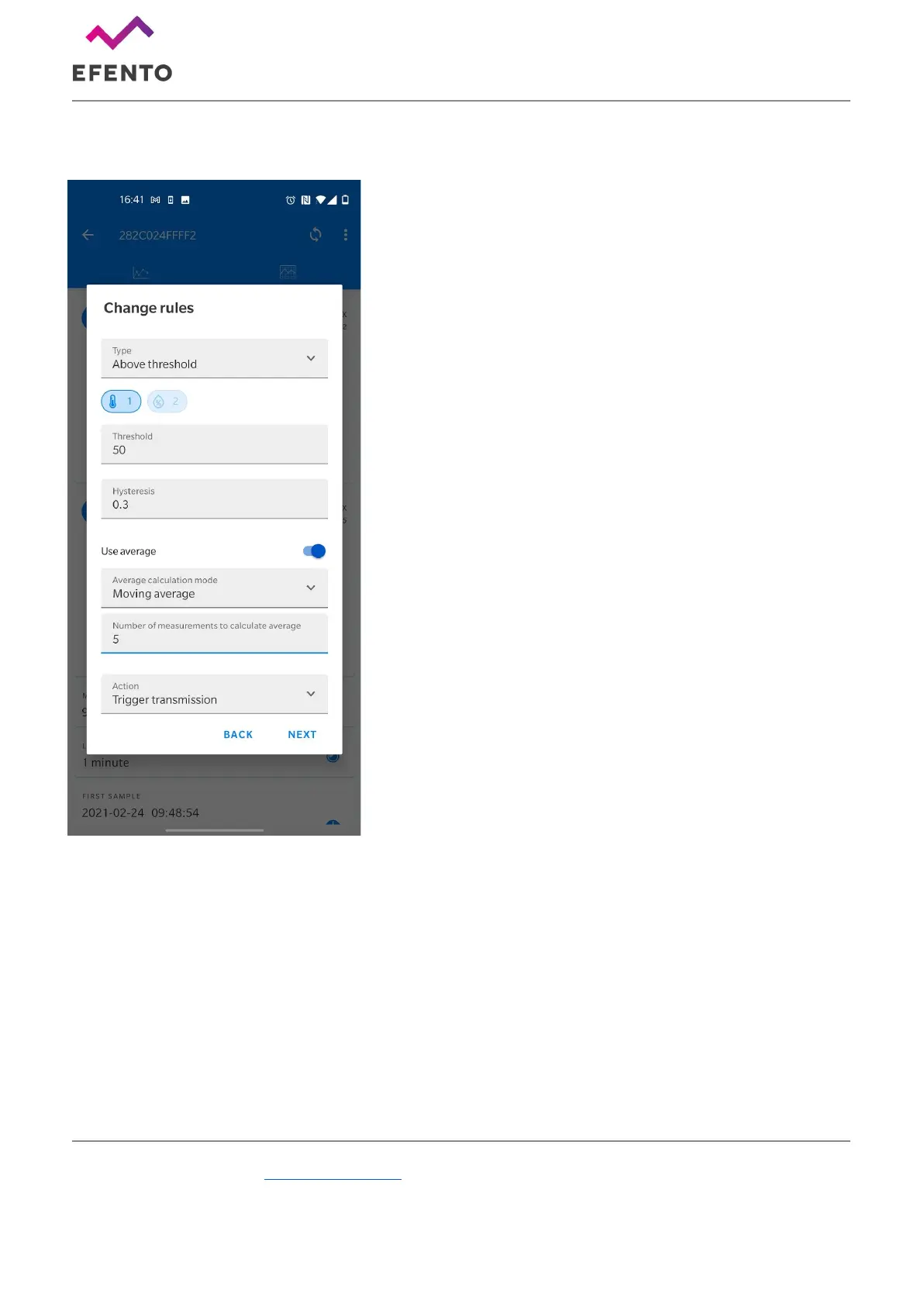
1. Connect to the logger, tap on the three dots in the upper right corner -> “Power user” -> “Rules”
2. Select one of the rules slots. All slots are treated equally, so it does not matter to which slot you
assign the new rule. Each time a device takes a measurement, it checks if any of the rules is
violated.
3. Select the condition type, channel (if a device measures e.g. temperature and humidity you can
set the rule for one of the channels), threshold value, hysteresis, average mode. This parameters
define the rule’s conditions
4. Set the action type (right now, the only possible action is “Trigger transmission”. Other action
types will be added in the future)


 To Next Page