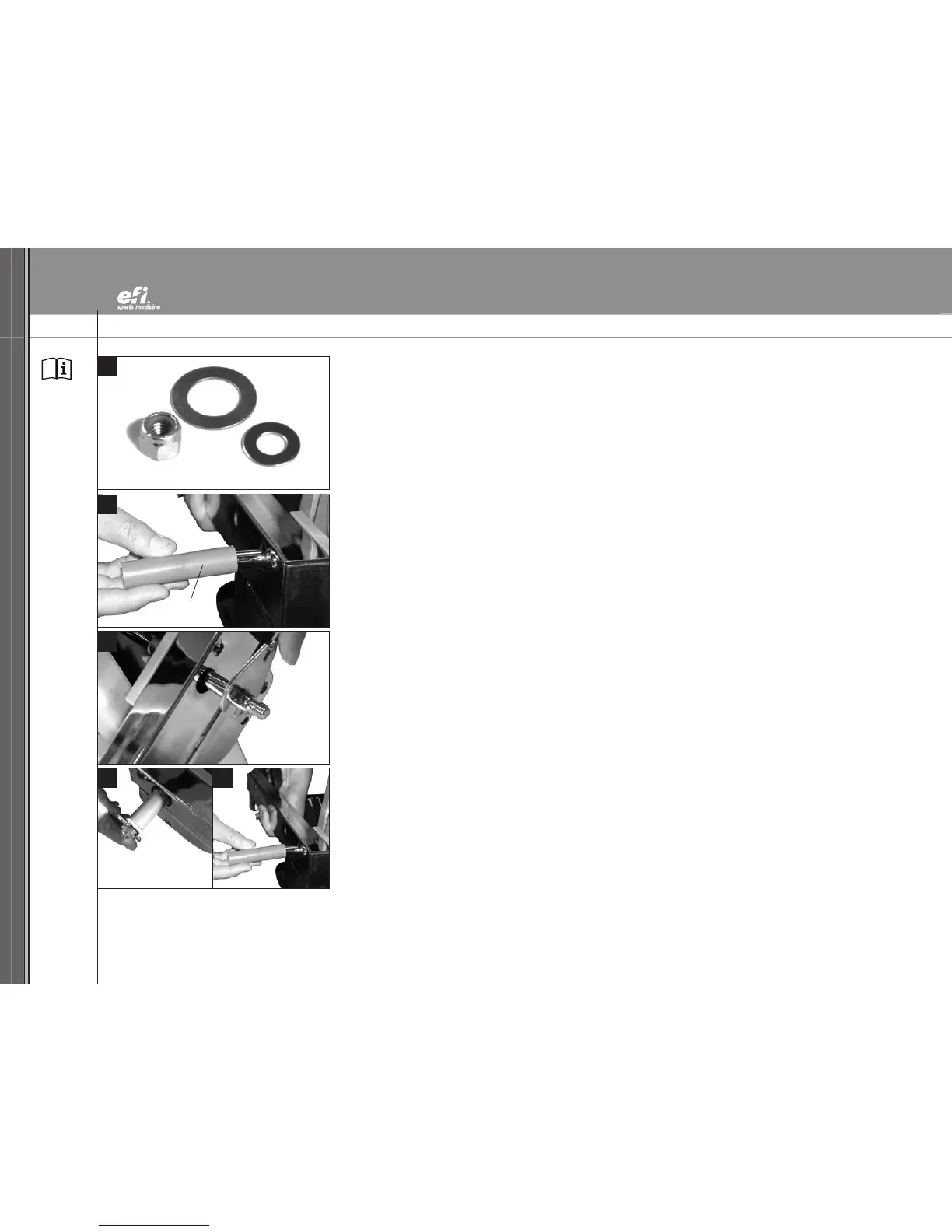
NOTE: Letters in (parentheses) refer to the PARTS IDENTIFIER on page 3 and/or the PARTS ASSEMBLY on page 4. Use as needed for clarification.
19
20
21
22 23
shipping sleeve
INSTALL LAT BARS (CONTINUED)
19.
Remove the nyloc nut, Chrome Washer (II) and the Bronze Washer (HH). Set them aside.
20. Hold the Upper Rail (N) with one hand. Remove the first shipping sleeve from the Tower
Crossbar (Z) with the other hand. Set the first shipping sleeve aside.
21. To remove the remaining shipping sleeve, immobilize the exposed end of the Tower Crossbar (Z)
by applying one of the Wrenches (GG) to the notch.
22. Use the other Wrench (GG) to loosen the remaining nyloc nut by turning it counterclockwise.
23. Hold the Upper Rail (N) with one hand. Remove the second shipping sleeve from the Tower
Crossbar (Z) with the other hand. Set the shipping sleeve aside. You may discard the shipping
sleeves or retain them in the event you need to ship your GTS in the future.
Now that the shipping sleeves have been removed, you are ready to attach the first LAT Bar (Y).


 To Next Page