EasyManua.ls Logo

EFLOW E3 NITRO - Display Function Navigation; Power Level Chart

EFLOW E3 NITRO
52 pages
Print Icon
To Next Page IconTo Next Page
To Previous Page IconTo Previous Page
Loading...
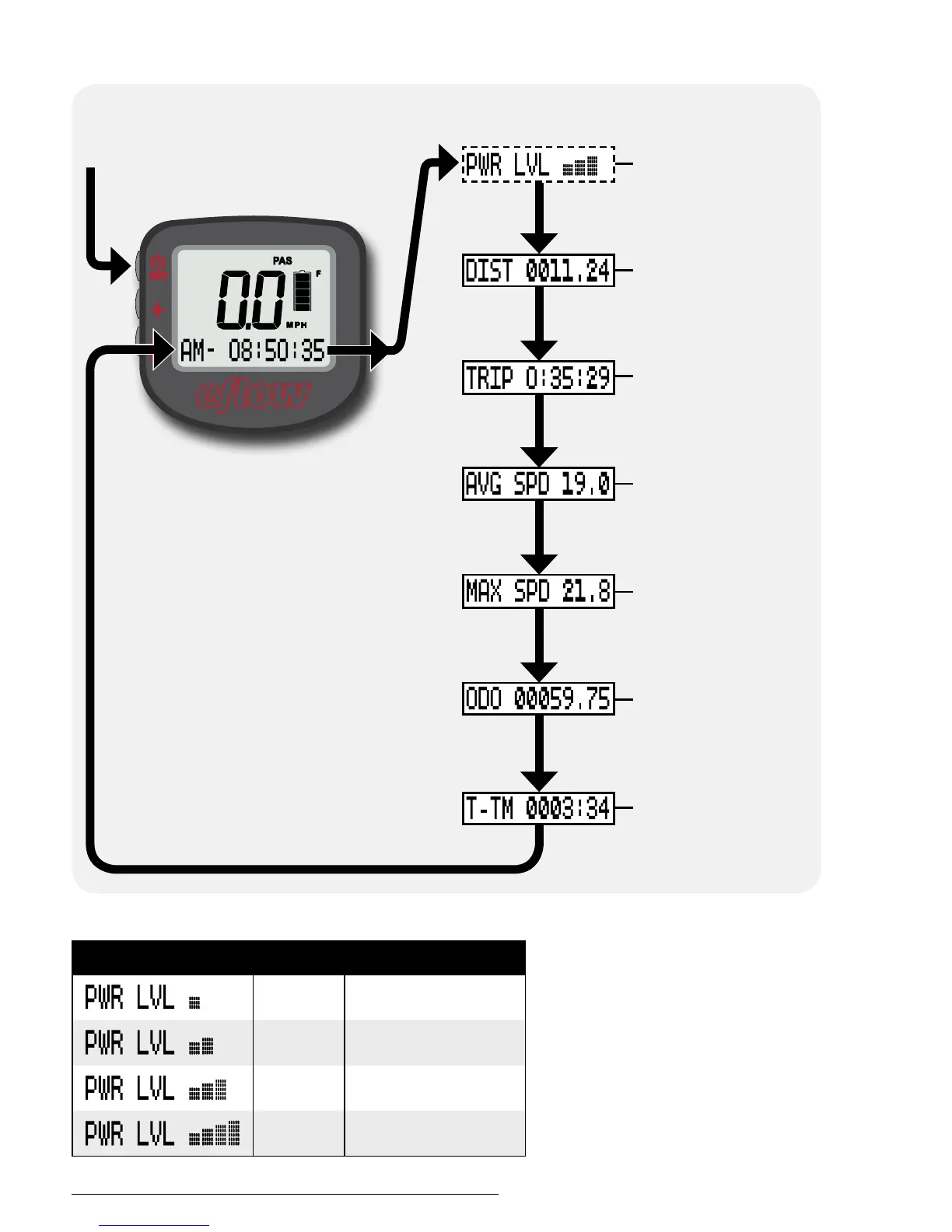
Using the display functions
To reset all trip data, hold “+”
and “–” together for 3 seconds.
Displays the total
ride time for the
bicycle in hours.
Available in PAS
mode only; sets
the strength of
motor assist.
Displays the ride
time for this trip.
Displays the
maximum speed
recorded on this
trip.
Odometer;
displays the total
mileage for the
bicycle.
Displays the
average speed
for this trip.
Displays the
distance traveled
on this trip.
Tap SET to cycle
between functions.
Displayed Level Motor output
1
40%
2
60%
3
80%
4
100%
Power levels
Currie Tech Technical and Customer Service: +1 800-377-4532
p. 30/52