Operating the EFOY fuel cell
Page 57
3 Operating the EFOY fuel cell
You can operate the EFOY fuel cell as follows:
• EFOY app (see S
ECTION 3.1).
• Operating panel (see SECTION 3.2).
• Buttons on device (see SECTION 3.3).
3.1 Using the app
The EFOY app is freely available from the App Store and Google Play.
The myEFOY function of the EFOY app is available starting with Android version 4.4 and
iOS 8.0 for Bluetooth 4.0-capable devices.
More information can be found at www.efoy.com
.
Via QR Codes you can download the app directly
iOS Operating system Android Operating system
To use the myEFOY function, you will need the EFOY Bluetooth adapter and the current
firmware.
In the app, touch myEFOY.
Enter the serial number of your EFOY fuel cell.
For the initial commissioning, follow the EFOY app’s instructions. See S
ECTION 4.1.
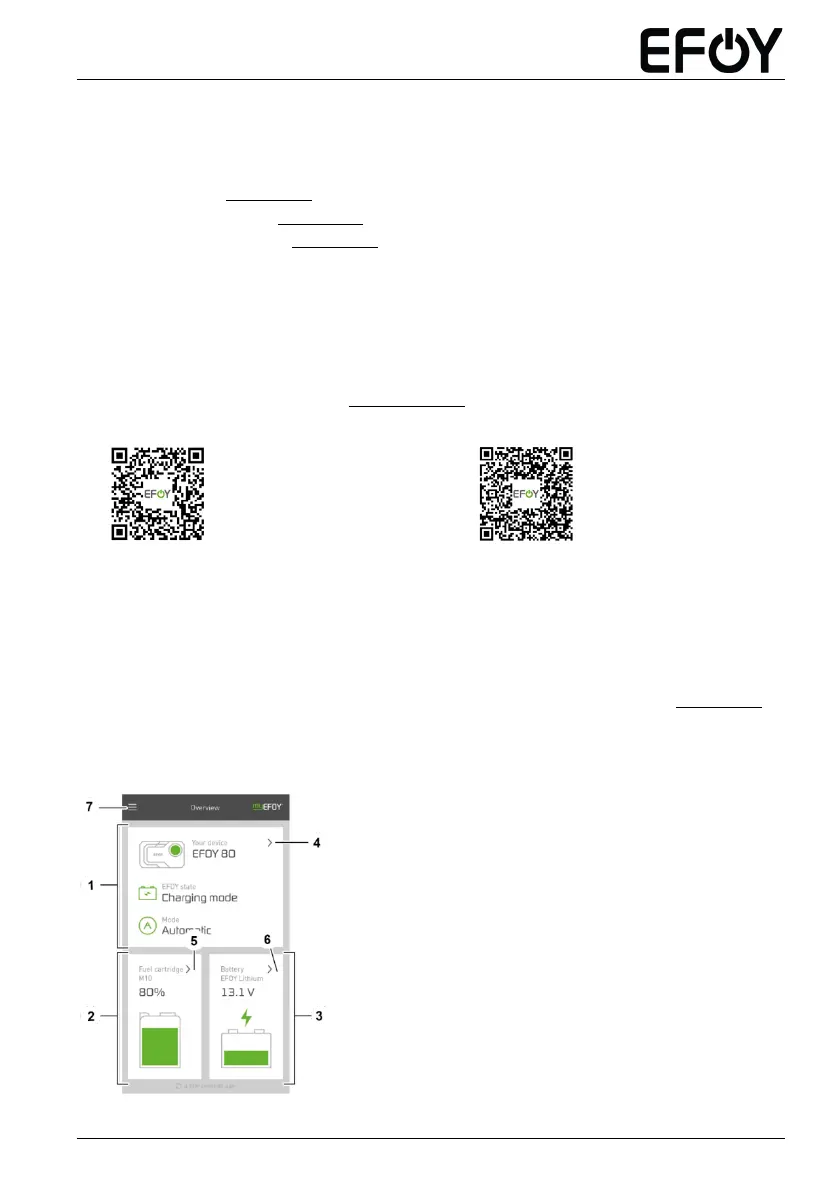
Following the initial commissioning and deactivation of transportation protection, the
main screen will appear.
Overview of the EFOY fuel cell
Overview of the
EFOY fuel cartridge(s)
Overview of the battery
Switch to the EFOY fuel cell detail
page
Switch to the EFOY fuel cartridge(s)
detail page
Switch to the battery detail page
Menu


 To Next Page