Operating the EFOY fuel cell
Page 58
3.2 Using the operating panel
When you connect the EFOY fuel cell for the first time, the language must be configured.
For information on connecting the operating panel, see S
ECTION 2.2
Select the desired language.
Follow the instructions on the operating panel for the initial configuration. See
S
ECTION 4.1.
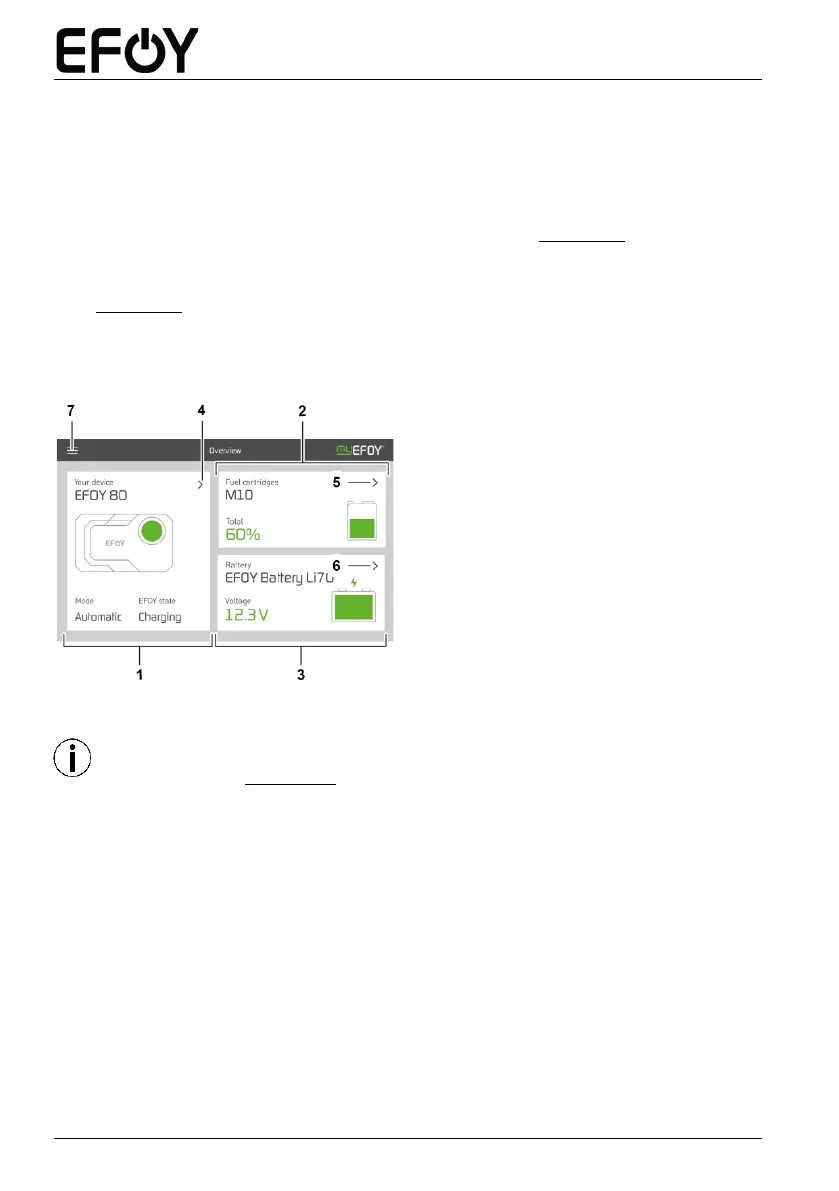
Following the initial configuration and deactivation of transportation protection, the
main screen will appear.
Overview of the EFOY fuel cell
Overview of the
EFOY fuel cartridge(s)
Overview of the battery
Switch to the EFOY fuel cell detail
page
Switch to the
EFOY fuel cartridge(s) detail page
Switch to the battery detail page
Menu
You can also connect the EFOY fuel cell to a computer via the Accessory
connection (see SECTION 2.2). Use an interface adapter and a USB adapter for
this purpose.


 To Next Page