56 VOLT LITHIUM-ION COMMERCIAL BRUSHCUTTER — BCX450016
CHANGING SPEED MODE (Fig.I).
This machine features three speed modes.
The speed mode will change with every press of the speed
mode button.
The speed indicator will display the active speed mode: one
light for low speed, two lights for medium speed, three lights
for high speed. The low speed mode provides better control
of the machine and longer operating time per charge.
NOTE: The speed mode can be set before the machine is
turned on OR during operation.
When the machine is re-started after a break, the speed
mode will return to the previous speed.
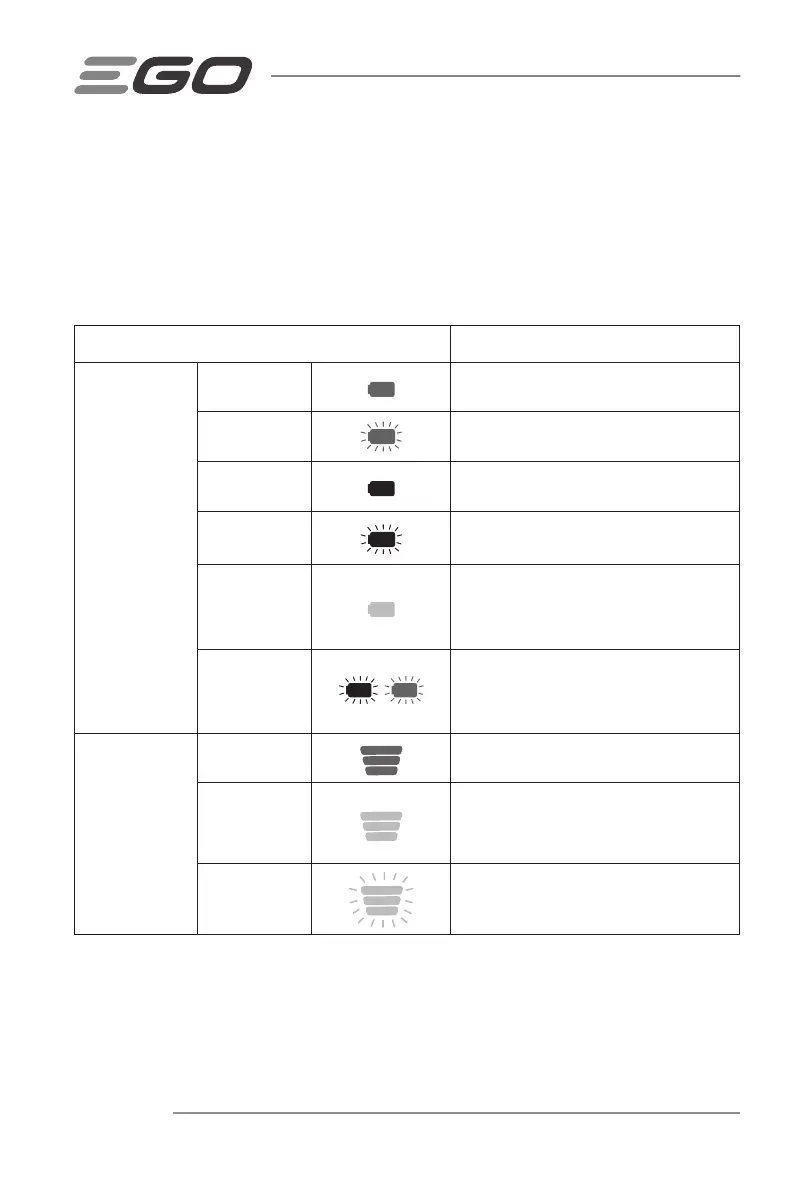
BATTERY-STATUS INDICATOR AND SPEED
INDICATOR (FIG. I).
The battery-status indicator shows the charge level and the
working status of the battery pack, and the speed indicator
shows the working status of the machine as shown in the
chart below. The battery-status indicator and the speed
indicator will illuminate when the machine is started.
Indicator Lights
Meaning
Battery-status
indicator
Solid green
Battery charge level of 20% to 100%
Flashing green
Battery charge level of 10% to 20%
Solid red
Battery charge level of less than 10%
Flashing red
The battery pack is nearly depleted and needs
to be charged immediately.
Solid orange
The battery pack is overheated. Cool the battery
pack until the temperature drops below 67°C.
See “Battery High-Temperature Protection”
below.
Flashing red/
green alternately
The battery pack electronics error. Replace
the battery pack or contact EGO customer
service center. See “Battery Electronics Error
Protection”.
Speed indicator
(the illustration
shows the high
speed)
Solid green
The machine is working properly.
Solid orange
The machine is overheated. Cool the machine
until the temperature drops below 80°C. See
“Machine High-Temperature Protection” below.
Flashing orange
The machine is overloaded. See “Machine
Overload Protection” below.



 To Next Page