
 Need help?
Do you have a question about the Eickemeyer RETEVET PORTABLE ERG and is the answer not in the manual?
Details the items included in the RETevet device package.
Instructions for connecting the device to power and allowing it to charge.
Guide on how to properly connect the electrode lead to the device.
Explanation of the device's joystick and power button functions.
Overview of the main menu interface and its options.
How to adjust various settings like language and backlight.
Setting date/time and practice details for report labeling.
Selecting output formats for test reports (PDF, JPEG, PNG).
Details on using flicker protocols for cone pathway assessment.
Information on performing flash ERG tests for comprehensive retinal function.
ERG protocols based on ECVO guidelines for veterinary use.
Details on single flash and short ERG protocols for specific use cases.
Protocol for quick, cone-based general assessment of retinal function.
Protocol for assessing rod recovery in dark-adapted PRA diagnosis.
Protocols for research and pharmaceutical testing based on ISCEV standards.
Specific protocols for dogs, cats, and nonhuman primates.
ERG protocols tailored for rabbits, mini pigs, rats, and mice.
Creating custom protocols and using reference interval data.
Guidance on anesthesia requirements and its impact on ERG testing.
Steps for preparing the animal and choosing appropriate electrodes.
Detailed step-by-step guide for conducting an ERG test.
Procedure for aligning the pupil and starting the test on the right eye.
Procedure for testing the left eye after completing the right eye test.
How to access and interpret results directly on the RETevet device.
Steps to transfer results to a PC for detailed analysis and archiving.
How flicker results are presented differently on the device and in PC reports.
Procedures for removing old test results from the device and PC.
Instructions for safely removing and reattaching the device's eyecup.
Steps for downloading and installing firmware updates for the RETevet device.
Guidance on battery charging and warnings for low battery status.
Troubleshooting steps for 'electrodes disconnected' or 'excessive noise' errors.
Resolving errors related to calibration, blank screens, or power indicators.
Steps to resolve issues when the device does not connect to a PC.
Resolving Windows scan errors and 'not measurable' result reports.
Instructions for resetting the device to factory defaults and changing language.
Defines the device's purpose and medical applications.
Information regarding the absence of natural rubber latex in device components.
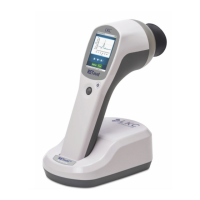
Technical specifications for the RETevet device, including light source, input, and size.
Guidelines for cleaning and disinfecting the device components.
Information on sterilization limitations and biocompatibility standards.
Instructions for calibration, storage conditions, and expected product performance.
Recommended operating conditions and the expected service life of the device.
Safety precautions related to EMC, RF interference, and surgical equipment.
Critical warnings about electrical shock, liquid ingress, and proper usage.
Guidance on emissions and immunity for electromagnetic environments.
Details on immunity test levels and guidance for electromagnetic environments.
Guidelines for maintaining safe distances from RF communication equipment.
Statements regarding RoHS compliance and hazardous substance restrictions.
Explanation of various symbols used on the device and in the manual.
Information on serial numbers, product codes, and regulatory approvals.
Details on obtaining customer support and the product warranty terms.
Information on ordering replacement parts and accessories.
Information regarding device service, repairs, and user-maintainable parts.
 General
| Category | Measuring Instruments |
|---|---|
| Application | Veterinary Ophthalmology |
| Manufacturer | Eickemeyer |
| Model | RETEVET PORTABLE ERG |
| Portability | Portable |
| Type | Electroretinograph |
| Features | Portable, easy to use |

 To Next Page