— 56 —
DLP Projector — Owner’s Manual
LED Error Messages
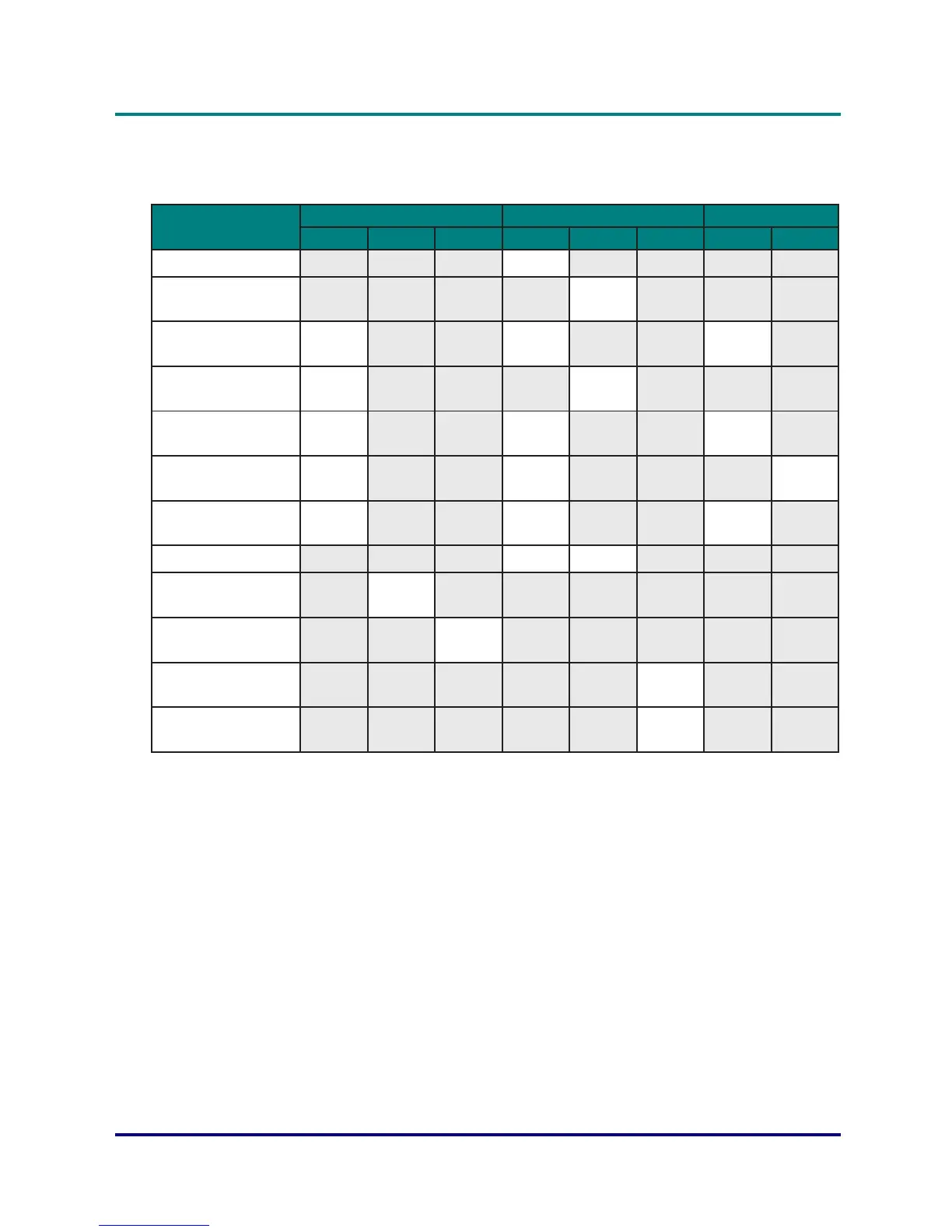
The LED status indicators are located on the top of the projector. Each LED is dened below.
Message
Light LED Status LED AV Mute LED
Green Orange Red Green Orange Red Green Orange
Standby State - - - Flashing - - - -
Power on
(Warm up)
- - - - Flashing - - -
Power on & Laser
diode on
Steady
light
- -
Steady
light
- -
Steady
light
-
Power off
(Cooling down)
- - - - Flashing - - -
AV mute is off
(Image is displayed)
Steady
light
- -
Steady
light
- -
Steady
light
-
AV mute is on
(Image is black)
Steady
light
- -
Steady
light
- - -
Steady
light
Projector
communication
Steady
light
- - Flashing - -
Steady
light
-
Firmware upgrade - - - Flashing Flashing - - -
Laser diode time has
expired
-
Steady
light
- - - - - -
Unit loses over 60%
initial luminance
- - Flashing - - - - -
Error
(Over temperature)
- - - - -
Steady
light
- -
Error
(Fan failure)
- - - - - Flashing - -


 To Next Page