Advantage IP Executive Installation Guide
16
4.2 Extension Name and Extension PIN
The Advantage system administrator must configure an extension name and extension PIN for
each Advantage IP Executive on the system. This is done by connecting to the Advantage
system, through the web browser interface, using the installer login and password as described
in the Advantage System Manual. This will result in the main Installation page being displayed
as shown above.
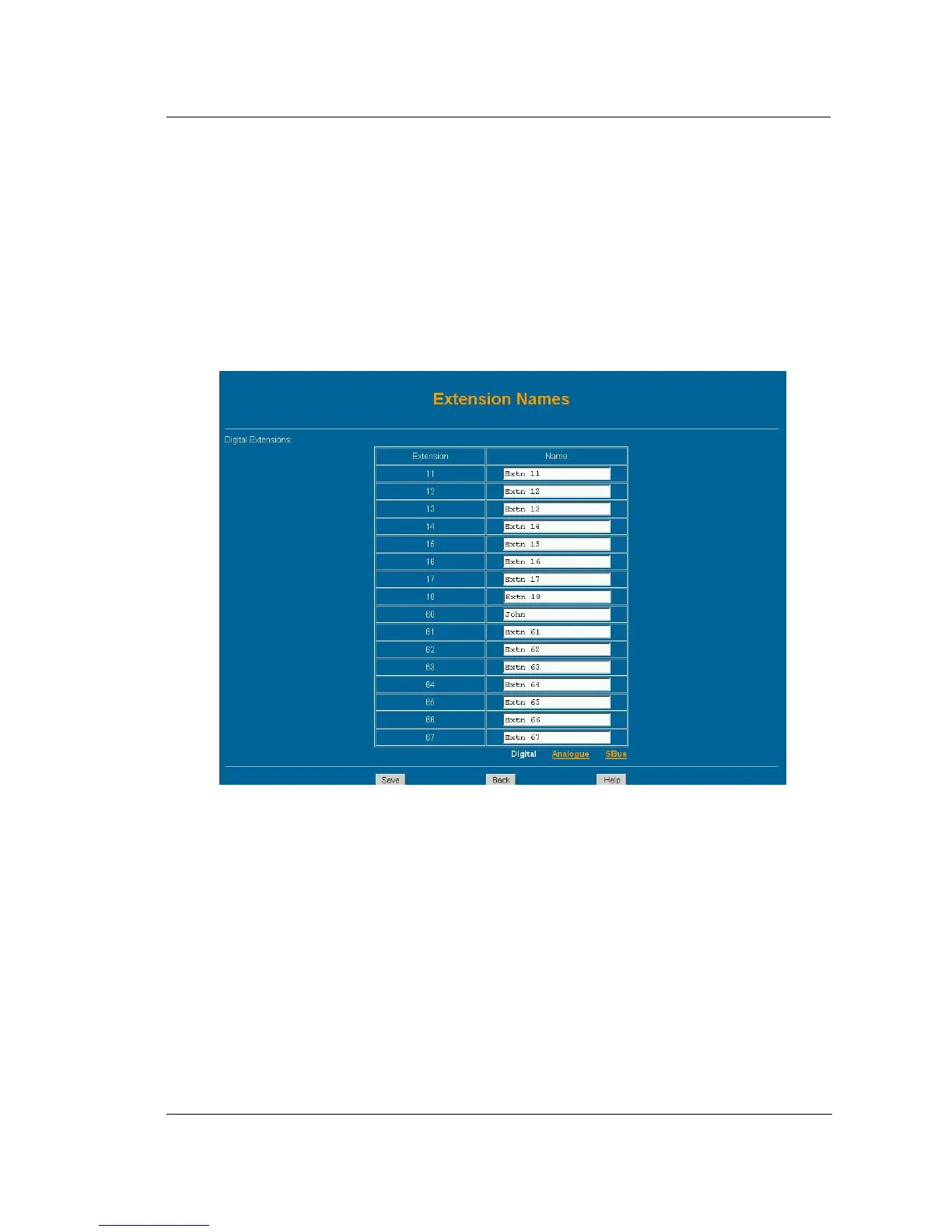
In the second column headed ‘Extension Settings’, Click on the link ‘Extension Names’ and then
on the link ‘Digital’ and the following page will be displayed.
The extension name is entered here opposite the relevant Extension number. In the example
shown here the default numbering scheme has allocated extensions 60 to 67 as digital IP
extensions with default names ‘Extn 60’ to ‘Extn 67’. The Administrator types the name of the
Advantage IP user opposite the extension number and clicks on the ‘Save‘ button. Press the
‘Back’ Button to return to the main page.
By clicking on the link ‘Pin Codes’ under the heading ‘Extension Settings’ and then on the link
’Digital’ the following page is displayed. The pin code must be entered in the white box opposite
the extension number and name. Press ‘Save’ and ‘’Back’ to exit.



 To Next Page