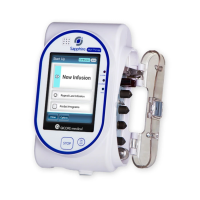
The Avoset infusion pump is a medical device designed for controlled delivery of fluids, medications, and nutrients to patients. It features a compact, portable design with a user-friendly interface, making it suitable for various healthcare settings.
Function Description:
The Avoset pump is primarily used for programmed infusions, allowing healthcare professionals to set specific rates and volumes for medication delivery. It supports both continuous and bolus infusions. The device incorporates a cassette-based administration set, which is crucial for its operation, ensuring accurate and safe fluid delivery. Key functions include:
- Programmed Infusion: Allows for the setup and execution of infusions with predefined parameters such as rate (mL/h) and volume to be infused (VTBI).
- Pause/Resume Infusion: Enables temporary cessation and continuation of an ongoing infusion, with the pump alerting the user if left paused for an extended period.
- Prime Function: Facilitates the removal of air from the administration set before connecting to the patient, a critical safety step. This process involves filling the set with liquid to ensure no air bubbles are delivered.
- Bolus Infusion: Provides a rapid, controlled delivery of a small volume of fluid or medication, often used for immediate therapeutic effects.
- Infusion History: The pump can store information about previous infusions, allowing for review or repetition of the last infusion parameters.
- Alarm System: Equipped with a comprehensive alarm system to alert users to various conditions, including air in line, occlusions (upstream and downstream), low battery, battery depleted, cassette misplacement, and pump malfunctions. These alarms are categorized by priority (high or low) and often include visual (red/yellow lights, screen messages) and auditory (beeps) indicators.
- Password Protection: Specific features can be password-protected to prevent unauthorized modification of settings, enhancing patient safety.
Important Technical Specifications:
While specific numerical values for flow rates, VTBI ranges, and battery life are not explicitly detailed in the provided pages, the manual indicates the following:
- Rate Display: The pump displays the infusion rate in mL/h, with examples showing "120 mL/h" and "300 mL/h."
- Volume Display: The volume to be infused (VTBI) is displayed in mL, with examples showing "479 mL," "1000 mL," and "999.5 mL."
- Battery Type: The device uses 3 AA (1.5V) alkaline or rechargeable batteries.
- Battery Life Indication: The pump provides warnings for "LOW BATTERY" (approximately 30 minutes remaining) and "BATTERY DEPLETED" (approximately 3 minutes remaining), indicating the need for battery replacement.
- Air Bubble Detection: The pump detects single or accumulated air bubbles in the set, with a threshold of 2mL for the "CHECK EMPTY SET/RESERVOIR" alarm.
- Occlusion Detection: The pump is capable of detecting both upstream and downstream occlusions, which can be caused by kinks in the tubing or closed clamps.
Usage Features:
- Intuitive Interface: The pump features a clear digital display and a combination of hard keys and multi-function buttons for easy operation. Hard keys include
+, -, ON/OFF, PRIME, START/PAUSE, and BOLUS. Multi-function buttons adapt their labels based on the current screen context (e.g., EDIT, REVIEW, INFO, NEW BAG, RESUME, MUTE, DISMISS, YES, NO, CLEAR, NEXT, BACK, STOP, SHUT DOWN).
- Setup Guidance: The quick guide provides step-by-step instructions for initial setup, including inserting batteries, turning on the pump, spiking the medication bag, attaching the administration set (cassette), priming the set, and connecting to the patient.
- Visual Indicators: Indication lights (Red/Yellow for Alarm, Green for Run) provide quick visual status updates. The "Running icon" on the display spins when an infusion is active.
- Error Messages: Clear on-screen messages guide the user through various operational states and alarm conditions, often suggesting troubleshooting steps.
- Resumption of Infusion: The pump allows for resuming an interrupted infusion with the remaining volume or starting a new infusion with the original bag volume.
- Password-Protected Access: Certain functions require a password, which is entered digit by digit using the
+ and - keys and confirmed with NEXT or OK.
Maintenance Features:
- Battery Replacement: Detailed instructions are provided for safely opening the battery compartment, inserting 3 AA batteries, and closing the cover. Users are advised to change batteries before each treatment and have extra fresh batteries available.
- Troubleshooting Guide: The manual includes a comprehensive "Alarms Troubleshooting" section, listing various alarm texts, their causes, and recommended troubleshooting actions. This covers infusion handling, infusion progress, battery issues, and pump malfunctions.
- Administration Set Handling: Instructions for removing and reinserting the administration set (cassette) are provided, which is relevant for resolving "CASSETTE MISPLACED" or "REMOVE AND REINSERT SET" alarms.
- Pump Malfunction Alarms: The pump is designed to detect internal errors (critical and non-critical), internal clock errors, and software update failures, prompting the user to contact service or replace the pump as needed.
- Overheating Detection: The "HIGH TEMPERATURE" alarm indicates pump overheating, with instructions to turn off the pump and allow it to cool down.

 Need help?
 General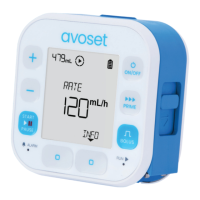

 To Next Page