EasyManua.ls Logo

Eitan avoset - Prime (Remove Air)

Eitan avoset
36 pages
Print Icon
To Next Page IconTo Next Page
To Previous Page IconTo Previous Page
Loading...
12 | Avoset Quick Guide
+
START
BOLUS
PRIME
PAUSE
ON/OFF
GO
RUN
ALARM
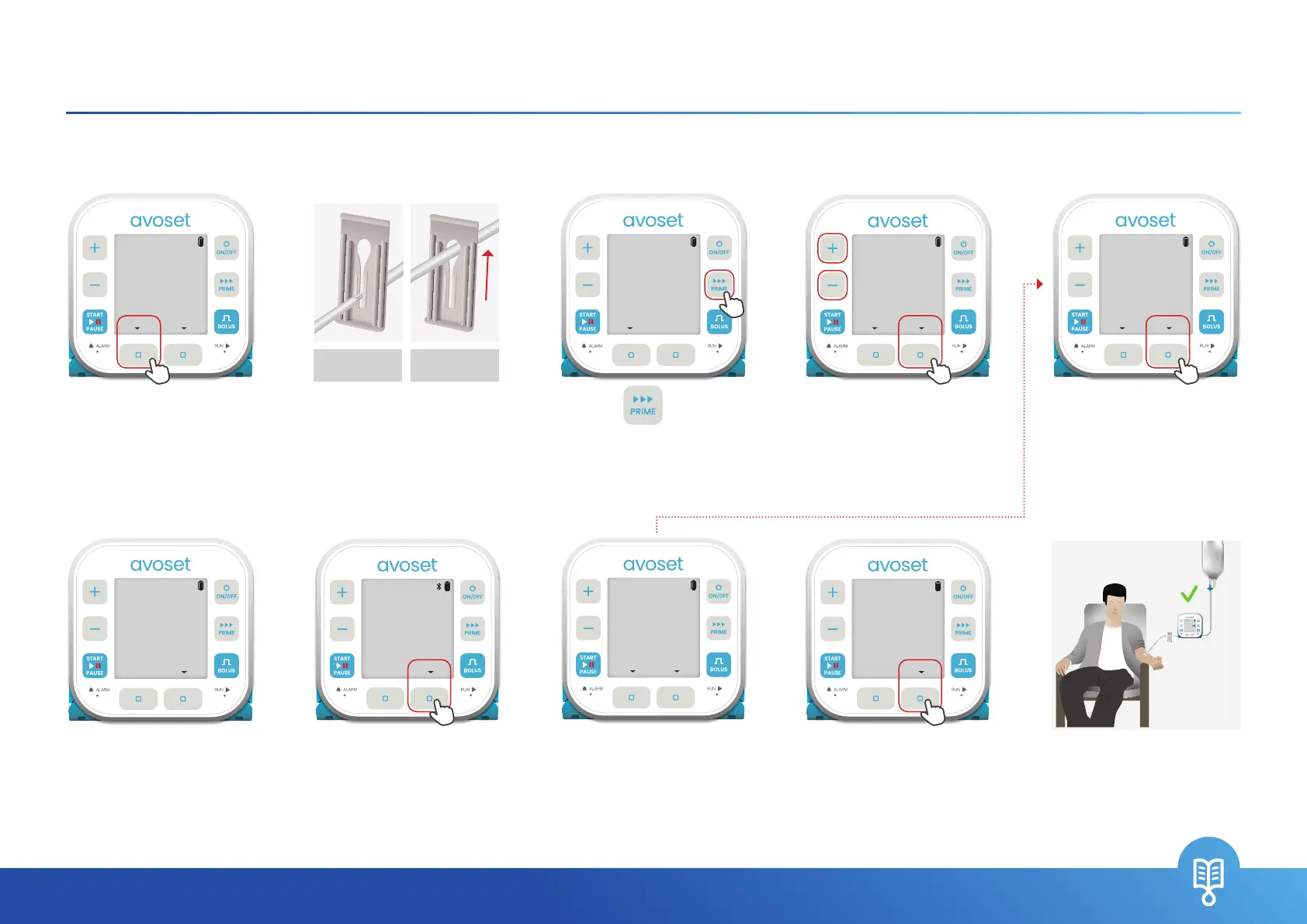
Following cassette insertion to the pump, prime the administration set to ll it with liquid and remove all air.
Clamp is closed
(set is pinched)
Clamp is open
(set is not pinched)
+
START
BOLUS
PRIME
PAUSE
ON/OFF
GO
RUN
ALARM
3OO
PRESS START
NORMAL SALINE
REVIEW
1OOO
EDIT
+
START
BOLUS
PRIME
PAUSE
ON/OFF
GO
RUN
ALARM
DISCONNECT
PATIENT
PRIMECANCEL
+
START
BOLUS
PRIME
PAUSE
ON/OFF
GO
RUN
ALARM
DID YOU PRIME
?
YESNO
+
START
BOLUS
PRIME
PAUSE
ON/OFF
GO
RUN
ALARM
PRIMING
...
O.S/9.O
mL
STOP
+
START
BOLUS
PRIME
PAUSE
ON/OFF
GO
RUN
ALARM
PRESS PRIME
BACK
+
START
BOLUS
PRIME
PAUSE
ON/OFF
GO
RUN
ALARM
CONNECT SET
TO PATIENT
OK
+
START
BOLUS
PRIME
PAUSE
ON/OFF
GO
RUN
ALARM
**O
ENTER PASSWORD
OKCLEAR
PRIME COMPLETE
9.0/9.0
mL
OK
+
START
BOLUS
PRIME
PAUSE
ON/OFF
GO
RUN
ALARM
VERIFY AIR IS
OUT OF LINE
NO AIRPRIME
Prime (remove air)
6. Priming process
indication (will end
automatically unless
you press the
STOP
multi-function button)
1. Press the
NO
multi-function button.
*This question appears
only if Prime Reminder
feature is on
5. Once the patient
is disconnected from
administration set,
press the
PRIME
multi-function button
to start priming
2. Open the clamp
(moves freely)
9. Once the patient is
connected, press the
OK
multi-function button
10. Following successful
priming, connect the
administration set to
the patient. The infusion
is ready
8. Verify there is no air
in the set and liquid
reaches the end of the
set and Press
NO AIR
.
Otherwise, press
PRIME
3. Press to start
priming
7. Press the
OK
multi-function button
4. Password entry may
be required. *To learn
about password, see
page 23

Related product manuals