8 | Avoset Quick Guide
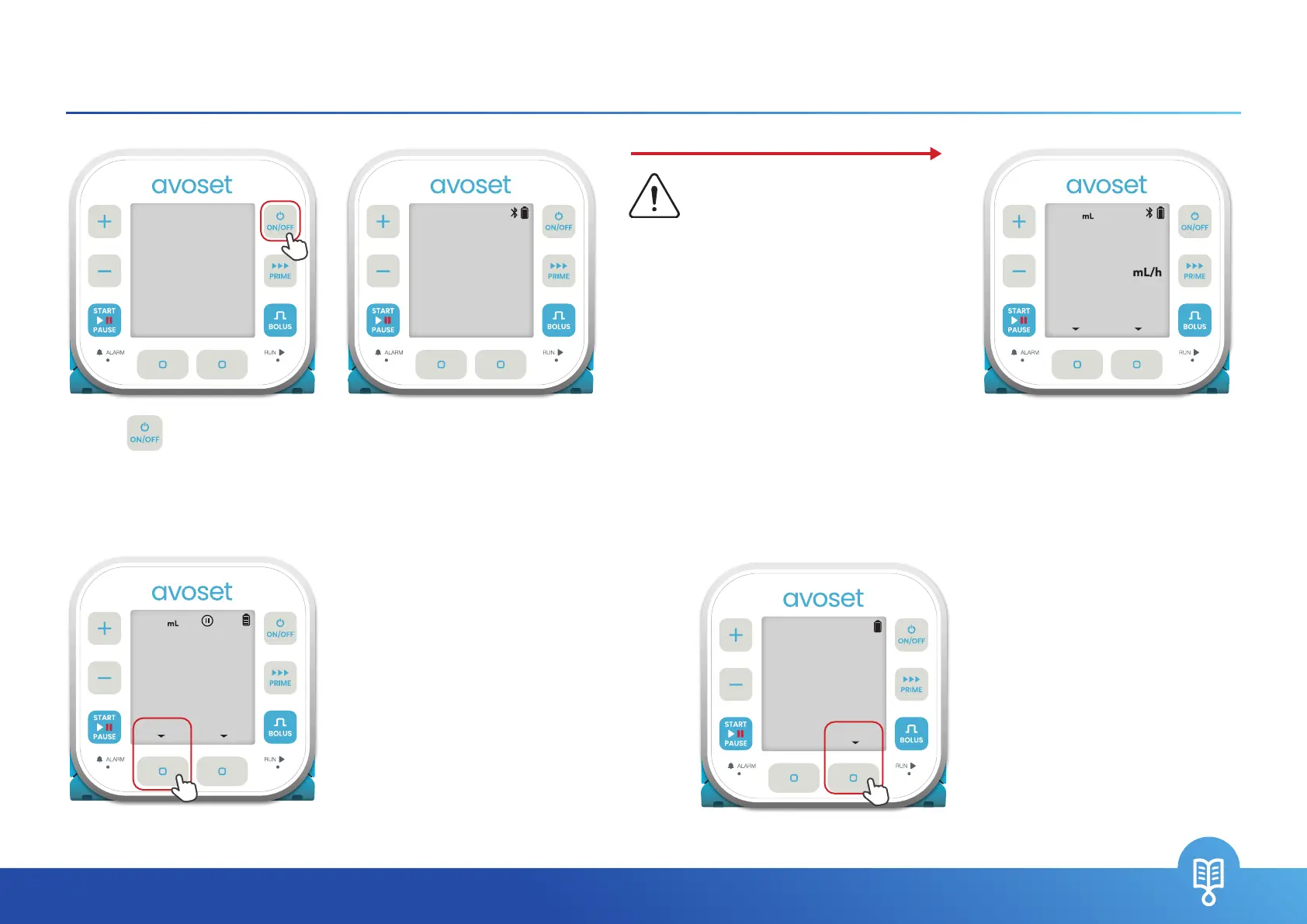
Turn On the Pump
Caution
Do not use the pump if during the
automatic system check any of the
following occur:
1. The screen does not light up, or
2. The pump screen is damaged (black
or wight areas cover the screen)
3. The pump does not beep, or
4. The LED indicators do not light up
+
–
START
BOLUS
PRIME
PAUSE
ON/OFF
GO
RUN
ALARM
To resume an infusion with the
remaining volume in the bag, press
the
RESUME
multi-function button
(see page 19).
OR;
To start a new infusion with a new
bag, press the
NEW BAG
multi-function button (see page 19)
One or more parameters was
edited during the last infusion.
Press
REVIEW
and conrm all
parameters until you get to the
home screen (see step 3 above).
+
–
START
BOLUS
PRIME
PAUSE
ON/OFF
GO
RUN
ALARM
In case the pump asks you
whether to resume or start new
bag of the infusion:
In case the pump prompts you
the last infusion was edited:
+
–
START
BOLUS
PRIME
PAUSE
ON/OFF
GO
RUN
ALARM
LAST INFUSION
WAS EDITED
REVIEW
+
–
START
BOLUS
PRIME
PAUSE
ON/OFF
GO
RUN
ALARM
3OO
PRESS START
MEDICATION
REVIEW
1OOO
EDIT
SN A
XXXX XXXX
SW VER. X.X.X
2. System self check interim
screen is displayed
3. Pump is ready
1. Press
to turn on the
pump
+
–
START
BOLUS
PRIME
PAUSE
ON/OFF
GO
RUN
ALARM
START NEW BAG
OR RESUME?
RESUMENEW BAG
999.S


 To Next Page