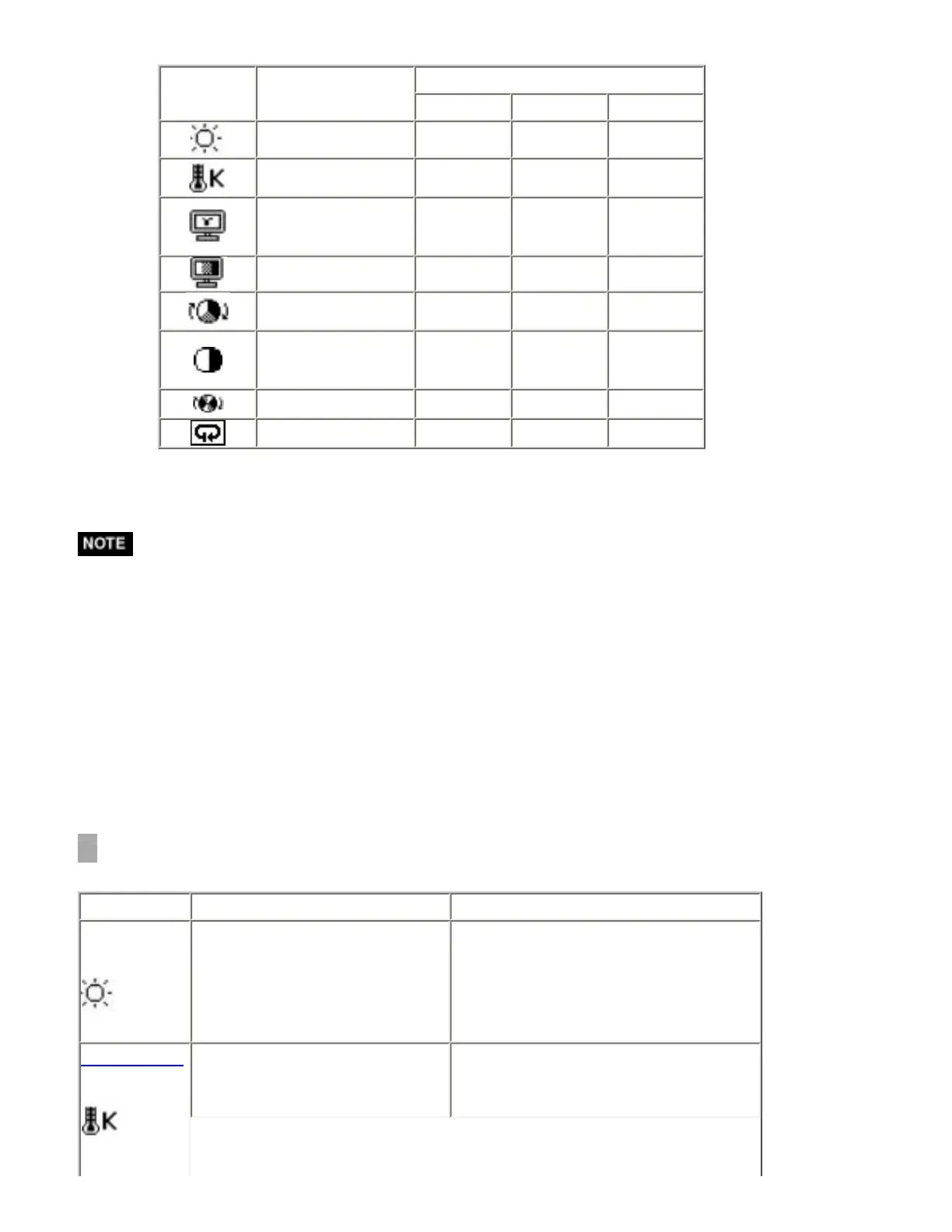
"*": Settable/Adjustable "-": Fixed at the factory
Icons Functions
FineContrast Modes
sRGB Custom CAL
Brightness** * *
-
Temperature**
-
*
-
Gamma**
-
*
-
Saturation
-
*
-
Hue
-
*
-
Gain
-
*
-
6 colors
-
*
-
Reset
-
*
-
**These settings can be also adjusted on the FineContrast menu.
* Allow the LCD monitor to stabilize for at least 20 minutes before making image
adjustments. (Allow the monitor to warm Up for at least 20 minutes before
making adjustments.)
* Performing the <Reset> of the <Color> menu returns the color settings of the
selected mode to the default settings.
* The values shown in percentages represent the current level within the specific
adjustment. They are available only as a reference tool. (To create a uniform
white or black acreen, the percentages for each will probably not be the same.)
Adjustment Contents
Menu Function Descriptions Adjustable Range
Brightness
To set the brightness of the
screen
0 ~ 100%
Temperature
To set the color temperature 4,000 ~ 10,000 K
in 500 K increments (including 9,300
K). Default setting is 5000K





 To Next Page