- 8 -
CUTTING AND PLACING THERMAL PADS
STEP 1
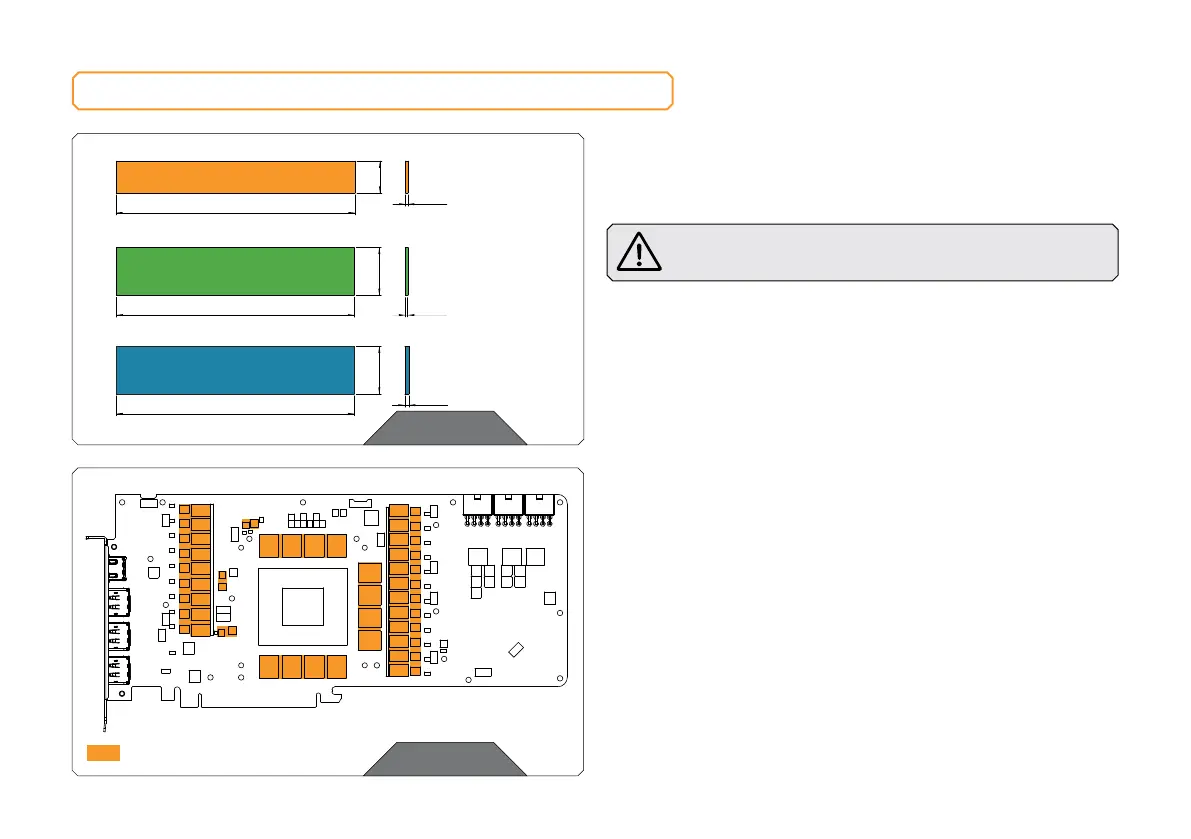
The GPU water block comes with thermal pads that have to be cut
into smaller pieces to cover all the VRM components, such as COILs,
MOSFETs, and drivers.
Remove the protective foil from both sides of the thermal
pad before installation.
Replacement thermal pads:
Thermal Pad F 1.0 mm – (120 x 16 mm) EAN: 3830046996732
Thermal Pad G 1.0 mm – (120 x 24 mm) EAN: 3830046996770
Thermal Pad G 2.0 mm – (120 x 24 mm) EAN: 3830046996794
STEP 2
Once cut to the size, Thermal Pads should be placed on the PCB, as
shown in the picture.
STEP 2
Thermal Pad - 120 x 16 x 1.0 mm
F1
STEP 1
Thermal Pad G – 2.0 mm (120 x 24 mm)
120 mm
24 mm
2 mm
Thermal Pad G – 1.0 mm (120 x 24 mm)
120 mm
24 mm
1.0 mm
Thermal Pad F – 1.0 mm (120 x 16 mm)
120 mm
16 mm
1 mm








 To Next Page